How Frill’s Widget Editor Works: The Preview Is the Production Widget
Last month, in the announcements teardown, I called Frill’s widget editor the best screen in their product and moved on. The claim it makes is a big one: you never deploy anything to find out what your widget looks like. Config on the left, the widget on the right, and every keystroke re-renders it. We have been telling people to set position and theme on a script tag and go look. So I went back for a full evening.
I want to see how live it is, and what it costs them.
The setup: a fresh 14 day trial workspace, usero-lab, on a plus address. The workspace from last month had expired, and an expired Frill trial does not become a free tier. It puts an undismissable “Your Free Trial has expired” modal over the admin and over the public board, with one button, “Choose a plan”. Everything below is something I did and watched, except where I say it came from their docs. One note on colour: my Chrome runs Dark Reader, so the admin screenshots render dark where Frill’s admin is light. Ignore that, the layout and behaviour are right. The host-page shots are colour-accurate.
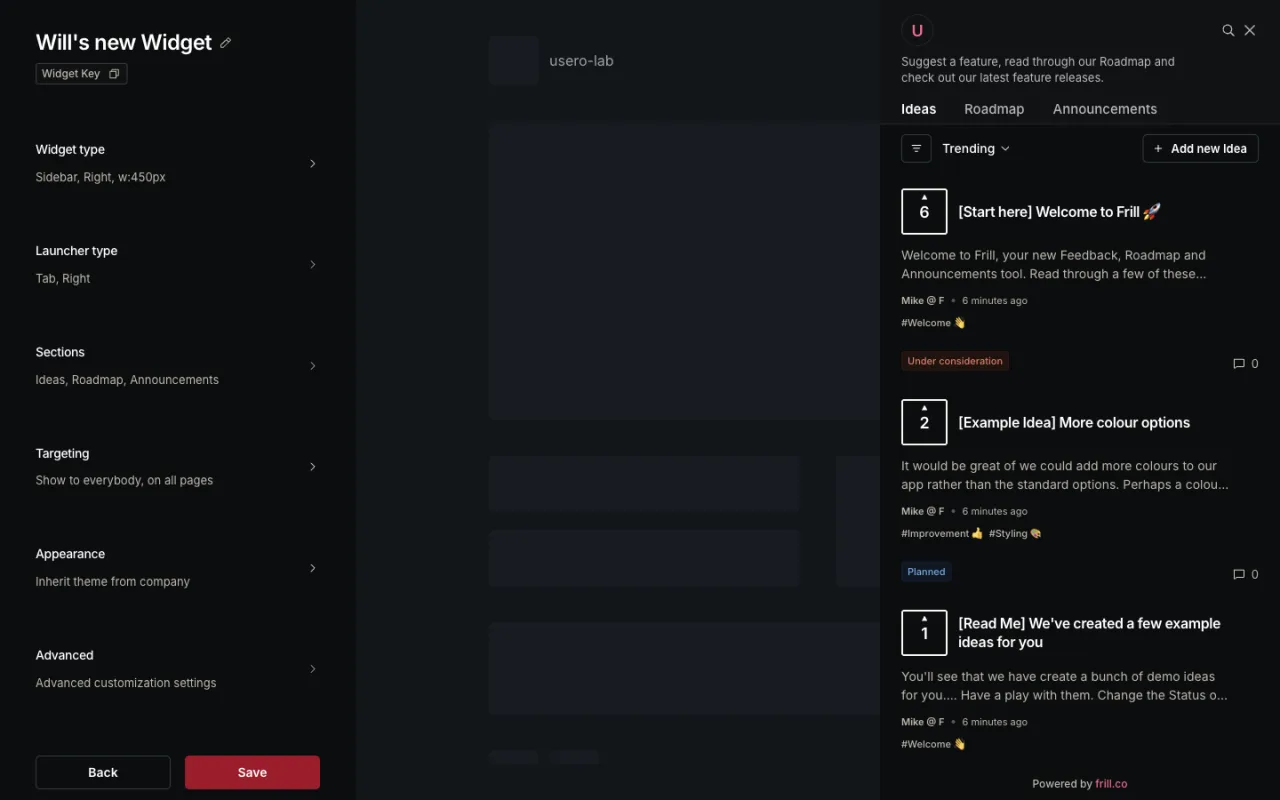
The rail is a 400px column with six rows, and each row summarises itself: Sidebar, Right, w:450px, Tab, Right. Click one and the whole rail is replaced by that panel, with its own Back at the top. It is a stack, so you only ever see one group of controls, and the preview on the right never moves. There are six panels but it feels like one page.
The preview is the part I came for. It is an iframe pointing at widget.frill.co/v2/app/ideas?key=widget_hSnAqt_sxk7J4&route=%2Fideas&lang=en&analytics=0&isFrillApp=1. Later that night I pasted the embed snippet onto a local page, and the widget there used the same key, widget_hSnAqt_sxk7J4. So the editor is booting the production bundle with the production key, analytics switched off, plus a flag saying it is inside the Frill app. Real ideas with real vote counts, down to the “Powered by frill.co” footer. So it can’t look different in the editor than it does on the site.
How live is it, in numbers? I snapshotted a DOM signal from the preview (the frame wrapper’s style, or the launcher’s text and computed background), applied a change, then polled every 50ms until it moved. So every figure below is “under this”, with 50ms of slack.
| Change | Time to preview update |
|---|---|
| Launcher type Tab to Floating | 96ms |
| Badge Count to Dot | 144ms |
| Sidebar position Right to Left | 341ms |
| Launcher background #ef567c to #1d9e6c | 343ms |
| Launcher text to "Ideas & feedback" | 531ms, per keystroke |
| Panel title to "Tell us what to build" | ~420ms, iframe torn down and remounted |
Nothing waits for Save. The launcher text case is the one that impressed me, because it fires on every keystroke of a text input and the tab on the right keeps up.
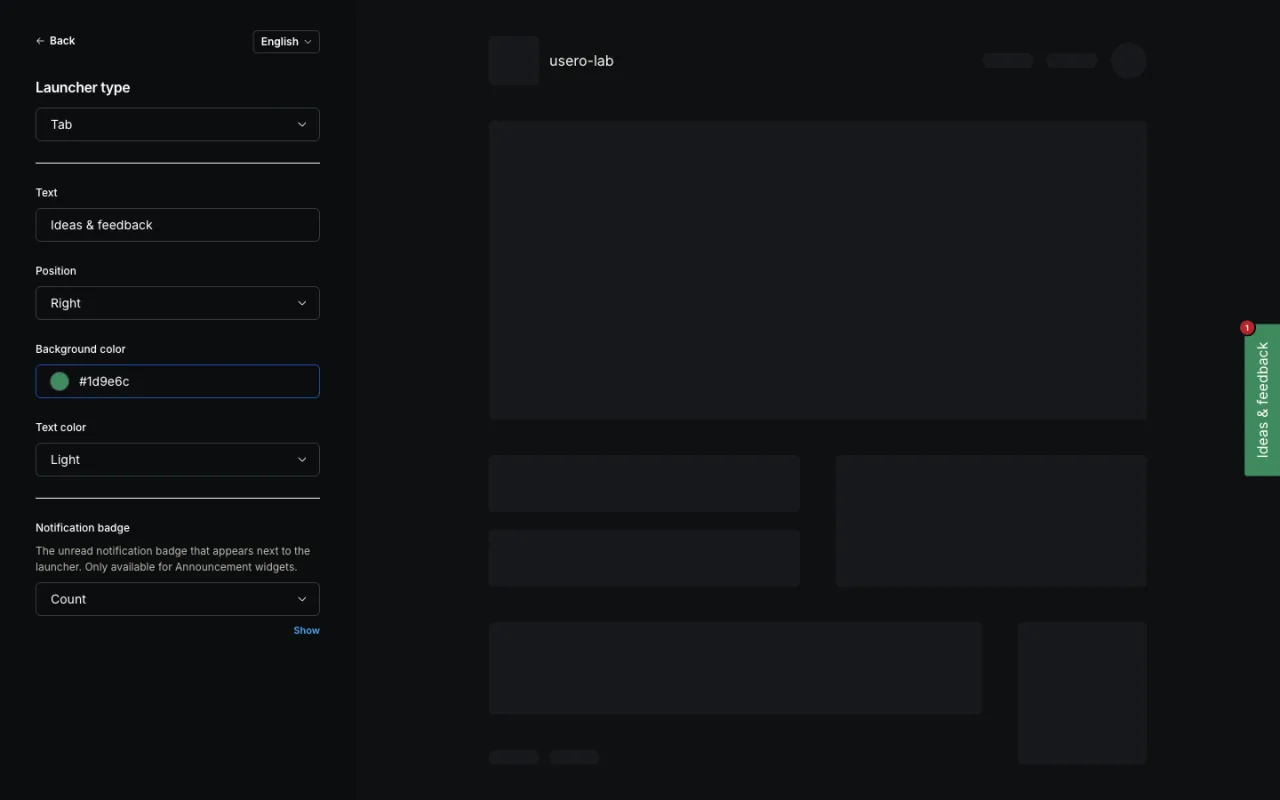
The title is the odd one out. Change the panel title and the whole preview iframe is torn down and remounted. Everything else gets its value pushed over postMessage. There is a visible flash. Next to a dozen controls that update in place, the one that flashes looks broken. It isn’t, it just goes through a different path.
What tripped me? With a Tab launcher I had typed “Ideas & feedback” and set #1d9e6c. Switching the launcher type to Floating dropped both: the preview came back as an icon-only bubble in the default pink, and the position dropdown quietly swapped its options from center-right and center-left to bottom-right and bottom-left. Switching back did not restore what I typed. There are also two controls named Position in two panels. I set the sidebar to Position: Left and the launcher tab stayed on the right edge, because launcher position lives in the other panel. And switching the widget type from Sidebar to Popover to Modal closes the panel, so you have to find the launcher and click it to see what you just changed. That’s the one spot where the preview isn’t live.
What about mobile? There is no device toggle. The preview canvas is always the desktop-width mock. The widget does have a real full-screen mode, exposed in Advanced as a “Full screen media query” defaulting to (min-width: 481px), and the tip beside it says “Resize the window to test your Widget in full screen.” I loaded my host page at 390px and the sidebar wrapper went from width: 450px to width: 100%, panel filling the viewport. It works. You just can’t see it in the editor, you have to resize your own browser window.
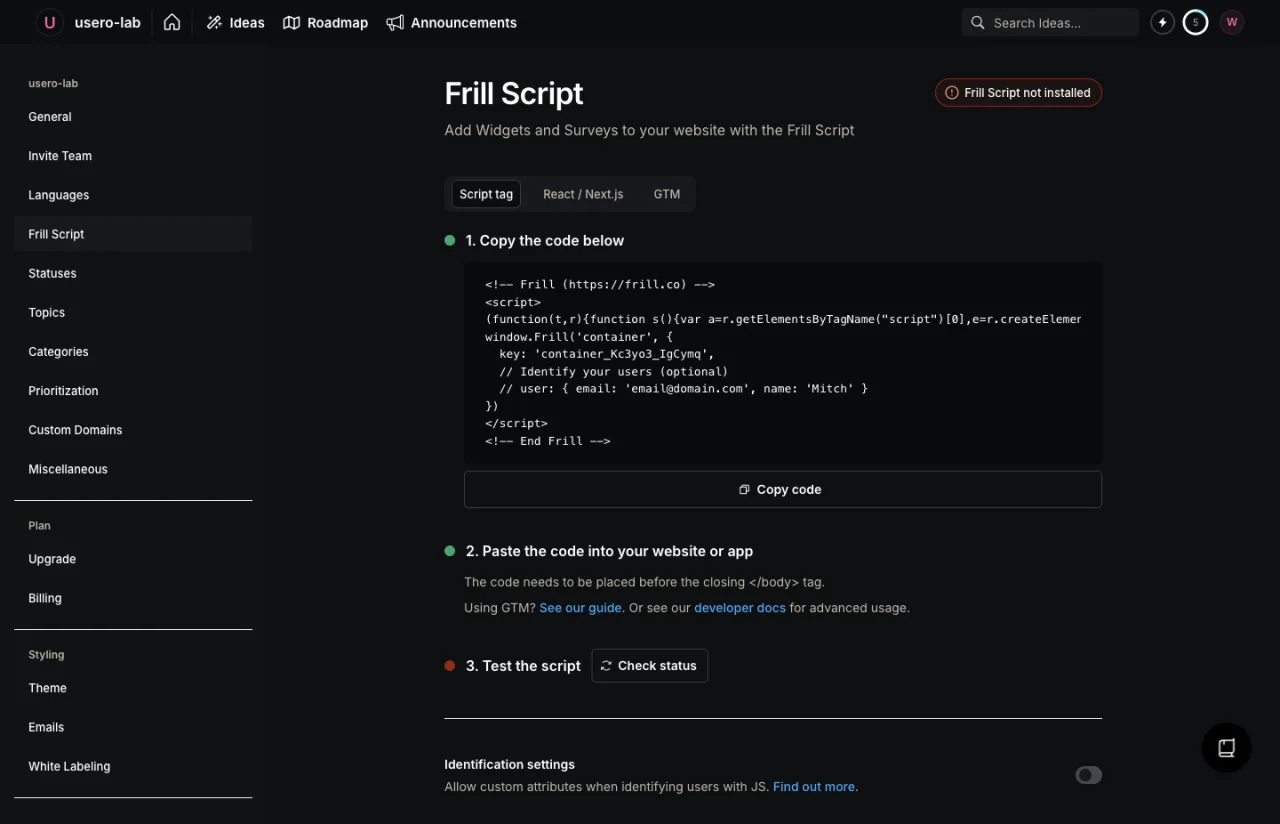
The other half of the design is the install snippet. It sits under Settings > Frill Script, and it does not name a widget. It calls window.Frill('container', { key: 'container_...' }) with one workspace-level key, and every published widget whose targeting matches the page appears. Once that tag is on the site, everything after it is a settings change, including brand new widgets.
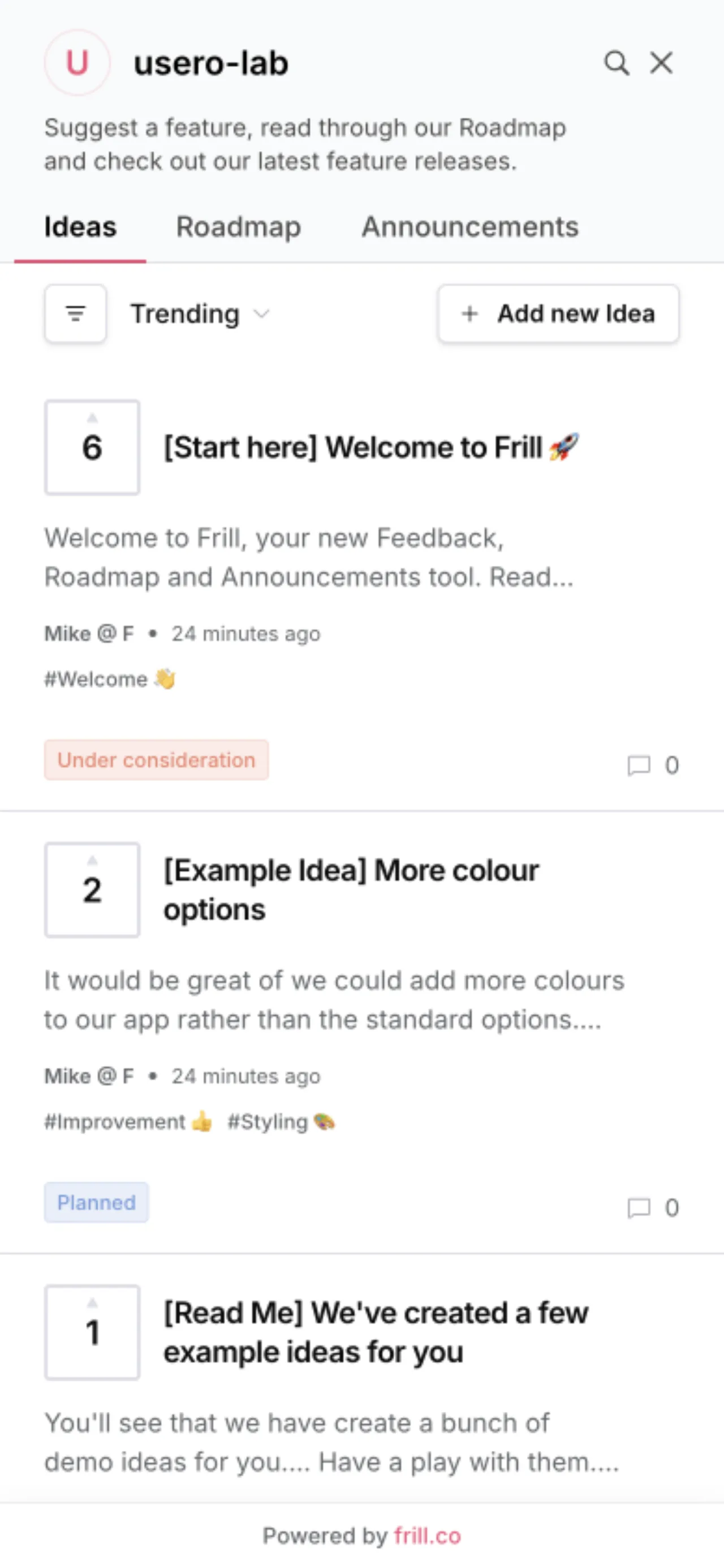
I tested the loop end to end. Changed the launcher text and colour, hit Save, reloaded the local host page. The first reload, about 6 seconds after Save, already showed “Ideas & feedback” in rgb(29, 158, 108), the #1d9e6c I typed. No CDN lag I could see, no change to the host page.
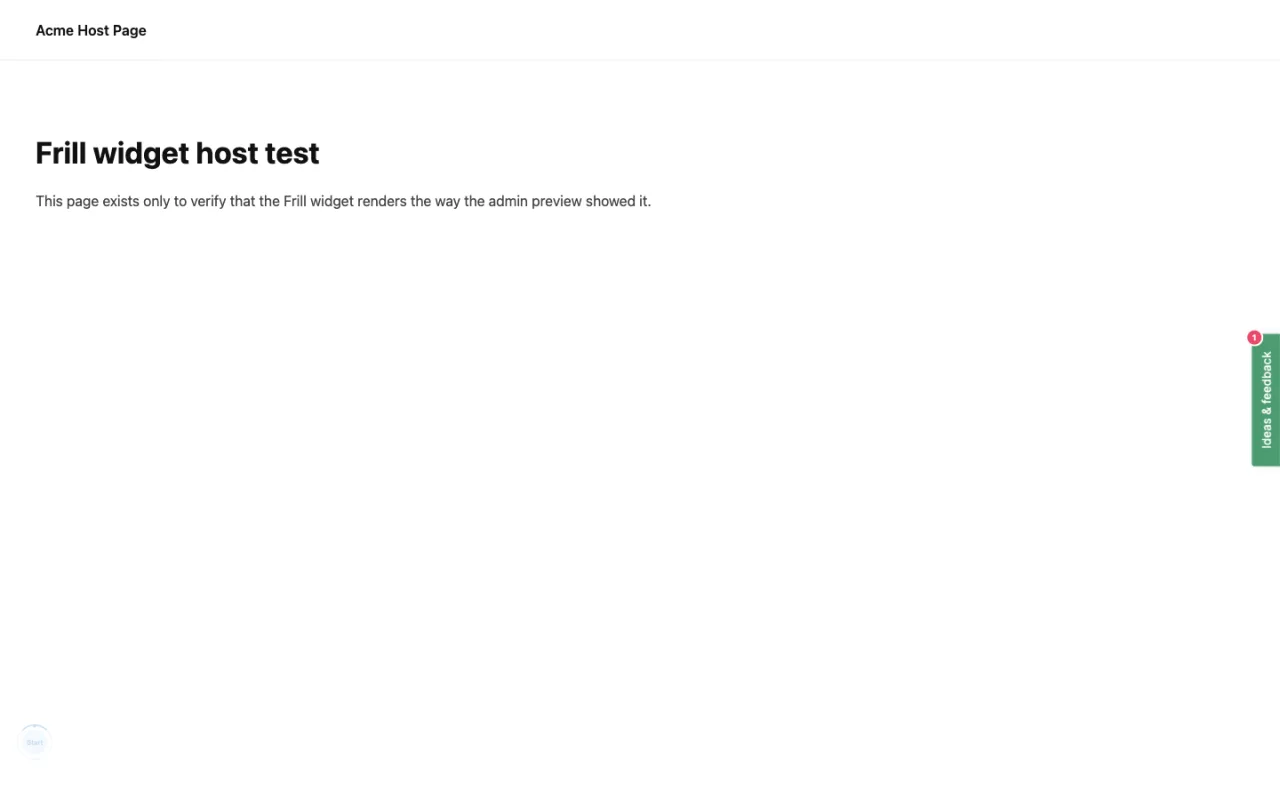
The downside: Save and Publish are separate, but there is no draft of a published widget. Edit a live widget, hit Save, and that is production, with no “you are editing a live widget” warning and no staged link to send a colleague. And the widget row is created the moment you pick a type in the chooser, before you have saved anything, so every time I entered the editor to look at something I left a card behind. I ended the session with five widgets, four of which I never meant to keep.
Is any of it paywalled? On the trial, none of it. Hide “Powered by Frill” was enabled, the hostname allowlist was editable, segments were there. The settings page explains why: the 14 day trial includes the Unlimited Surveys, White Labelling and Privacy add-ons ($25/mo each on the upgrade page, Enterprise from $349/mo). The gate is at the end of the 14 days, and it shuts everything. On the expired workspace every app.frill.co route redirects into the modal, and the public feedback board your customers were using goes down with it.
How we built ours
Verdict was build, and it shipped tonight on a PR branch. The reason is boring: every Usero customer’s first task is pasting the widget snippet, and until tonight the only way to see what position, theme, title or placeholder do was to deploy them, which is no help to a PM trying to pick a colour.
The page is Widget, at /:clientId/widget. Left, the controls: position (left or right), theme (auto, light, dark), primary colour, title, placeholder, and toggles for the email field and the screenshot option. Right, the real @usero/sdk widget, with the real client id, inside an iframe over a neutral mock page. Same principle as Frill’s analytics=0&isFrillApp=1 trick. Without the iframe, a left-positioned launcher would float over our own dashboard sidebar. Props hot-swap through the React SDK’s update() without remounting, so a title change re-renders in place and doesn’t flash like Frill’s does.
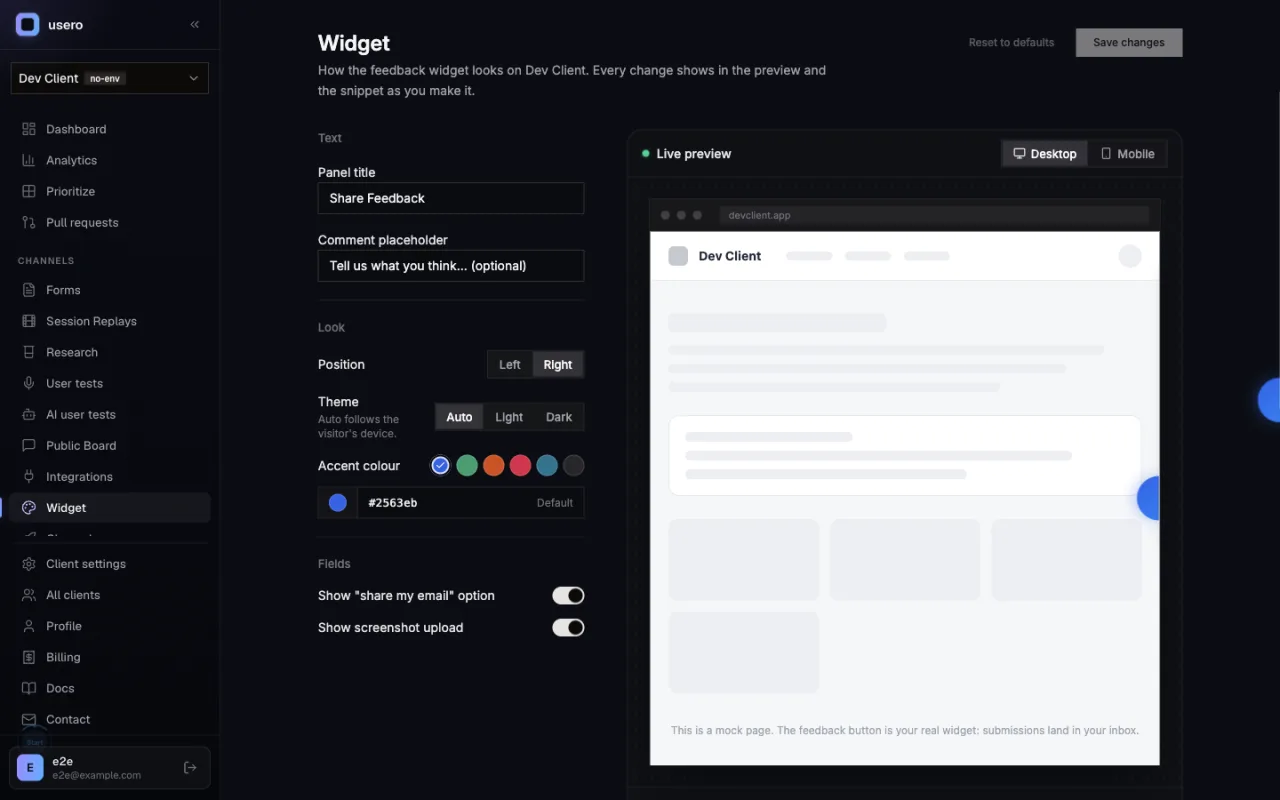
The preview has a desktop / 390px mobile toggle. It was the control I missed most in Frill, and once the preview is an iframe it is close to free. Submissions from the preview are real. They land in the inbox tagged widget-editor-preview, and the page says so above the preview.
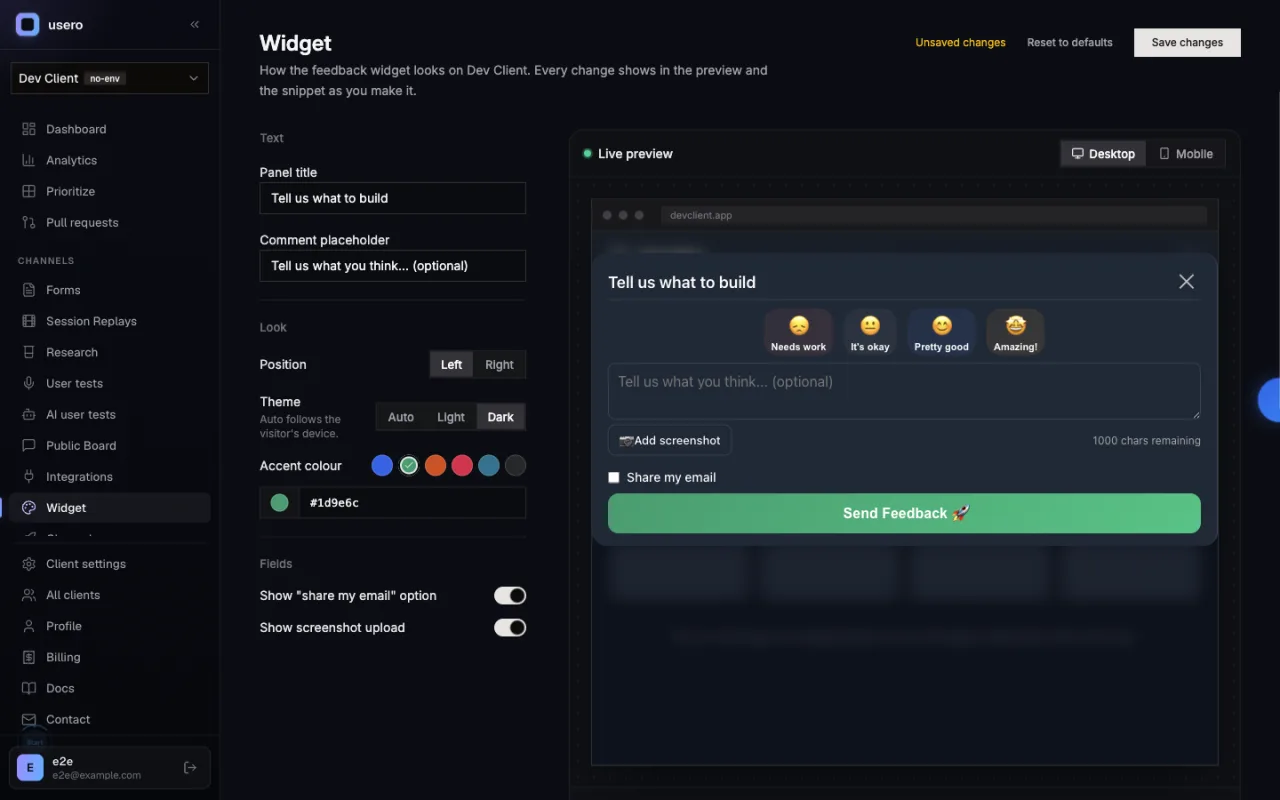
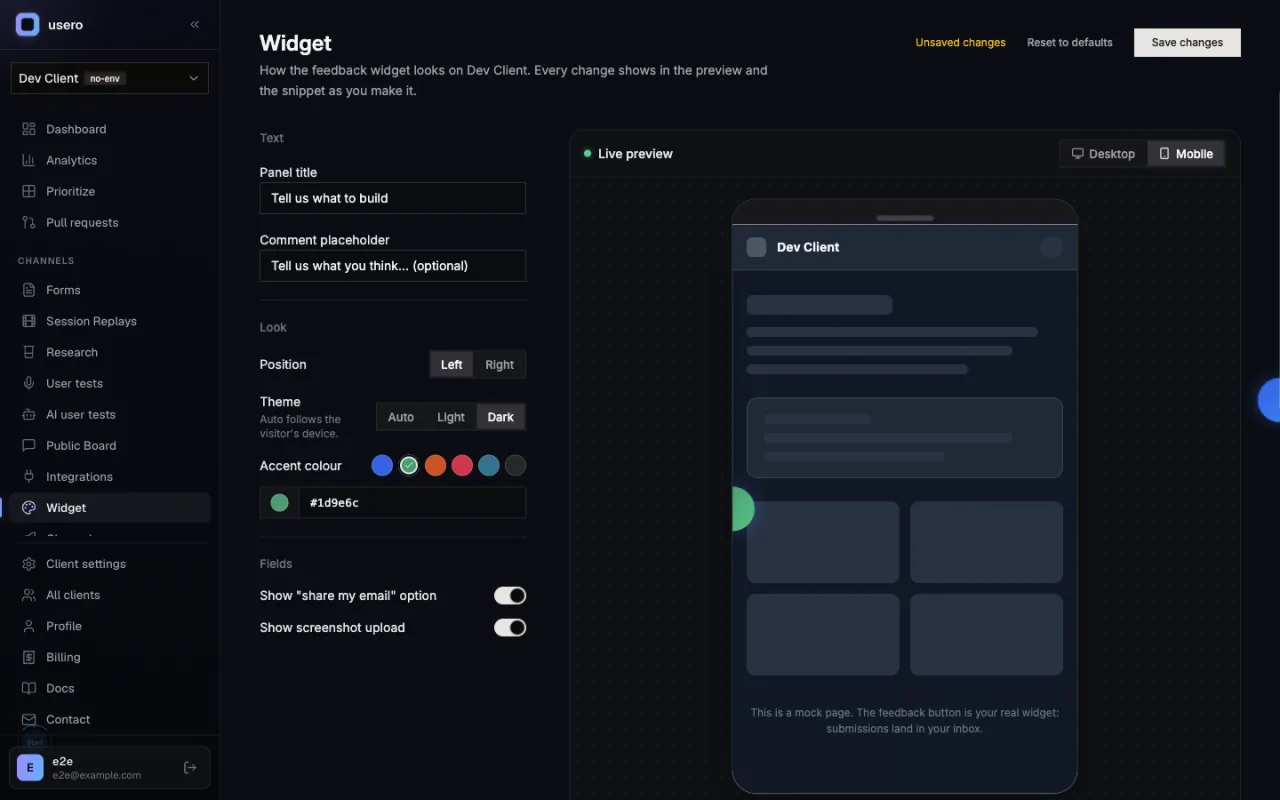
Underneath the preview, the script-tag, vanilla and React snippets regenerate from the current form, non-default options only, each with a copy button. Save writes the appearance into the existing Client.settings JSON column, so no migration and no SDK release, and the snippets on the integrations page follow the saved appearance from then on. Nothing gets written until you hit Save, so no stray widgets.
We do give something up. Frill’s snippet carries one workspace key, and every save is a production change with no developer in the loop. Our SDK reads its props at init, so our editor generates the snippet, and a colour change still needs a deploy. A runtime config fetch would close that gap, but it needs an SDK release, so it’s filed as a follow-up.
Verification: 16 unit tests, one Playwright spec on desktop and mobile Chrome, an authed curl smoke. On the way through, the engineer found and fixed a pre-existing bug: the general settings save was overwriting the whole settings JSON with just requireEmail. Shipped on top of that, saving the email toggle would have wiped your colours. Good night to find it.
Deliberately not built: sections, targeting, segments, per-language copy, a widget list. Usero has one website feedback widget per client and no roadmap or announcements sections in the panel, so those rails would be inventing product we don’t have. Frill’s self-summarising collapsed rows didn’t make it either. They’re worth it when you have six panels. We have one column.
The open question is the runtime fetch. Frill’s model means a founder can recolour the launcher at 11pm without waking anyone up, and I keep coming back to how good that felt from the admin side. Whether it is worth the SDK release and an extra request on every page load is next week’s call.
Frequently Asked Questions
What does Frill’s widget editor preview?
The production widget. The editor’s preview is an iframe loading widget.frill.co/v2/app/<route> with the widget’s real key, plus analytics=0 and isFrillApp=1. When I installed the embed snippet on a host page, the widget there used the same key as the preview, so the editor renders the same bundle, data and theme CSS your visitors get.
How fast does Frill’s live preview update?
Under 550ms on every control I measured, including per-keystroke text inputs. Launcher type changed in 96ms, badge style in 144ms, sidebar position in 341ms, launcher background in 343ms and launcher text in 531ms. The panel title is the exception: it remounts the preview iframe (~420ms) instead of updating in place, so it flashes.
Does Frill have a mobile preview?
No. The editor has no device toggle. The widget’s full-screen mobile mode is real, controlled by a "Full screen media query" in Advanced (default (min-width: 481px)), and Frill’s tip is to resize the browser window to test it. At 390px the sidebar switches to width: 100% and fills the viewport.
How is the Usero widget editor different?
Same live-preview idea. Ours adds a desktop / 390px mobile toggle, creates nothing until you save, and preview submissions land in the inbox tagged as such. The trade-off is the install model. Frill’s one workspace script makes every save a production change. The Usero SDK reads its props at init, so the editor generates the snippet and a change still needs a deploy. A runtime config fetch is a follow-up.
Continue reading
How to Connect User Feedback to Claude Code and Cursor With a Feedback MCP Server
Six feedback tools now ship MCP servers. Here is what a feedback MCP server gives an agent, how to wire one into Claude Code, Cursor, Claude Desktop, Windsurf or VS Code, and a worked example that ends with the agent asking the tool to open the pull request.
7 min read
How the AnnounceKit Email Digest Works: We Waited for the Draft That Never Came
We enabled the AnnounceKit email digest, set it to send Saturday, and came back on Saturday. No draft, no digest, and nothing in the product showing whether it ran: no draft view, no send history, and a config that froze into upgrade modals mid-trial while staying armed. Plus the weekly digest we built for Usero the same night: a cadence choice instead of a second channel, a draft-preview email with a one-click skip, and an admin page that always shows the next digest and what happened to the last one. Free.
8 min read
How AnnounceKit Boosts Announcements: Four Megaphones, No Front Door
A second night inside a live AnnounceKit trial, this time on boosters and the email digest. The modal booster collects reactions and feedback right where the announcement lands, then fires again on reload at someone who already answered. The digest emails you a draft 12 hours before it sends. And every path a reader could take to become an email subscriber failed in our workspace, so the email side had nobody to send to. Plus what we built the same night: changelog email subscriptions on Usero, with a confirmation link before anyone is subscribed and requesters deduped out of the broadcast. Free on every plan.
9 min read
Build a feedback loop your team actually uses
Usero collects, clusters, and turns user feedback into shipped fixes.
Get started free