How Frill’s Announcements Widget Works: Everyone Hears It Shipped, Except the Person Who Asked
Frill has an announcements widget: a launcher on your site with an unread badge, opening a panel with your changelog in it. We were about to build a What’s new view into our own widget, so we spent the evening inside a live Frill workspace watching how a team that already shipped it lays it out.
The setup: a 14-day trial workspace, two announcements authored and published for real, a widget created and published, and the embed script loaded on a throwaway host page so we could see what an end user sees. Where something below comes from their docs rather than our own clicking, we say so.
The best screen in the product
Frill’s widget editor is a config rail on the left and the real widget rendered live on the right, populated with your actual announcements. Change the launcher from Floating to Tab and the tab appears. Change the theme and it recolors. There is no save-deploy-refresh loop, no mock preview drawn in the admin’s own styles. You are looking at the thing your users will get, while you configure it.
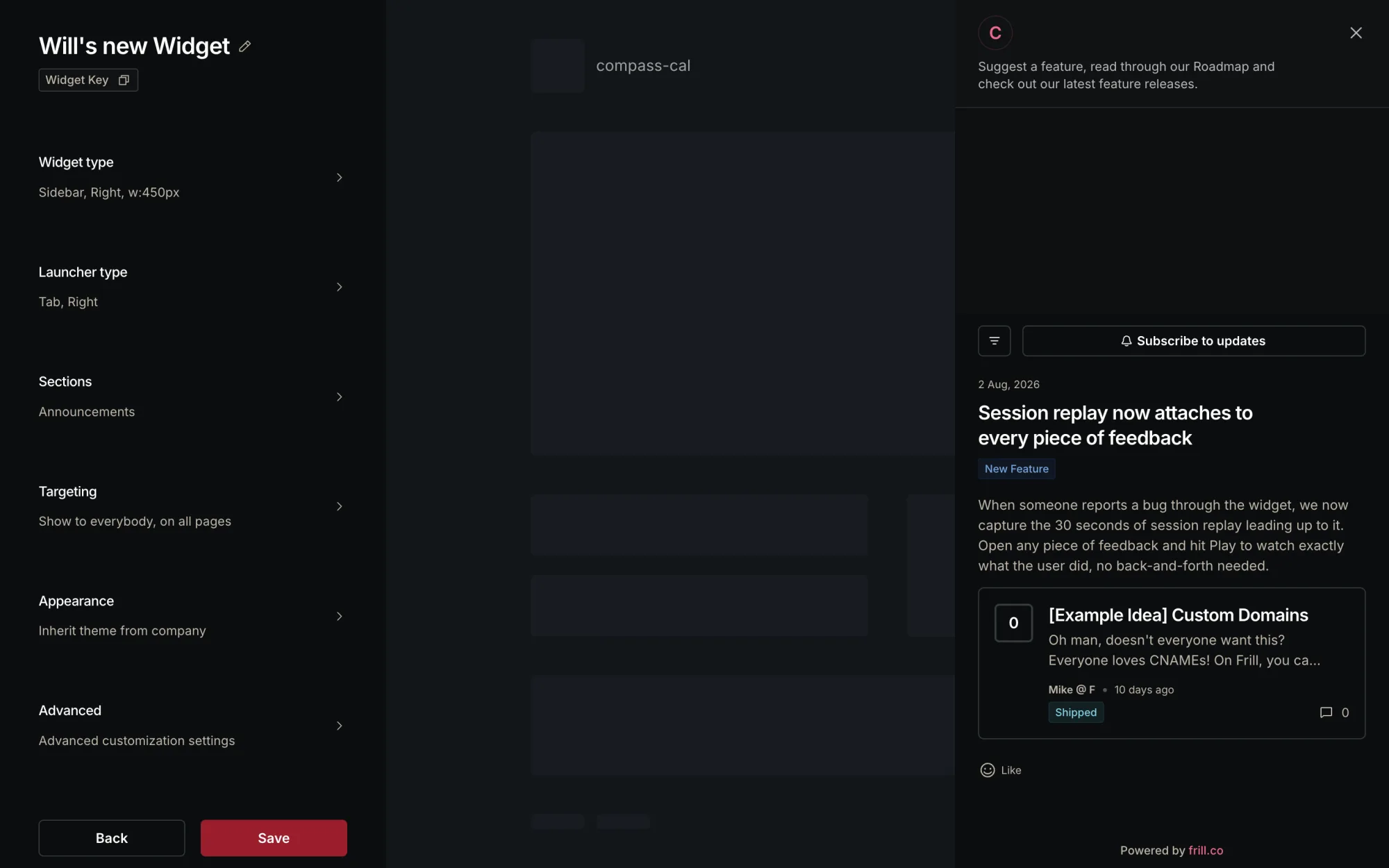
The config surface underneath is deep. Four widget types (popover, modal, sidebar, embed), four launcher types, and the launcher one has a mode we want to steal: Selector, which binds the widget to an element already on your page. If your app has a What’s new link in its nav, Frill attaches to it instead of adding another floating bubble to your UI. Someone on that team respects the host app.
One trap in here: a new widget is created Unpublished and renders nothing until you find the separate publish step. The only signal is a small badge on the widget card. We lost a few minutes to it.
The Idea block is the right primitive
The announcement editor is a Notion-style document. Line 1 is the title, everything under it is the body, and a plus button on any empty line opens a block menu. The block worth writing about is Idea: pick it and you get a searchable list of every Idea on your board with vote counts and status badges, and choosing one embeds a live card of it, votes, author, status and all, into the announcement. That is the “here is the thing you asked for” primitive, and the vote counts in the picker tell you which Ideas deserve an announcement at all.
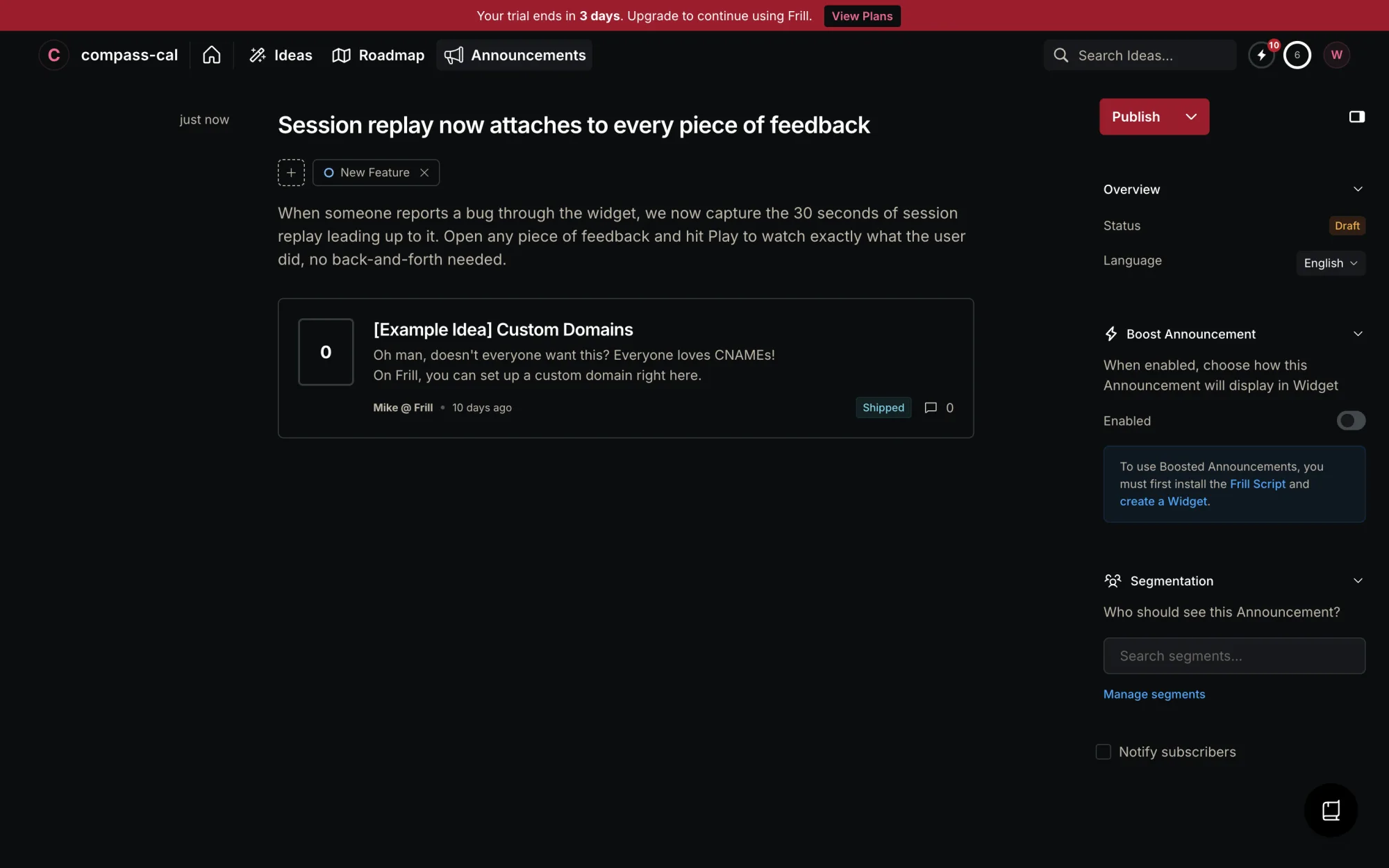
Then, at the bottom of the right rail, delivery. The email leg of closing the loop is one checkbox reading Notify subscribers. No audience count, no preview of the email, no list of who it went to afterwards. Their docs say voters on a linked Idea get emailed automatically when you publish, which we did not verify within the session. What we can say is that delivery is a broadcast: the subscriber list, or a segment of it. The person who asked for the thing is not told that their thing shipped, and nothing in the authoring UI even surfaces who they are.
Fifteen minutes on a toggle
Boost is the popup: publish an announcement with Boost enabled and the next page load in the host app shows a toast, banner or modal with your own title, blurb and button label, deep-linking into the widget. The config has a live preview and the copy overrides are a nice touch, since the popup can be short while the changelog entry stays detailed.
Here is where we lost fifteen minutes. We enabled Boost on announcement #1 after it was already published, saved, cleared the widget cookie, reloaded the host page. Nothing. Reloaded again. Nothing. We assumed we had broken the embed. Then we created announcement #2 with Boost enabled before hitting Publish, and the snippet fired on the next page load, first try.
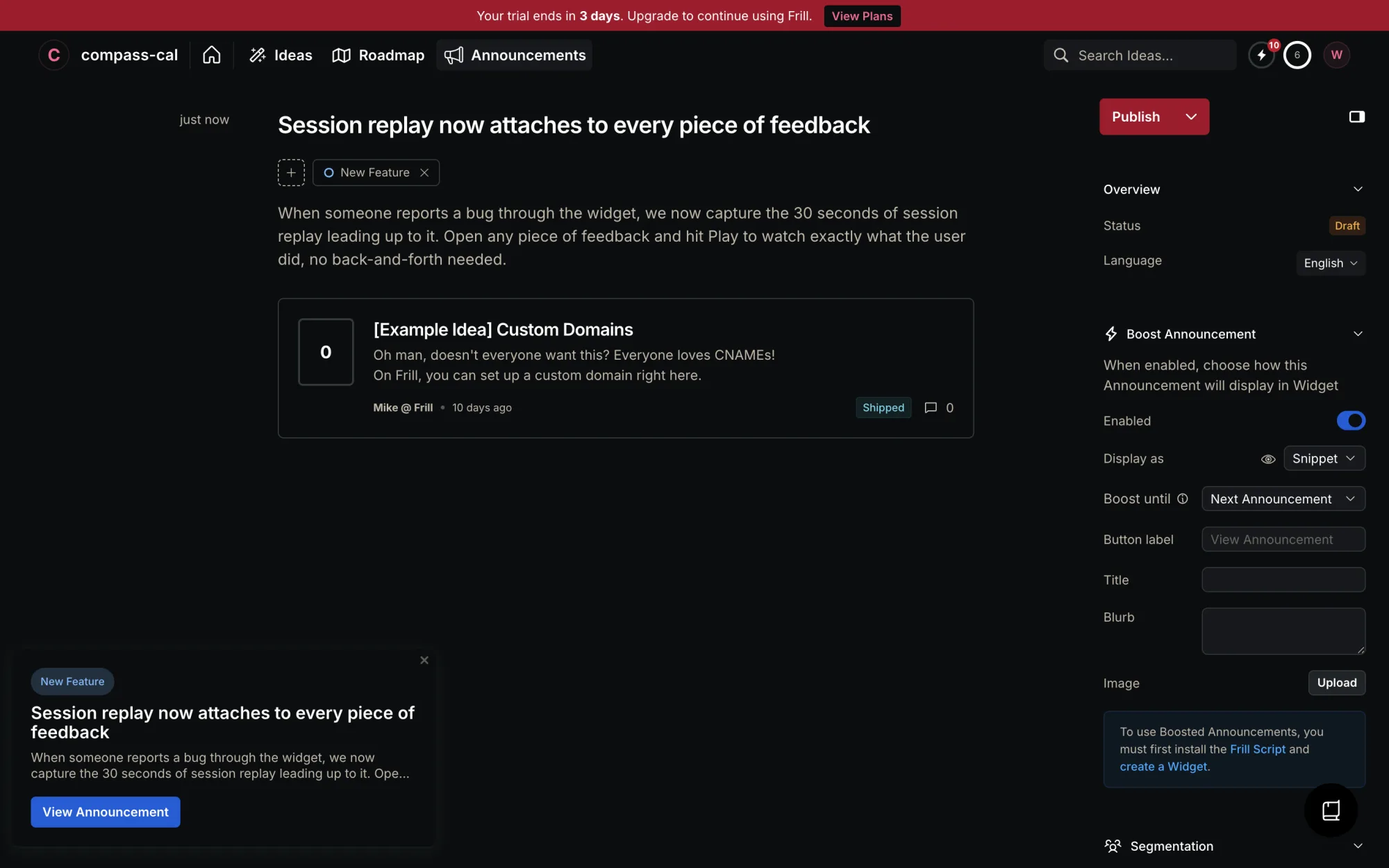
So boost state appears to be evaluated once, at publish time. That is a defensible design, it saves them re-checking every announcement on every page load. But nothing in the UI says so. The toggle flips, the save succeeds, and the popup never comes. We only worked it out by publishing a second announcement to compare against. A one-line note under the toggle would have given us those fifteen minutes back.
The widget, the badge, and the cookie
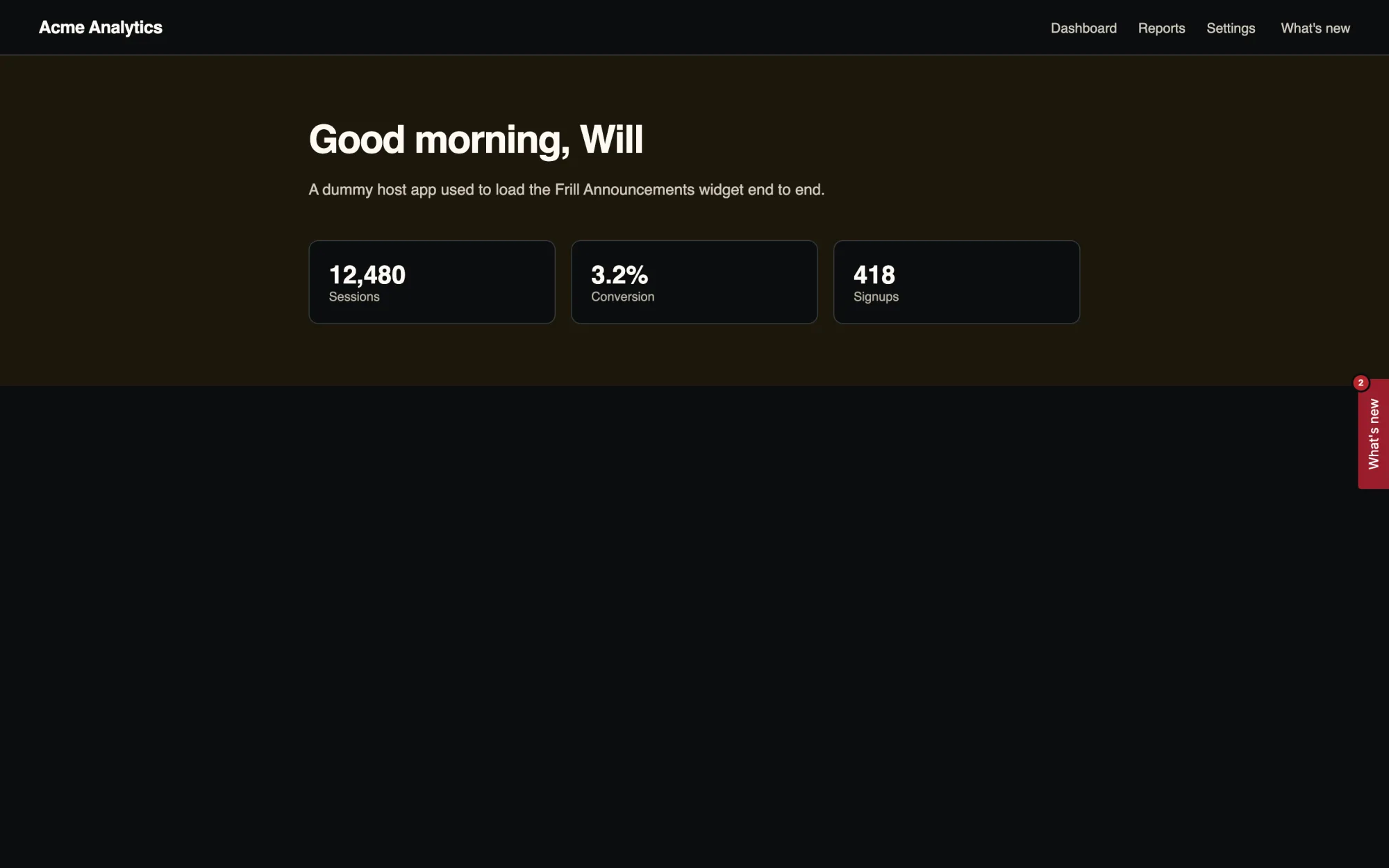
On the host page the launcher is a tab pinned to the edge with a count badge, 2 unread in our case. Click it and a 450px sidebar slides in: the feed, category pills, the embedded Idea cards, a Like control with a three-emoji picker (thumbs up, heart eyes, fire, and that is the whole vocabulary), and a Subscribe to updates button that takes an email from an anonymous visitor without an account. Everything carries Powered by frill.co unless you pay for white label.
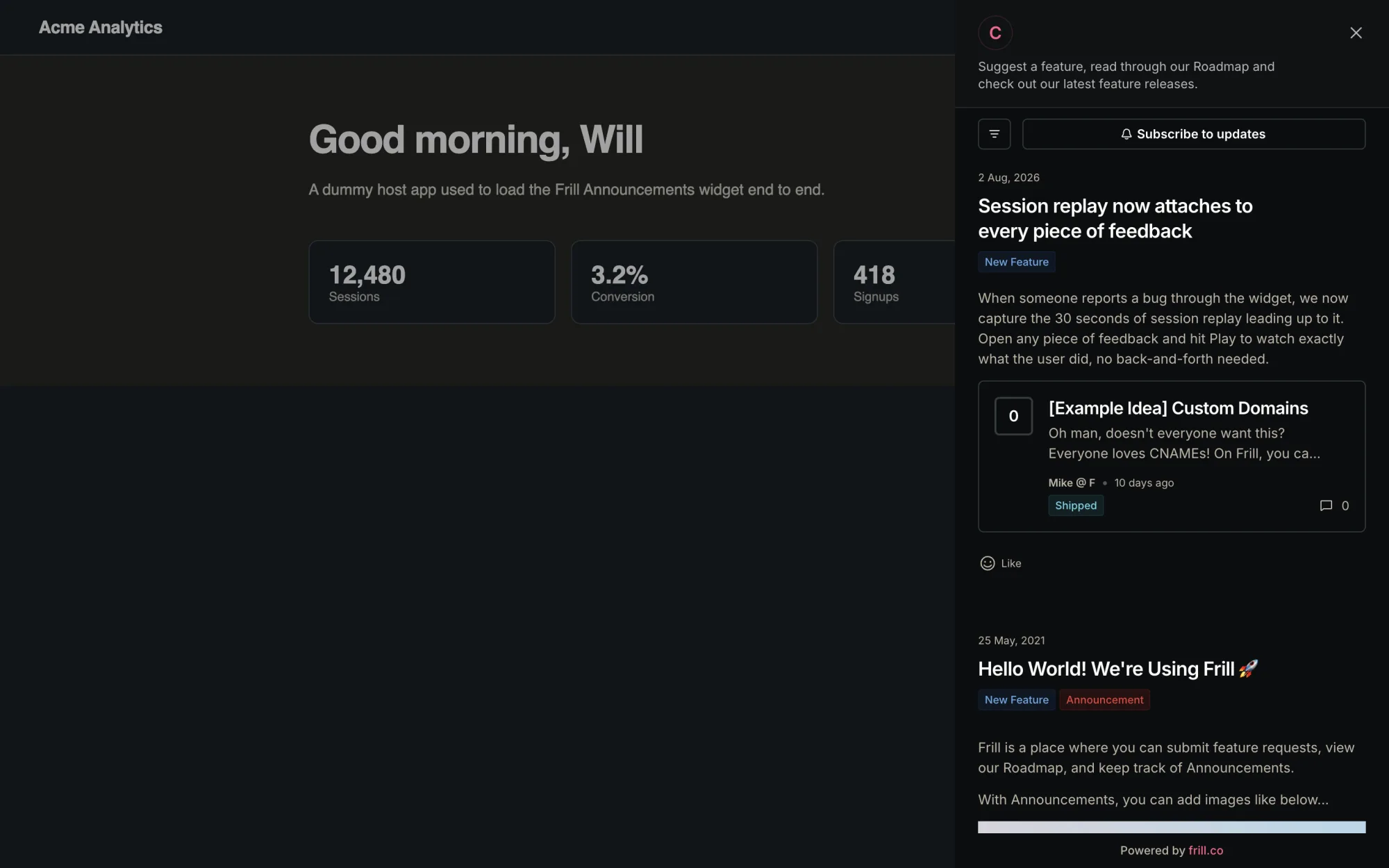
Closing the widget clears the badge. Where does that read state live? In a first-party cookie on the host domain, holding one timestamp: lastSeenAnnouncement. Clear cookies and every announcement is unread again. Switch browsers, same. For a marketing site widget that is fine. For an in-product changelog, where the whole point is “you have seen this, stop badging me”, it is thin. Identified users get a separate identity token and presumably server-side state, but we only exercised the anonymous path, so we can only report the cookie.
What it costs
From the in-app plan chooser on our trial, in USD: Startup at $25 a month, Business at $49, Growth at $149, Enterprise from $349. White labelling is a $100 a month add-on, and it is the only hard paywall we hit all evening, everything else on the announcements surface was open to the trial. Emails are metered: our trial had 20 a month, with extras at $0.002 each, so the changelog email fan-out is a usage-billed line item rather than unlimited. Their pricing page describes announcements, boosts, scheduling, segmentation and the widget as core across paid plans, and since no wall interrupted us we have no reason to doubt it, but that part is their claim, not our observation.
How we built ours
The thing we could not stop thinking about on the way out: Frill knows who voted on an Idea. We know the person who wrote the complaint, because every piece of feedback in Usero carries its requester. When an AI-authored pull request merges and closes a piece of feedback, we already hold the whole chain: changelog entry, PR, feedback, requester email. We built that join for the requester email notifications a few nights ago. Tonight’s job was putting the same join behind the widget.
The backend is one endpoint, GET /api/changelog. Called with just a client id it returns the latest published entries. Called with the identified user’s email it also returns a yours array: the entries that exist because of that person’s own feedback. On the widget side, one new option, whatsNew: true. The launcher grows an unread dot, the panel grows two tabs, Feedback and What’s new, and the second tab lists the entries.
And pinned at the top of that tab, the part Frill has no shape for: a Shipped for you card. It quotes the user’s own words back to them and cites the PR that shipped the fix. “You said the widget is blinding at night. Here is the merge that fixed it.”
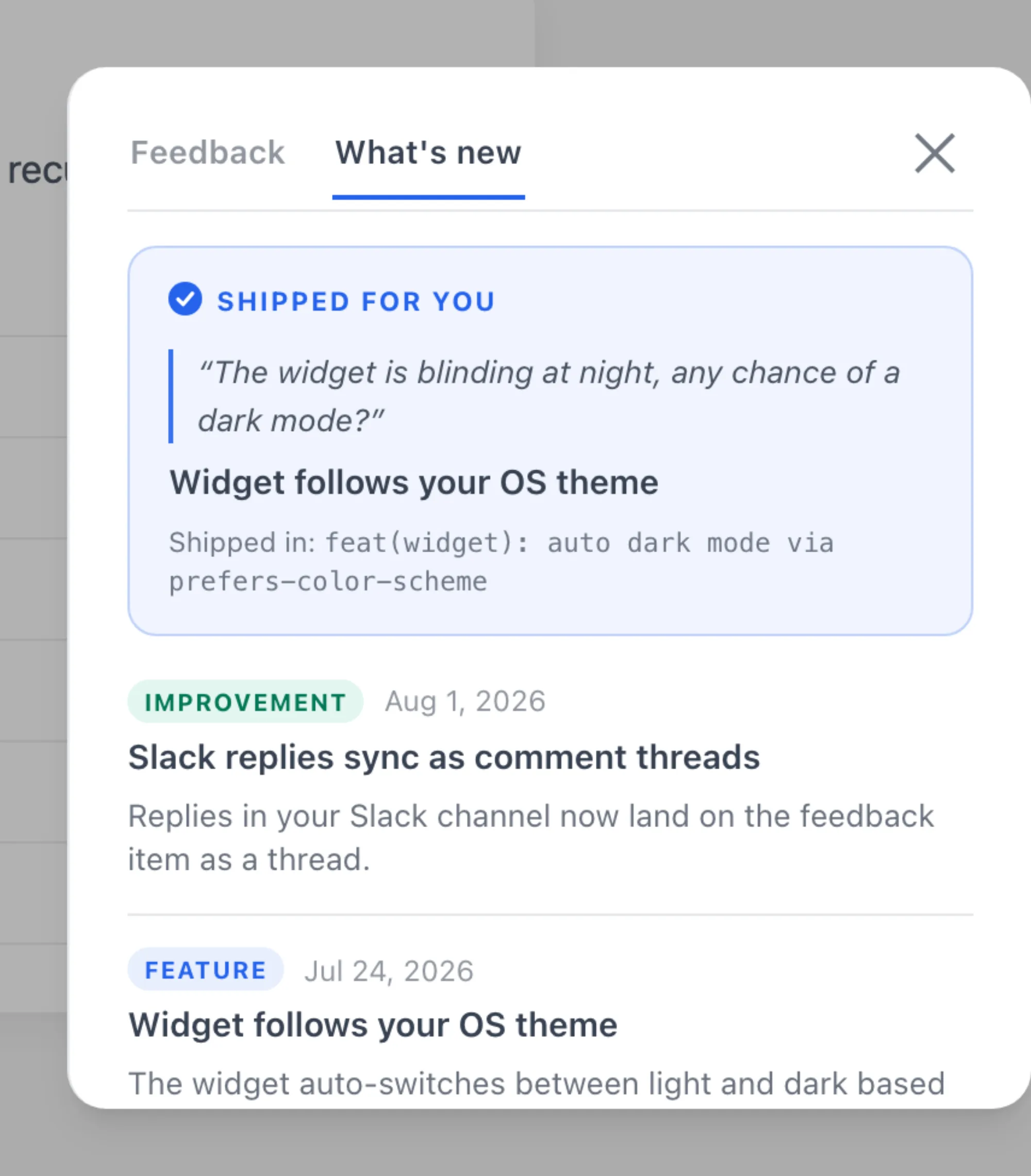
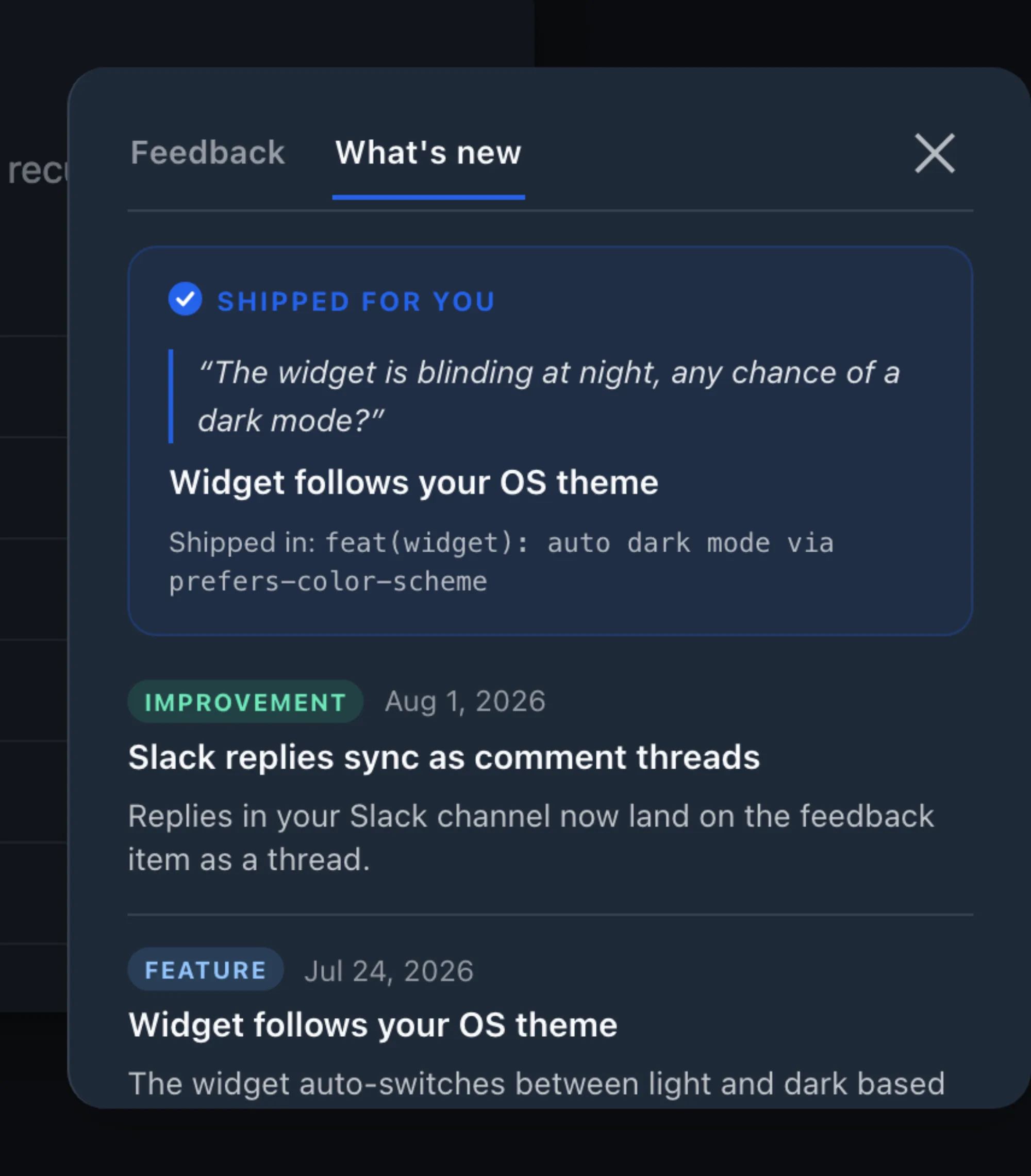
Frill’s widget answers “what has this company shipped lately?”, and answers it well. Our users’ question is smaller: “did anything happen with my thing?”. That one needs the join.
Honest scope notes, because v1 is a v1. No reactions, no comments, no subscribe button. And read state for anonymous visitors is localStorage, which is the same weakness we just spent a section noting in theirs, a storage clear brings the dot back. The part we care about survives, though: the Shipped for you card is derived server-side from the identified email, so a cookie clear cannot take it away.
What we took away
Two things of theirs go straight onto our list: the live widget preview beside the config rail, and Selector-mode launchers. Both are the work of people who have watched customers install this thing. The boost toggle and the unlabelled notify checkbox go on a different list, the one of places where a shipped feature hides its own rules, and our localStorage read state sits on that list too until we move it server-side.
The What’s new view ships behind a widget flag while we finish the rough edges. If you want the loop it closes, from a user’s complaint to an AI-authored PR to that user seeing it shipped, sign up free or read the Canny changelog teardown, where the requester notification half of this story was built.
Frequently Asked Questions
What is the Frill announcements widget?
It is the in-product half of Frill’s changelog. One container script on your site renders a launcher, a floating bubble, a tab, or a binding to an element you already have, with an unread badge. Clicking it opens a panel with the announcement feed. Announcements can also be boosted, which fires a toast, banner or modal unprompted on the next page load. The widget itself is configured server-side in the Frill dashboard, so changes after install need no code deploy.
Why did enabling Boost on a published Frill announcement do nothing?
Boost appears to be evaluated at publish time. In our session, turning Boost on for an announcement that was already live, saving, and reloading the host page fired no popup. Creating a second announcement with Boost enabled before publishing fired the snippet on the next page load. There is no warning in the UI about this. If you want a popup, enable Boost before you hit Publish.
How does Frill track which announcements a visitor has read?
For anonymous visitors, read state is a first-party cookie on the host domain holding a lastSeenAnnouncement timestamp. Closing the widget clears the badge. Clear cookies, switch browsers, or use a second device and everything is unread again. Identified users get a separate identity token, but we only exercised the anonymous path.
How much does Frill cost?
The in-app plan chooser on our trial showed Startup at $25 a month, Business at $49, Growth at $149, and Enterprise from $349, in USD. White labelling, which removes the Powered by Frill branding, is a $100 a month add-on. Emails are metered: 20 a month on the trial, then $0.002 per extra email. We hit no paywall on the announcements surface itself during the 14-day trial, so the tier gating between those plans is quoted from their pricing materials rather than from a wall we ran into.
How is Usero’s What’s new view different from Frill’s widget?
Frill’s widget shows the same feed to everyone who opens it. Usero’s widget asks the backend for the changelog with the identified user’s email, and the response includes the entries that shipped because of that person’s own feedback. Those render as a pinned Shipped for you card quoting their original request next to the pull request that closed it. The feed is a broadcast for everyone else, and a receipt for the person who asked.
Continue reading
The Notion Integration Every Feedback Tool Promised
Notion is the most requested integration on the feedback boards of Canny (249 votes, Under Review since August 2019), Featurebase (196 votes, Planned for three years with a slipped Q2 ETA), and Sleekplan, and none of the four tools we studied ship it. A read through six years of public request threads, why the gap survived, and the one-way Notion database push we built in a night on the 2025-09-03 API.
9 min read
How Featurebase Forwards Feedback to Issue Trackers: The Threshold That Never Fired
A hands-on teardown of Featurebase issue tracker forwarding: the upvote-threshold request their own team filed three years ago (200 upvoters, still Planned), the push-all toggle and manual flow behind the $29 per seat gate, the GitHub app that can only file issues, and the demand-threshold auto PR we built the same night.
9 min read
AI User Testing on Our Own Product: The Bugs It Found Were Not in the Code
We ran AI user testing against our own preview deploy: an agent driving a browser with a plain-English task. The first attempt found nothing useful and filed one confidently wrong finding. Three rounds of fixing the observation layer later it found a stale CI variable that 404s the Connect GitHub button and a sticky header eating a dialog close button, neither of which any static check can see. Costs, limits, and why this is closer to flow regression testing than usability research.
9 min read
Build a feedback loop your team actually uses
Usero collects, clusters, and turns user feedback into shipped fixes.
Get started free