Traffic source capture
Every session and every feedback report records where the visitor came from.
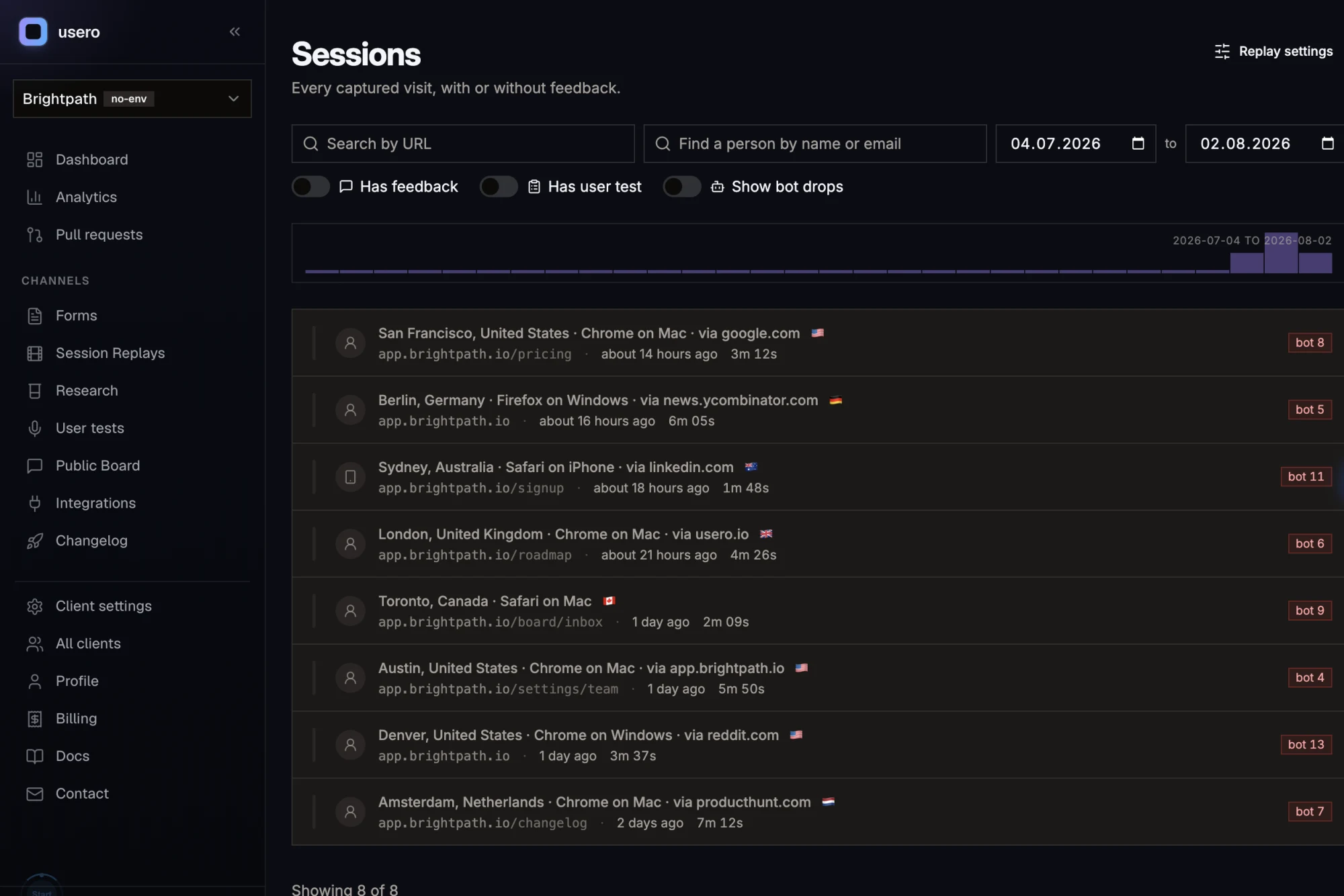
Usero stores the referrer and the landing URL on each recording, and the referrer and page URL on each report. Open one visitor, see the blog post or search that sent them, then press play and watch what they did with it.
Someone signs up, pokes around for four minutes, and never comes back. Analytics logs a session. It cannot tell you which post sent them or where they gave up.
Analytics gives you a channel breakdown. It tells you 40 people arrived from organic search last week, and nothing about what any one of them did after landing. Replay tools have the opposite hole: you watch a real person stall halfway through setup with no idea whether they came from a comparison post, a Hacker News thread, or a link a colleague sent them. Both halves of the story exist, in two products, keyed on nothing you can join. So the question you care about, which pages bring in people who stick around, stays a guess. You read attribution off aggregate charts and read behaviour off a handful of recordings, and you never get to put a single person in both.
How it works
Traffic source capture in Usero.
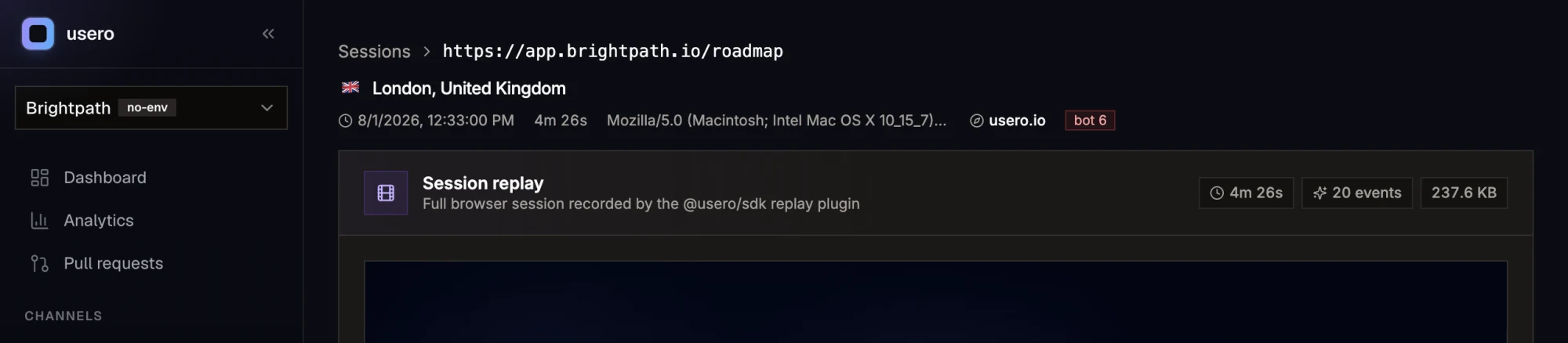
Disclosure: I build Usero, so weigh that. There is nothing to switch on here. When a recording starts, the SDK reads document.referrer and the current URL and stores them on the session. When someone submits feedback, the same two values are stored on the report. No UTM scheme to maintain, no tagging convention for your team to forget. In the dashboard, the session page puts a source beside the timestamp and the duration: Google, Hacker News, LinkedIn, or the bare host of a site we do not have a name for. Referrers from your own domain collapse to internal navigation, so a visitor clicking from your pricing page to your docs is not counted as a traffic source. A session with no referrer reads as Direct. Hovering the label shows the raw referrer URL, including the exact path, so you can tell which post it was and not only which domain. We used this on ourselves last week. A signup went quiet, and rather than guess I opened their session. The source said they had arrived from one of our own comparison posts, the page written for people shopping for an alternative to a competing tool. The replay showed what they did after that. It is a different read on a churned account than "organic search, one session, bounced".
Attribution attached to a person, not a bucket
You are not looking at a channel row with 40 in it. You open one visitor, see the exact URL that sent them, and watch the recording of what they did next. When a signup churns or a report comes in, the arrival path is already sitting on the record.
Clicks between your own pages do not count as traffic
A same-origin referrer is collapsed to internal navigation instead of being logged as a source. Usero derives your host from the landing URL of the session itself, so nothing needs configuring for it to know which domain is yours.
Feedback carries the page it was written on
Each report stores the page URL it was submitted from and the referrer that brought the visitor in. Sort by page and you can see which parts of the product produce complaints, and whether a wave of them traces back to one inbound link.
Captured on install, with nothing to maintain
The two fields land the moment the SDK loads. There is no tracking plan to write, no campaign parameters to append to links, and no drift when someone shares a URL without the tags on it.
The honest objection
Referrers are unreliable now. Browsers strip them and half my traffic will show up as Direct.
That is fair and you should expect it. Strict referrer policies, apps that open links in their own webview, and anything shared through a DM or a Slack message will arrive with no referrer at all, and Usero will show those as Direct. Search engines, link aggregators, and ordinary links between sites still pass one, so the sources you do get are real. Treat this as forensics on individual sessions rather than a complete attribution model: it answers "where did this specific person come from" well and "what share of my traffic came from X" badly. If you need channel-level numbers you can trust, keep your analytics tool. This sits next to it.
FAQ
Quick answers about traffic source capture.
What exactly gets captured?
On a session replay: referrer (the raw document.referrer at the moment recording starts) and startUrl (the page the visitor landed on). On a feedback report: referrer and pageUrl (the page the report was submitted from). All four are stored as raw URLs, so the path and query string survive, not only the domain.
Do I need UTM parameters or any tagging for this to work?
No. The referrer comes from the browser, so it is there whether or not the link had campaign parameters on it. UTMs are still useful if you run paid campaigns and want to separate two links from the same domain, but nothing here depends on them.
Why does a session say Direct?
Because no referrer arrived. That happens when someone types the URL, opens a bookmark, clicks a link out of a native app or a chat client, or comes from a site with a strict referrer policy. Direct is a real category of traffic and it is usually the largest one.
What is the difference between Direct and internal navigation?
Direct means no referrer at all. Internal means the referrer was your own host, so the visitor clicked through from another page on your site. Usero separates the two because a self-referral is not a traffic source, and counting it as one inflates your own domain into your top referrer.
Can I see which page a feedback report came from?
Yes. Every report stores the page URL it was submitted from, and the feedback detail view shows it. Combined with the referrer, you can follow a complaint back through the page it was written on to the link that brought that person to your site.
Does this replace Google Analytics?
No, and it is not trying to. Analytics is built for aggregate reporting across all traffic. Usero records the source on the sessions and reports it captures, which is a smaller set with much more detail per row. Most teams will run both.
Turn that feedback into a pull request.
Free tier. No credit card. Two-minute install. The AI opens the PR, you merge it.
Keep reading
- Session replay docs (captured fields)->
- Best user feedback tools (2026)->
- Session Replay->
- AI-authored GitHub PRs->
- Slack feedback capture->
- Forms->
- Feedback clustering->
- App store review import->
- Chrome extension->
- Discord feedback capture->
- Email forwarding->
- GitHub issues sync->
- Feedback API->
- User testing->
- Public roadmap and feedback board->
- Chrome Web Store review import->
- Unified feedback inbox->
- Changelog->
- Revenue-weighted prioritization->
- Evidence quotes on clusters->
- Survey Score Over Time->