MCP server for Claude Code and Cursor
Ask your editor what users are complaining about. Then have Usero open the PR.
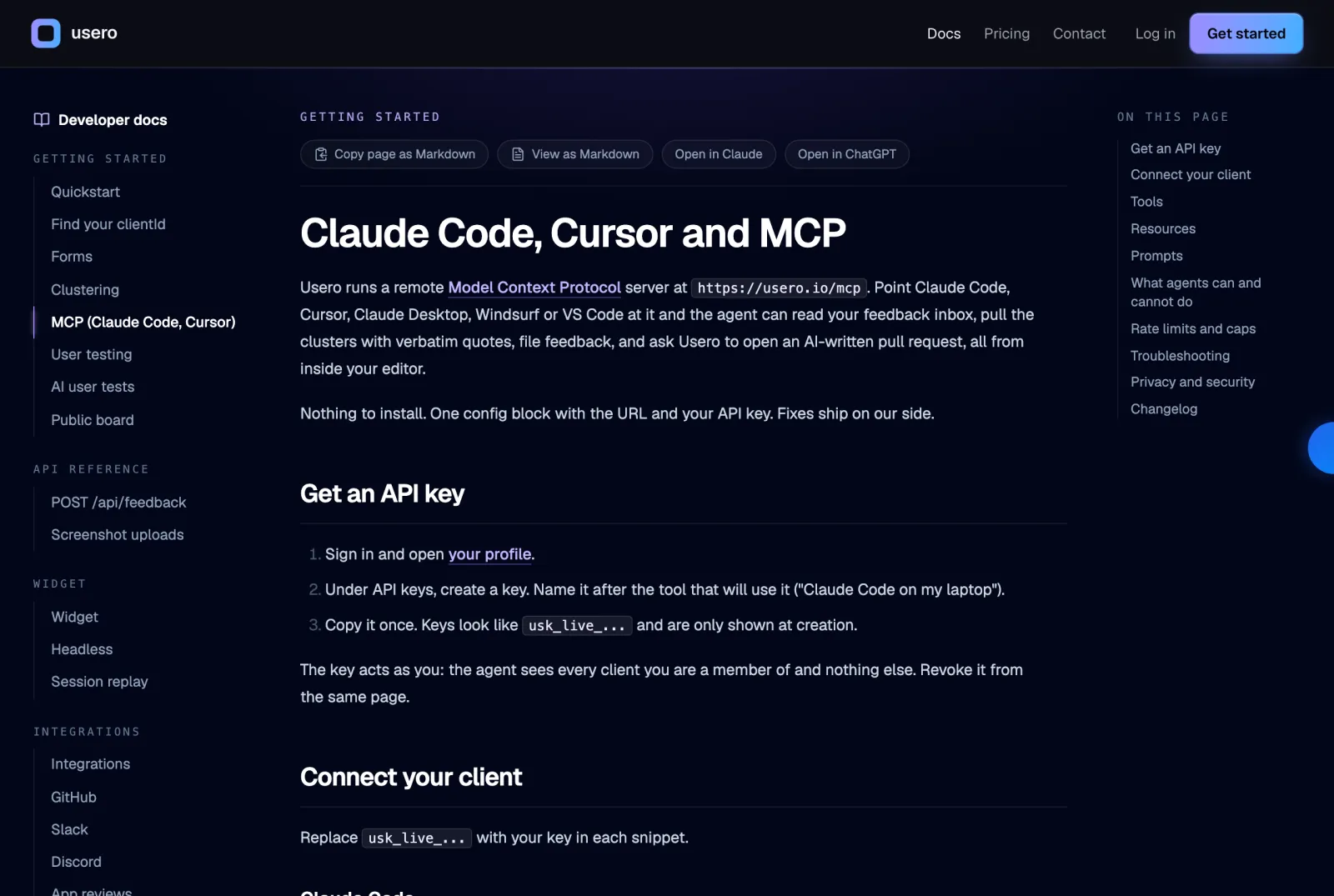
Usero is a remote MCP server. Add one config block to Claude Code, Cursor, Claude Desktop, Windsurf or VS Code and the agent can search your feedback inbox, pull clusters with verbatim quotes, file feedback, and call request_ai_pr to have Usero write and open a pull request server-side.
The feedback lives in one tab and the code lives in another. Every fix starts with a copy-paste from the inbox into the editor, and most of the time the paste never happens.
A developer working in Claude Code or Cursor asks the agent to fix something, and the agent has the repo, the tests and the terminal but not the ten reports that describe the bug. So the developer reads the reports in the dashboard, summarises them into a prompt, loses the exact wording, and the agent fixes the version of the problem the developer remembered rather than the one the users described. Canny, Featurebase, Productboard, Sleekplan, Pendo and Aha all ship MCP servers now, and the read side is table stakes. What none of them do is let the tool call open the pull request. The agent can read the complaint but cannot act on it without leaving the editor, so the loop from "a user said this" to "a branch exists" still has a human copying text across windows in the middle.
How it works
MCP server for Claude Code and Cursor in Usero.
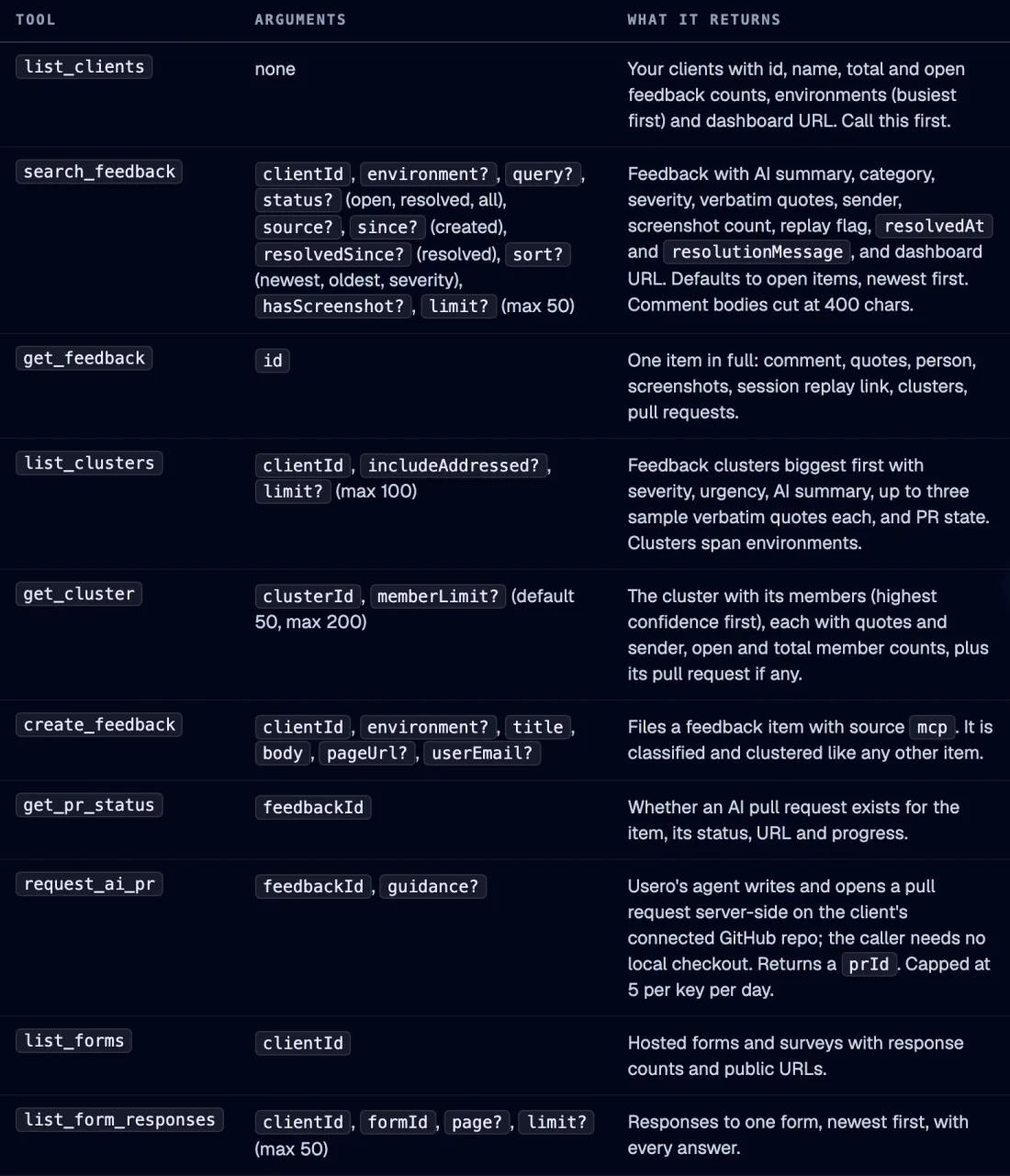
Disclosure: I build Usero, and I use this daily from Claude Code. The server runs at usero.io/mcp on the same Worker and database as the dashboard, authenticated with the same API key you use for the REST API. Ten tools. list_clients tells the agent which products it can see. search_feedback filters the inbox by query, status, source, environment, date and whether a screenshot is attached. get_feedback returns one report in full with the quotes, the sender, screenshots, the session replay link and any PR. list_clusters returns the clusters biggest first, each with severity, urgency and up to three verbatim sample quotes. get_cluster returns the members. create_feedback files a report from the agent. list_forms and list_form_responses read survey answers. get_pr_status checks a PR. And request_ai_pr asks Usero to write and open the pull request on the connected repo, server-side, so the agent needs no local checkout and your GitHub credentials never leave Usero. Two resources let an agent pin a client's clusters or a single report into context, and three prompt templates (triage_inbox, fix_top_complaint, write_changelog_from_feedback) cover the common asks. The server makes no LLM calls of its own. It is deterministic plumbing over your data, and the agent on your side does the thinking.
Clusters with the exact words, inside the editor
list_clusters returns every open cluster with its size, severity, urgency score and up to three verbatim quotes. The agent works from "after the bank verification popup it just spins forever", which names the code path, and not from a summary that dropped it.
request_ai_pr opens the PR without a local checkout
The agent calls one tool with a feedback id and optional guidance. Usero clones the repo in its own container, writes the change on a branch and opens a normal pull request on GitHub. The caller gets a PR id back. Your CI runs, you review, you merge. Nothing merges on its own.
One remote server, every client
There is nothing to install. Claude Code, Cursor, Claude Desktop, Windsurf and VS Code Copilot all take the same URL and header. Any other client that speaks MCP over streamable HTTP works too. Fixes and new tools ship on our side, so the config block you paste today keeps working.
Read tools are marked read-only, writes are capped
Clients that prompt before side effects skip the prompt on the eight read tools. create_feedback and request_ai_pr are the only writes, and request_ai_pr is capped at 5 per key per day so a looping agent cannot burn your PR allowance. Tool calls overall are limited to 120 per key per minute.
Setup, three ways.
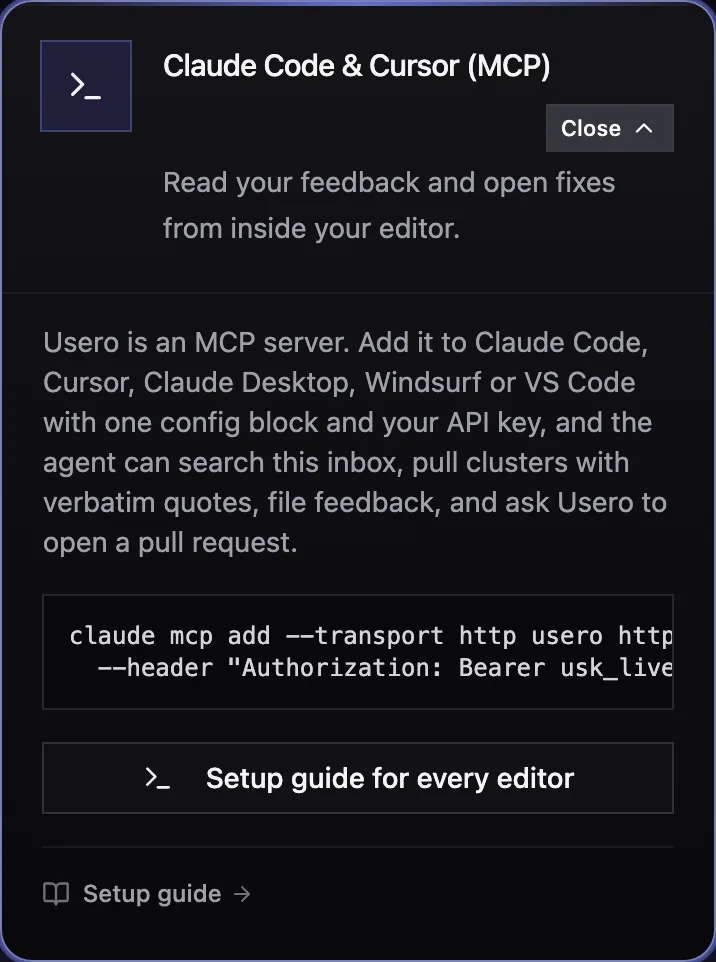
Create an API key on your profile page, then pick your client. Claude Code is one command, Cursor is one JSON file, and the Claude Code plugin bundles the server config with a skill that teaches the agent when to reach for it.
claude mcp add --transport http usero https://usero.io/mcp \
--header "Authorization: Bearer usk_live_..."{
"mcpServers": {
"usero": {
"url": "https://usero.io/mcp",
"headers": {
"Authorization": "Bearer usk_live_..."
}
}
}
}/plugin marketplace add usero-feedback/claude-plugin
/plugin install usero
# then: /usero:triage_inboxWhat a session looks like.
A Claude Code session against the seeded development inbox, connected to the MCP server. The question was one line. The agent made four Usero tool calls and answered in 15 seconds, and it flagged the seed rows instead of quoting them as users.
- You
What are users complaining about most in my product right now? Give me the top 3 with a quote each.
- list_clients
3 clients. dev-client: 73 feedback items, 64 open, environments production, dev, staging. GitHub repo connected.
- list_clusters
6 clusters, biggest first. #1 "Checkout times out on 3DS card payments", 18 reports, critical, urgency 85, effort 2. Sample quote: "after the bank verification popup it just spins forever".
- get_cluster
pm_cl_2 "Custom dashboards for the reporting engine", 11 members. Member comments read "Seed report N for prioritization matrix testing", quotes empty.
- Claude
Top 3 by volume in dev-client (73 items, 64 open): 1. Checkout times out on 3DS card payments, 18 reports, critical, at least one enterprise renewal blocked. "after the bank verification popup it just spins forever" 2. Custom dashboards for the reporting engine, 11 reports. No usable verbatim quote here, the underlying items are seeded test placeholders, so I won't fabricate one. 3. Dark mode for the dashboard, 6 reports. Same caveat. Cluster #1 is the only one with real quotes and by far the most urgent (urgency 85, effort 2). Clusters #2 and #3 look like demo data; worth confirming whether dev-client is your production feed before acting on them.
The honest objection
Why would I want the agent to open the PR through Usero when it already has my repo open?
Often you would not, and the tools are built for that. If the fix is in the code you have open, let the agent read the cluster with get_cluster and patch it locally; that is the common case for a developer in Cursor. request_ai_pr is for the other cases: a PM or founder in Claude Desktop with no checkout, a bug in a repo you are not working in today, or a batch of small fixes you want opened as separate PRs while you keep working. It runs in Usero's container with the Usero GitHub App, so your own GitHub credentials are never handed to the agent, and the PR body links back to the feedback that asked for it. Both paths end in a normal pull request you review. Pick per fix.
FAQ
Quick answers about mcp server for claude code and cursor.
How does authentication work?
With the API key from your profile page, sent as a Bearer header. The key acts as you: the agent sees every client you are a member of and nothing else. Revoke it from the same page. Keys are hashed at rest. OAuth is not offered yet; every MCP client supports a static header, so the key is the shortest path.
Which clients are supported?
Claude Code, Cursor, Claude Desktop, Windsurf and VS Code with GitHub Copilot agent mode have tested config snippets on the docs page. Anything that speaks MCP over streamable HTTP works, since the server is stateless JSON-RPC over POST with no session id and no SSE. Codex and other newer clients that accept a remote URL plus a header connect the same way.
Does it cost extra?
No. The MCP server is included on every tier, including the free one. Pull requests opened through request_ai_pr count against the same monthly PR allowance as the dashboard button and the REST API, and nothing else is metered.
What are the rate limits?
120 tool calls per API key per minute. Past that, the tool returns an error naming the seconds to wait. request_ai_pr is capped at 5 per key per UTC day. search_feedback returns at most 50 items per call and get_cluster returns 50 members by default, 200 at most, with a flag telling the agent when the list was truncated.
What can the agent not do?
Resolve or delete feedback, change client settings, connect integrations, invite members, touch billing, or see clients you are not a member of. Those stay in the dashboard on purpose. If your workflow needs one of them from an agent, tell us through the contact page.
Is my feedback sent to a model on your side?
No. The MCP server makes no LLM calls. It returns your data to the agent you connected, and that agent does the reading. The only model Usero runs on your behalf is the one that writes the pull request when you call request_ai_pr, which is the same path as the dashboard button.
Will tools change under me?
Tools are never removed inside 90 days of being announced. A tool on its way out gets "deprecated" in its description first. The docs page carries a changelog table, and the Claude Code plugin version bumps on every tool change.
Turn that feedback into a pull request.
Free tier. No credit card. Two-minute install. The AI opens the PR, you merge it.
Keep reading
- MCP setup for every client (docs)->
- Best user feedback tools (2026)->
- Widget Editor->
- Person profiles->
- AI user tests->
- Demand threshold auto PR->
- Sentry Integration->
- Session Replay->
- AI Replay Scanner->
- Traffic source capture->
- AI-authored GitHub PRs->
- Slack feedback capture->
- Forms->
- Feedback clustering->
- App store review import->
- Chrome extension->
- Discord feedback capture->
- Email forwarding->
- GitHub issues sync->
- Feedback API->
- User testing->
- Public roadmap and feedback board->
- Chrome Web Store review import->
- Unified feedback inbox->
- Changelog->
- Revenue-weighted prioritization->
- Evidence quotes on clusters->
- Survey Score Over Time->
- Notion integration->