Widget Editor
Customize your website feedback widget beside a live preview of the real thing.
Pick the position, theme, accent colour, title and fields for the Usero feedback widget and watch the production widget update as you type. Flip to a 390px phone frame, copy the snippet it generates, and save. Every report it collects can become a GitHub pull request.
The only way to see what a website feedback widget looks like on your site has been to set some options on a script tag, deploy, and go look. Wrong colour? Deploy again.
A feedback widget is the first thing most teams install and the one they tune least, because tuning it is a deploy loop. Someone on the product side wants the launcher on the left, in the brand green, with a title that does not say "Share Feedback", and the answer is "ask an engineer to change the props and ship it". So the defaults stay. Frill solved this for their widget with an editor that renders the production widget next to the controls, and the trade-off they made is that every save is a production change with no developer in the loop. We wanted the live preview without turning a colour picker into a deploy button.
How it works
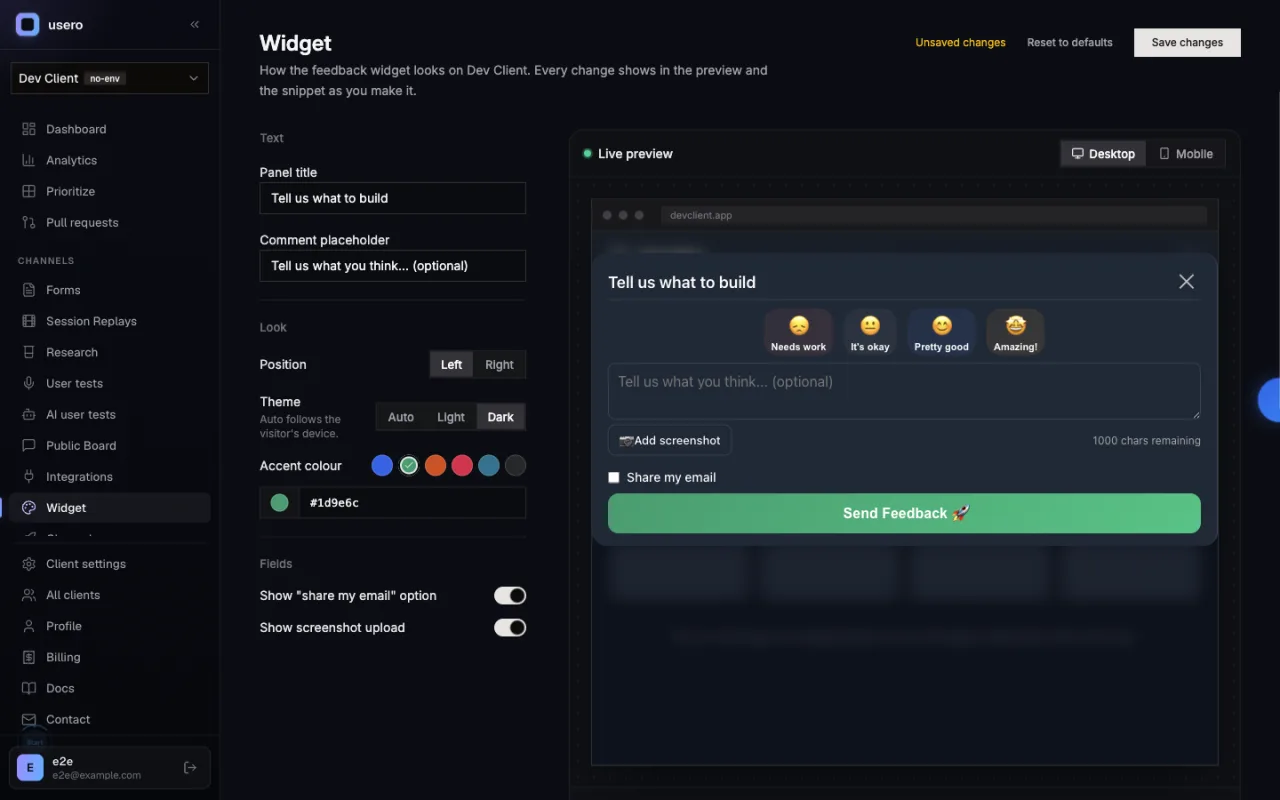
Widget Editor in Usero.
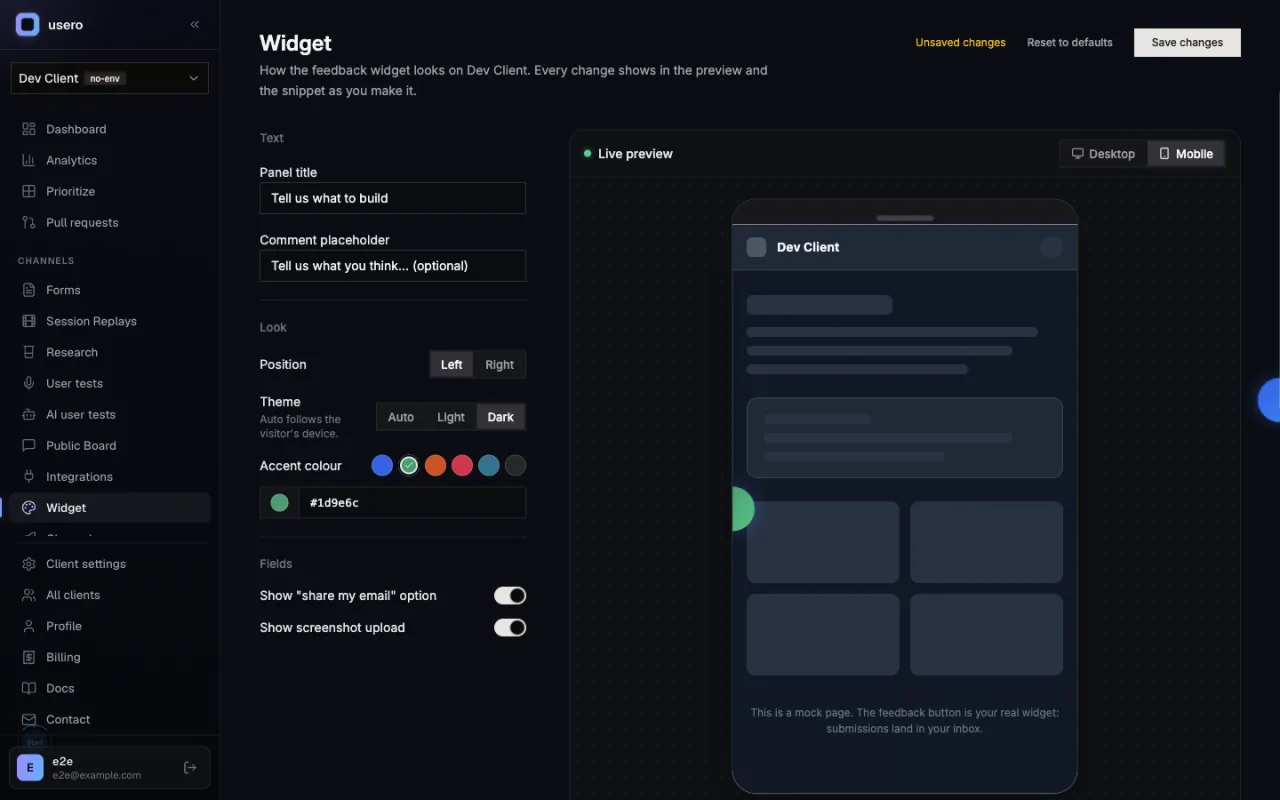
Disclosure: I build Usero, so read this as the maker talking. The Widget page in the dashboard is a form on the left and the real @usero/sdk widget on the right, loaded with your real client id inside an iframe over a neutral mock page. Change the position, theme, accent colour, panel title, comment placeholder, or the email and screenshot toggles, and the widget in the preview updates in place through the SDK without remounting. A Desktop / Mobile toggle swaps the mock page for a 390px phone frame. Below the preview, the script-tag, vanilla and React snippets regenerate from the current form with only the non-default options. Save writes the appearance to your client settings, and from then on the snippets on the integrations page carry it. Submissions from the preview are real: they land in your inbox tagged as widget-editor previews, so you can test the whole path, including the AI-drafted PR, before anything ships.
The preview is the production widget
The iframe loads the same @usero/sdk build your visitors get, with your real client id. There is no mock drawn in the dashboard’s own styles. If it looks right in the preview, it looks right on your site.
Desktop and 390px mobile, one click apart
A device toggle swaps the mock page for a phone-width frame so you can see the launcher and the open panel at a mobile size without resizing your own browser window.
The snippet writes itself
Script tag, vanilla JS and React snippets regenerate as you edit, carrying only the options you changed from the defaults. Copy one and paste it. After you save, the snippets on the integrations page follow the saved appearance too.
Nothing is written until you save, and preview submissions are real
Opening the editor creates nothing. Save is the only write, and it goes into your existing client settings, so there is no migration and no SDK upgrade. Feedback sent from the preview lands in your inbox tagged as a preview, which makes it a safe way to try the full loop from widget to pull request.
The honest objection
If I change the colour after my site is live, does the widget on my site change too?
Not yet, and I would rather say so than imply it. The SDK reads its options at init, so the editor generates the snippet and a change to the snippet still needs a deploy. The saved appearance keeps the snippets on the integrations page current, so the next deploy picks it up, but the running widget does not fetch its config at runtime. That fetch is the obvious next step and needs an SDK release, so it is filed as a follow-up rather than shipped half-done.
FAQ
Quick answers about widget editor.
What can I change in the widget editor?
Position (left or right), theme (auto, light or dark), the accent colour, the panel title, the comment placeholder, and whether the "share my email" checkbox and the screenshot upload button are shown. Everything else, such as identifying users, session replay and the What’s new tab, stays in code because it depends on your app.
Do I still need to deploy after I save?
Yes, if the change affects the snippet on your site. The widget reads its options when it initialises, so the editor updates the snippet and your site picks it up on the next deploy. A runtime config fetch, where the widget asks Usero for its saved appearance on load, is not built yet; it needs an SDK release and is on the list.
Are submissions from the preview real?
Yes. The preview is your real widget with your real client id, so anything sent from it lands in your inbox. It is tagged as a widget-editor preview in the metadata so you can tell it apart from customer feedback.
Does saving the appearance change anything else in my settings?
No. The appearance is stored alongside your existing client settings, and saving other settings leaves it alone. We found and fixed a bug while building this where the general settings save overwrote the whole settings record, so this is tested.
Turn that feedback into a pull request.
Free tier. No credit card. Two-minute install. The AI opens the PR, you merge it.
Keep reading
- Widget docs (install, options, and the editor)->
- Best user feedback tools (2026)->
- Person profiles->
- AI user tests->
- Demand threshold auto PR->
- Sentry Integration->
- Session Replay->
- AI Replay Scanner->
- Traffic source capture->
- AI-authored GitHub PRs->
- MCP server for Claude Code and Cursor->
- Slack feedback capture->
- Forms->
- Feedback clustering->
- App store review import->
- Chrome extension->
- Discord feedback capture->
- Email forwarding->
- GitHub issues sync->
- Feedback API->
- User testing->
- Public roadmap and feedback board->
- Chrome Web Store review import->
- Unified feedback inbox->
- Changelog->
- Revenue-weighted prioritization->
- Evidence quotes on clusters->
- Survey Score Over Time->
- Notion integration->