How Maze Analyzes Unmoderated User Tests: One Paragraph, One Word, and a Sales Call
Maze is the name in unmoderated user testing: build a study from blocks, share a link, and participants work through it alone while the product records them and an AI analyzes what happened. We ship unmoderated user tests too, with voiceover recording and AI analysis, so of everything in this series, this one sits nearest our own product. We spent the evening inside their product, built and published two studies, and took one end to end as a participant. Then we went back to our own codebase and shipped the piece of ours that their design talked us into.
One honesty note before anything else. Our Maze workspace was on an Enterprise trial overlaid on a Free plan, so every AI feature in this post was trial-unlocked, not free-tier. The upgrade page listed Free, $0, as the current plan while the banner counted down the trial. Worth keeping in mind for the pricing section later, because the gap between Free and Enterprise turns out to be most of the story.
The builder earns its reputation
The study builder is a three-pane layout: block list on the left, block config in the middle, and a live participant preview on the right that updates as you type. That preview is the best screen in the product. You never wonder what the participant will see, because you are looking at it. Small touches land as you build too: paste a URL into a website task and Maze fetches the page and renders its real title as a preview card, so you can see the link you just typed is the right one.
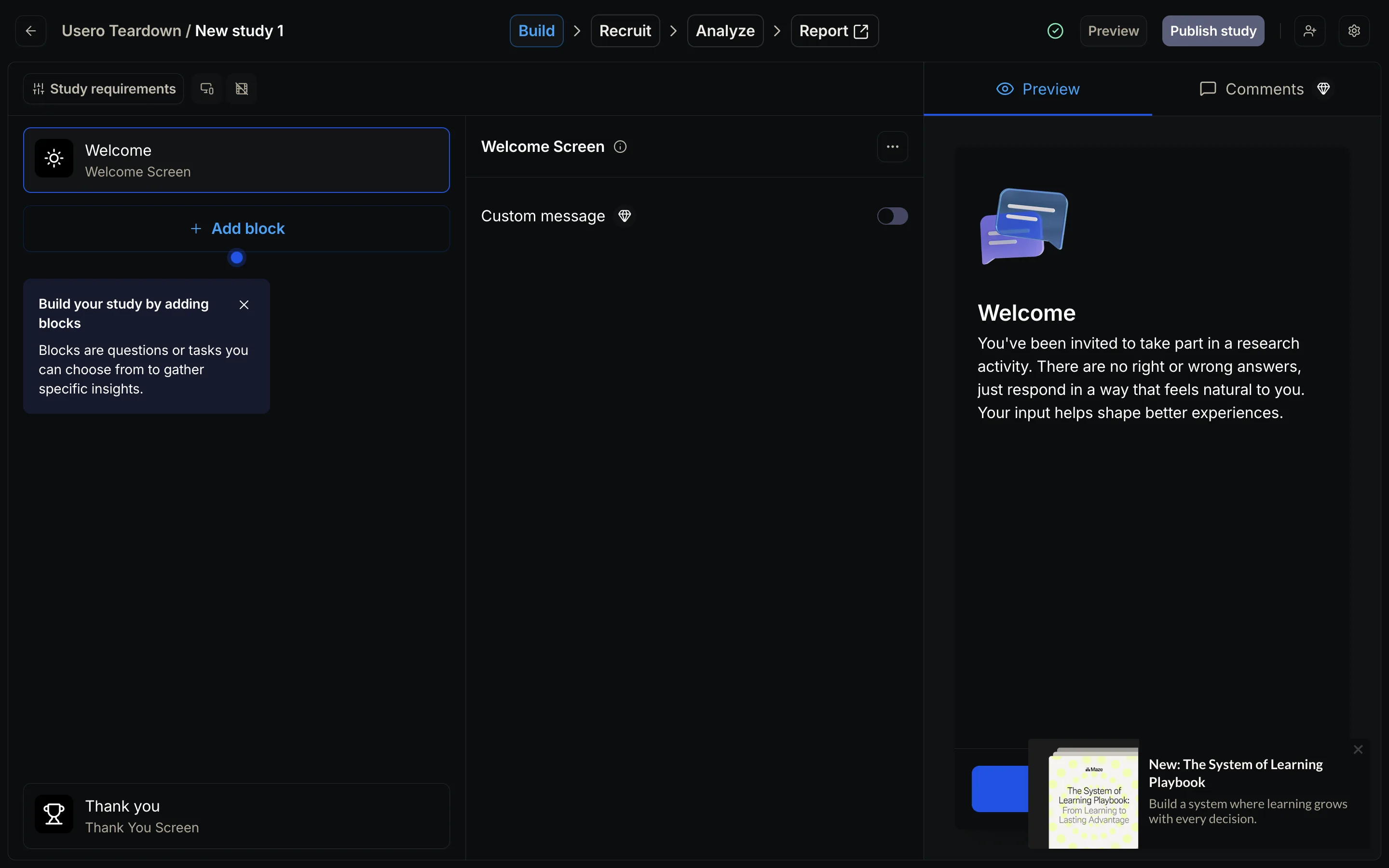
The recording settings hide the most thoughtful feature we found all night: “think aloud education.” Turn it on and participants get an intro video on sharing their thoughts, reminders during tasks, and, the good one, a prompt to speak if no audio is detected. Going quiet is the failure mode of unmoderated think-aloud, and Maze built for it. We wrote that down to steal.
Not everything held up. We named both studies at publish time and neither name persisted; the dashboard still lists them as “New study 1” and “New study 2”. And the AI “Rephrase the title” button took our question “How clear was it that Usero writes the pull request for you?” and returned “How would you rate your overall experience with the process?”, throwing away every specific noun. A novice researcher clicking Apply there loses their question and never knows it.
The first AI follow-up was sharp
We took the no-recording study end to end as a participant. The whole run took about 46 seconds of response time. The open question had Maze’s AI follow-ups enabled, and we answered honestly: we would worry about an AI pushing code to main without human review, and our slow CI makes a bad PR expensive. Within seconds a follow-up appeared: “Can you explain why having a human review before merging is important to you?” That is a good probe, specific and on topic, and worth more than a static second question would have been.
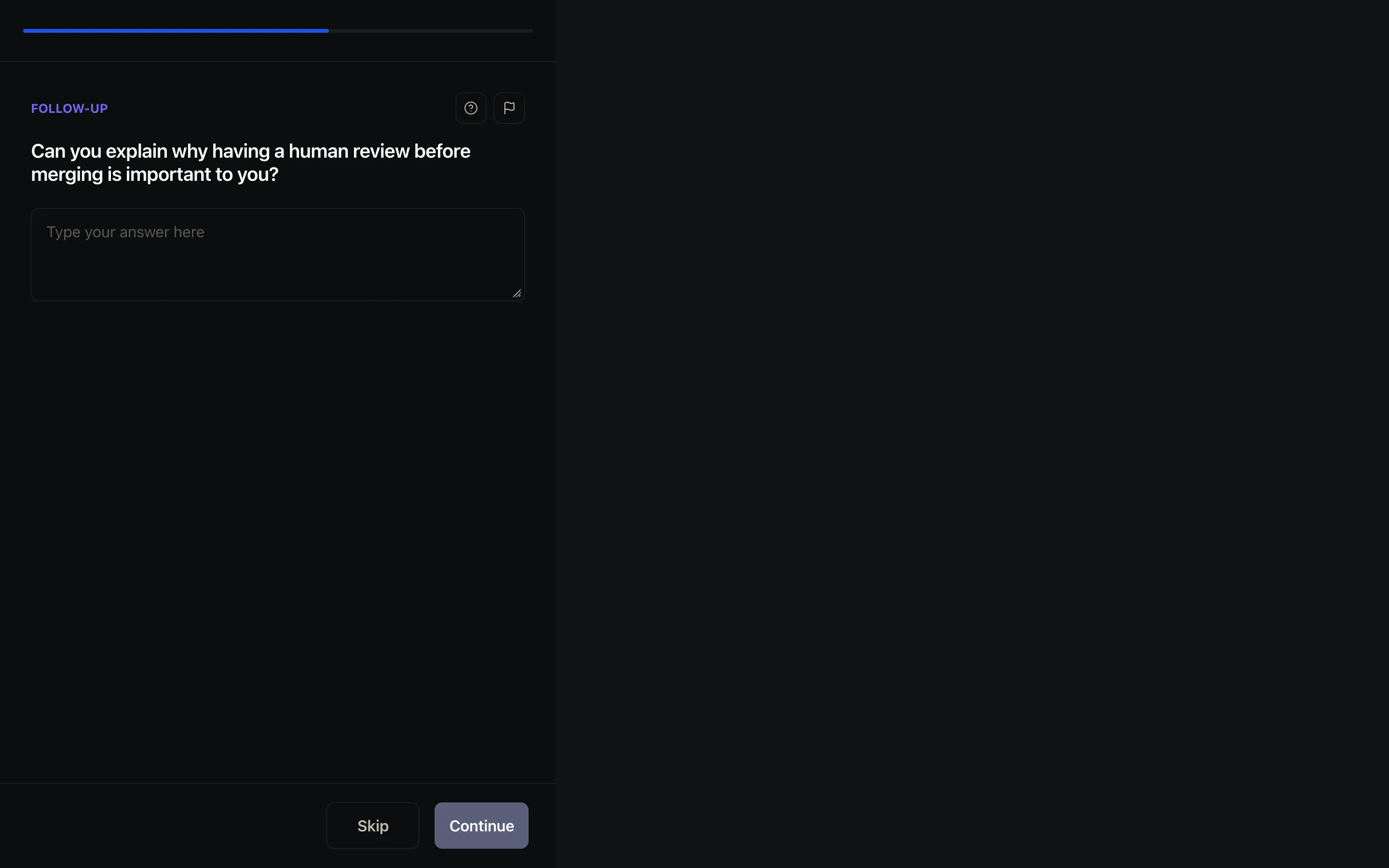
The second follow-up drifted: “What specific aspects of a human review do you find most effective for ensuring accountability?” Consultant phrasing, and we skipped it. So the quality lasted exactly one turn in our session. But the escape hatches deserve credit. Skip and “Flag this question” sit on every AI follow-up, which most AI-interview tools omit, and a participant who is done being probed can just leave.
The permission wall costs whole participants
Our other study had Clips required, Maze’s term for recording camera and mic. As a participant, declining the permissions is terminal. The modal switches to “Check microphone & camera”, lists Camera: Blocked and Microphone: Blocked, and the primary button reads “Waiting for” and stays disabled. There is no decline-and-continue, not even for the plain text questions in the same study. Every webcam refusal costs you the whole participant, typed answers included.
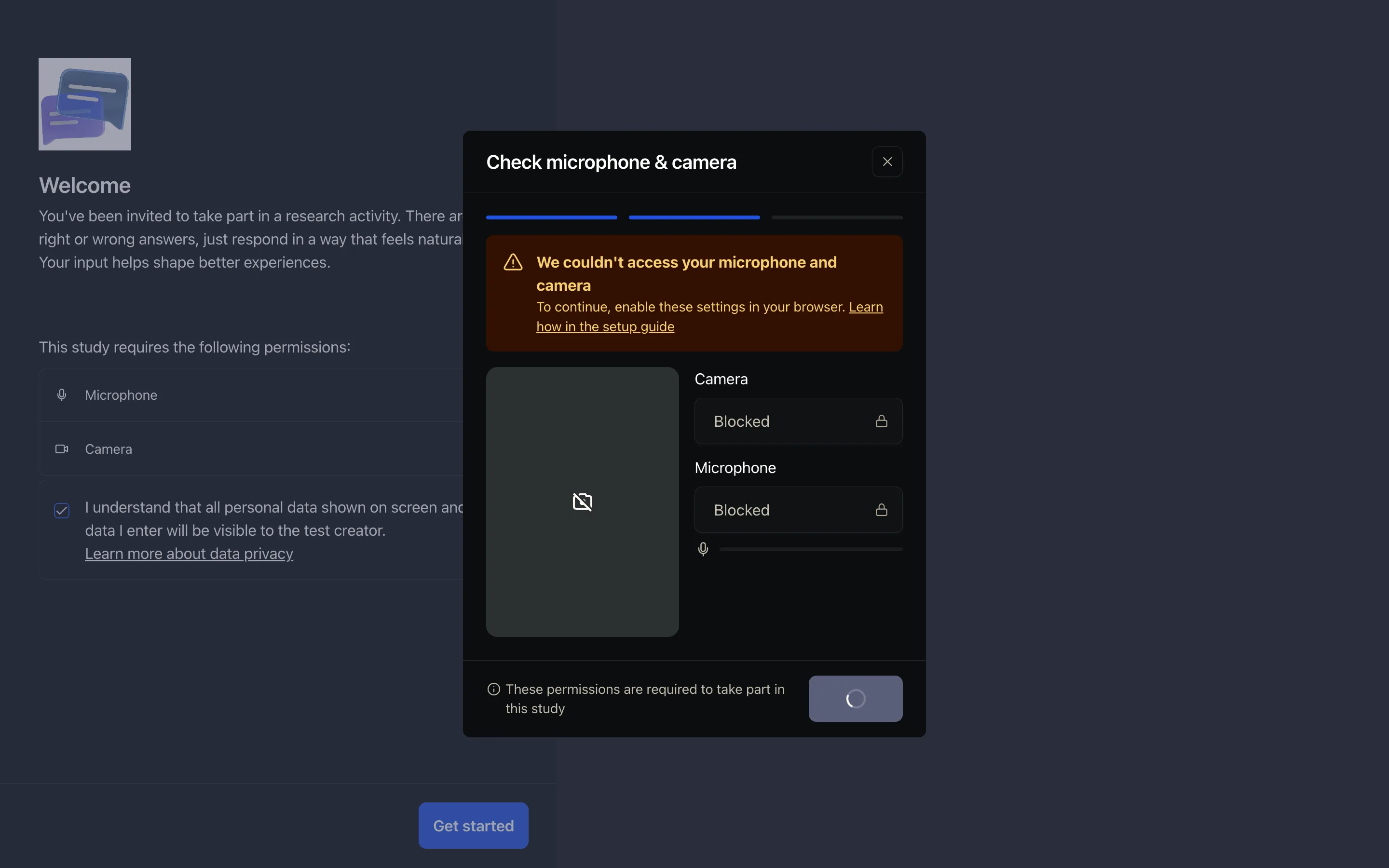
To be fair on the details: Maze’s help docs describe studies where permissions are optional, so all-or-nothing is a per-study setting rather than the only mode. The same docs also note that closing the tab before the upload completes can lose a participant’s clips, so a session can go perfectly and still lose its recording. We did not observe either of those; both come from their documentation.
One paragraph and one word
The results were ready before we could navigate to them. No processing queue at all, and that speed is real engineering. What the AI produced per session is thinner: one summary paragraph, and one sentiment word.
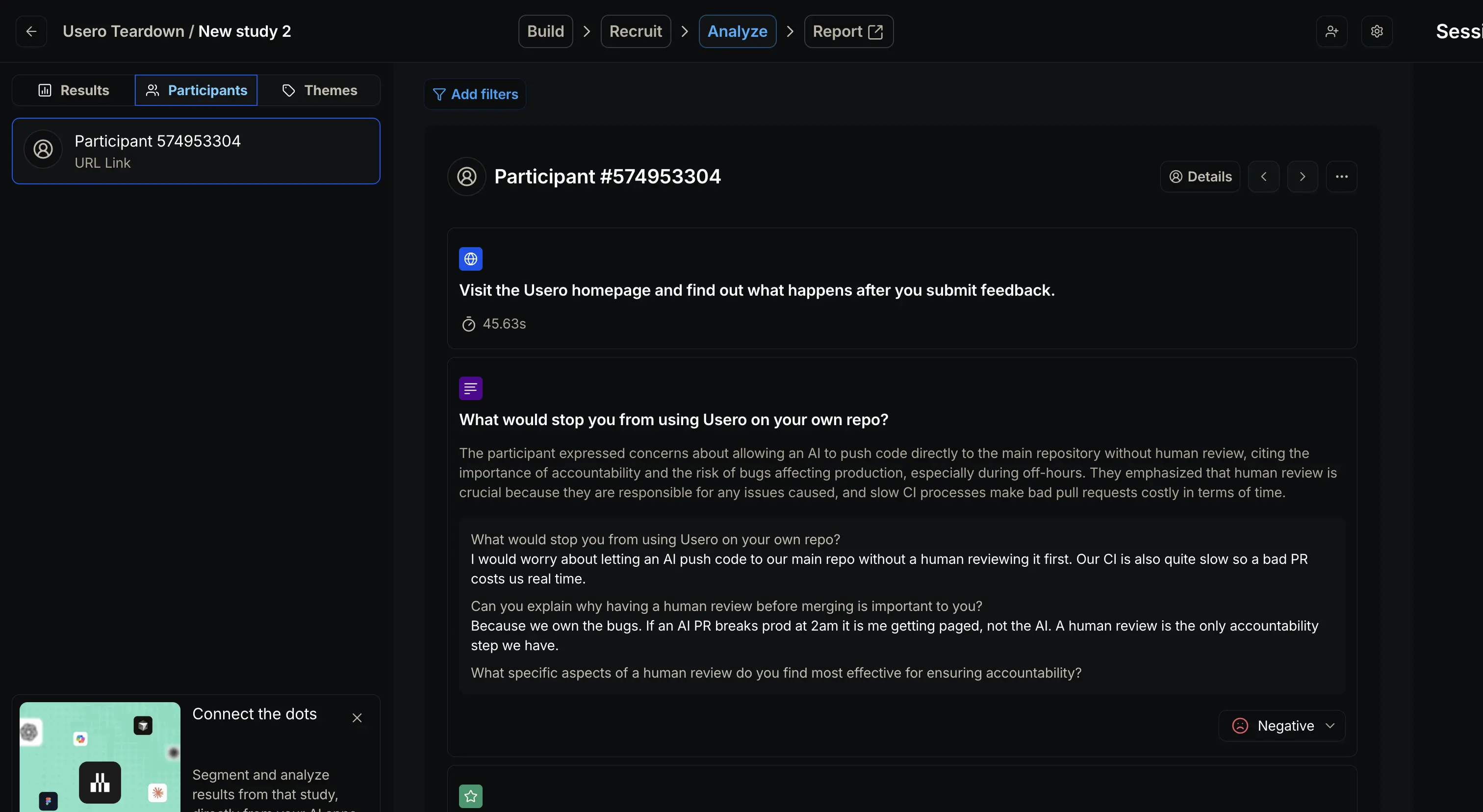
The paragraph was good. It compressed our answer and both follow-ups accurately, and on a study with twenty participants it would save real reading time. The sentiment label was the word “Negative”, with no score and no explanation, attached to what was a reasoned objection about code review rather than negative affect. And that is the whole per-session output. There is no severity ranking or timestamped quote, and nothing that says what to do next.
Where does it go from there? The Themes tab told us cross-session analysis is a manual workflow: create highlights from your Clips recordings, tag them into themes, share them. Their pricing page lists “generated themes analysis” as an Enterprise feature, so an automatic path presumably exists at volume, but we never saw a machine-generated theme. And the Report tab, the destination the “automated presentation-ready reports” pitch points at, never rendered for us. Clicking it did nothing, and typing /report directly returned their 404 page. The loop, as we experienced it, ends at a summary you read.
All of it is behind a sales call
Maze has two tiers: Free ($0, one study a month, 7 blocks max) and Enterprise, which is custom pricing with no dollar figure anywhere, on the public pricing page or in the app. The in-app upgrade matrix is the authoritative list, and its “Maze AI” section reads as a clean sweep: auto-naming, question rephrasing, generative follow-ups, sentiment analysis, generated themes, every row Enterprise-only. Clips too, so think-aloud recording itself is Enterprise. Every AI behaviour in this post was something a free user cannot touch.
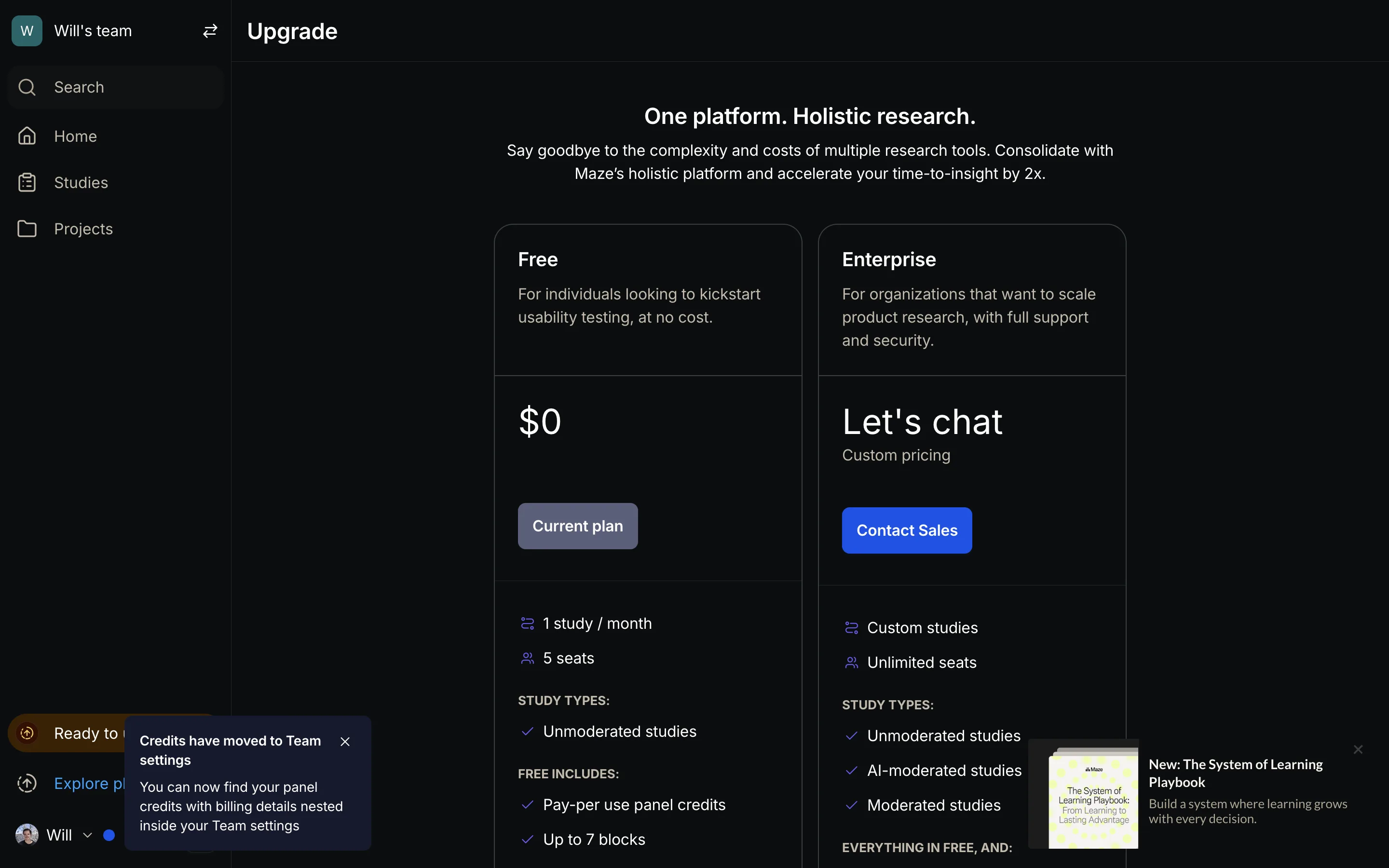
The panel adds its own arithmetic: ordering responses for our study quoted 5 credits per response, itemised as 3 base plus 2 for the AI Conversation block, a 67% surcharge for the AI. What a credit costs in dollars we could not find out; nothing the trial let us open showed a rate. So the full bill for AI-analyzed user testing at Maze is a sales call plus a credit price we never saw.
What we built instead
Our unmoderated user tests already record the screen and the participant’s voice, then transcribe and analyze the session. But until tonight the human track had the same shape as Maze’s: the analysis produced insights that sat on the session page, and reading them was the end of the road. Our agentic AI tests have filed their findings into the feedback inbox since they shipped. The human sessions, the direct head-to-head with Maze’s think-aloud tests, dead-ended.
Tonight’s build made findings first-class. When a session’s analysis completes, each friction finding that carries a severity tag (high, medium, or low) files into the feedback inbox as its own item: the finding’s title and description in the participant’s terms, attributed to the participant’s email like any other feedback, tagged with the test it came from.
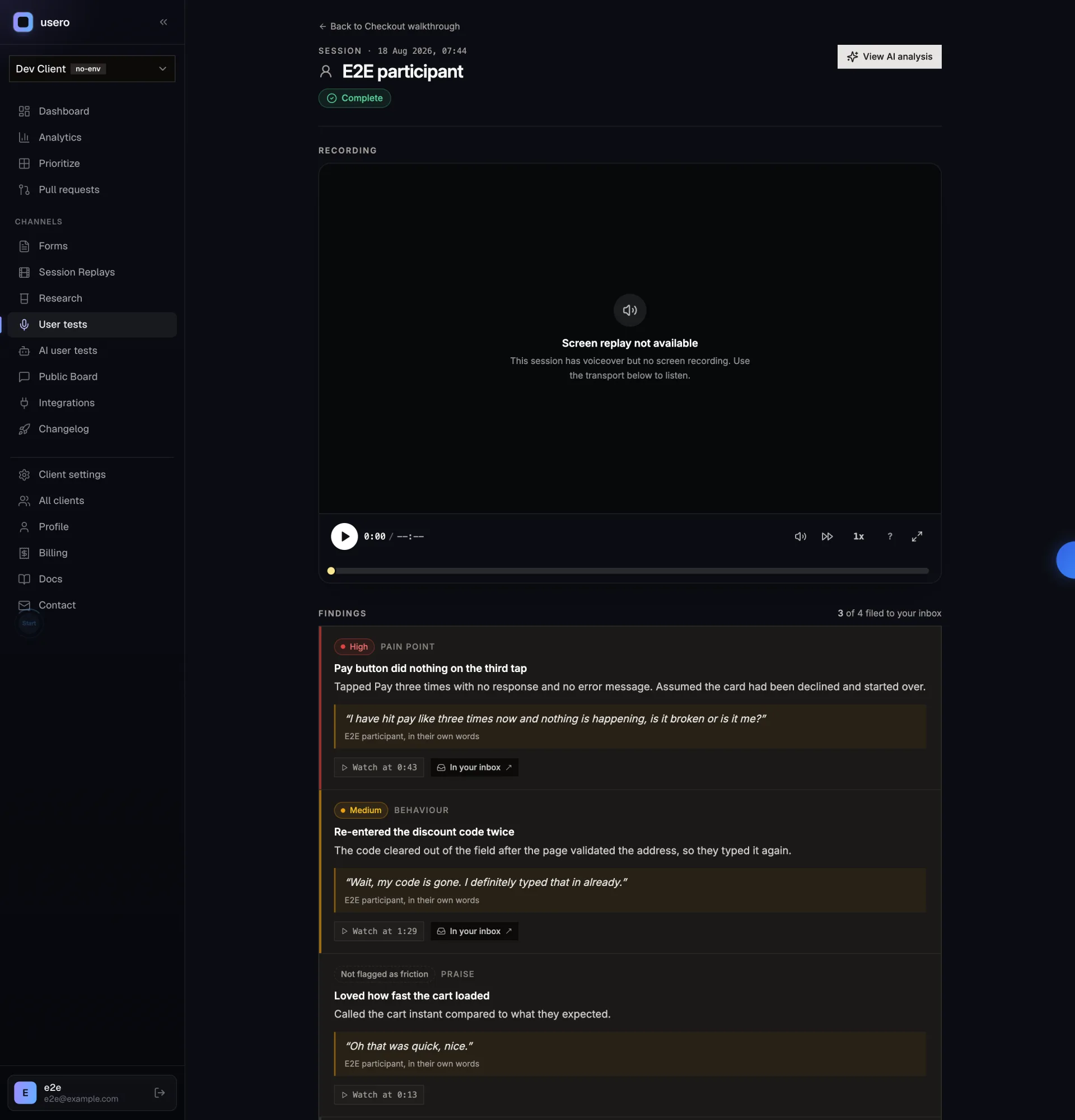
The part we cared most about is the clock. The analysis hears the audio, so each finding has a timestamp on the audio track; the session already knows the offset between when the replay started and when the mic came on. Add them together and a finding opens the session replay at the second the participant hit the problem, the same moment-seeking we built for widget feedback in the Hotjar night. A finding with no identifiable moment gets no link rather than a fabricated one, because a replay that opens on the login screen and claims “here” is worse than no replay.
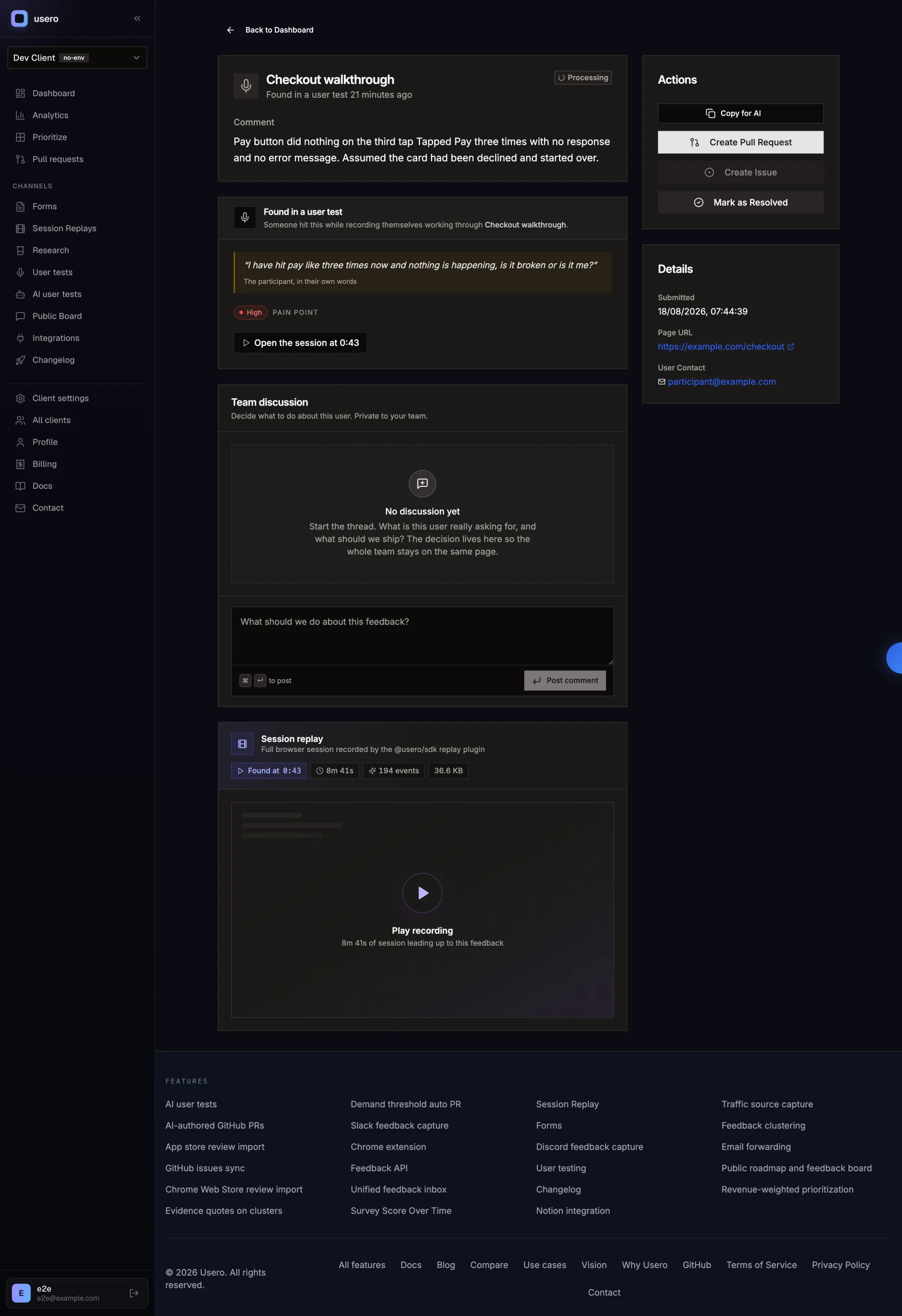
Two filters keep the inbox honest. Only friction files: pain points, and observed behaviour where the product misbehaved. Praise, feature ideas, and neutral descriptions stay on the session page, because a session yields several insights and filing all of them would triple inbox volume for nothing the PR path could act on. And at most one finding per session may open a pull request unattended, the highest-severity one; the rest keep their manual Create Pull Request button. One recording should not become five speculative PRs.
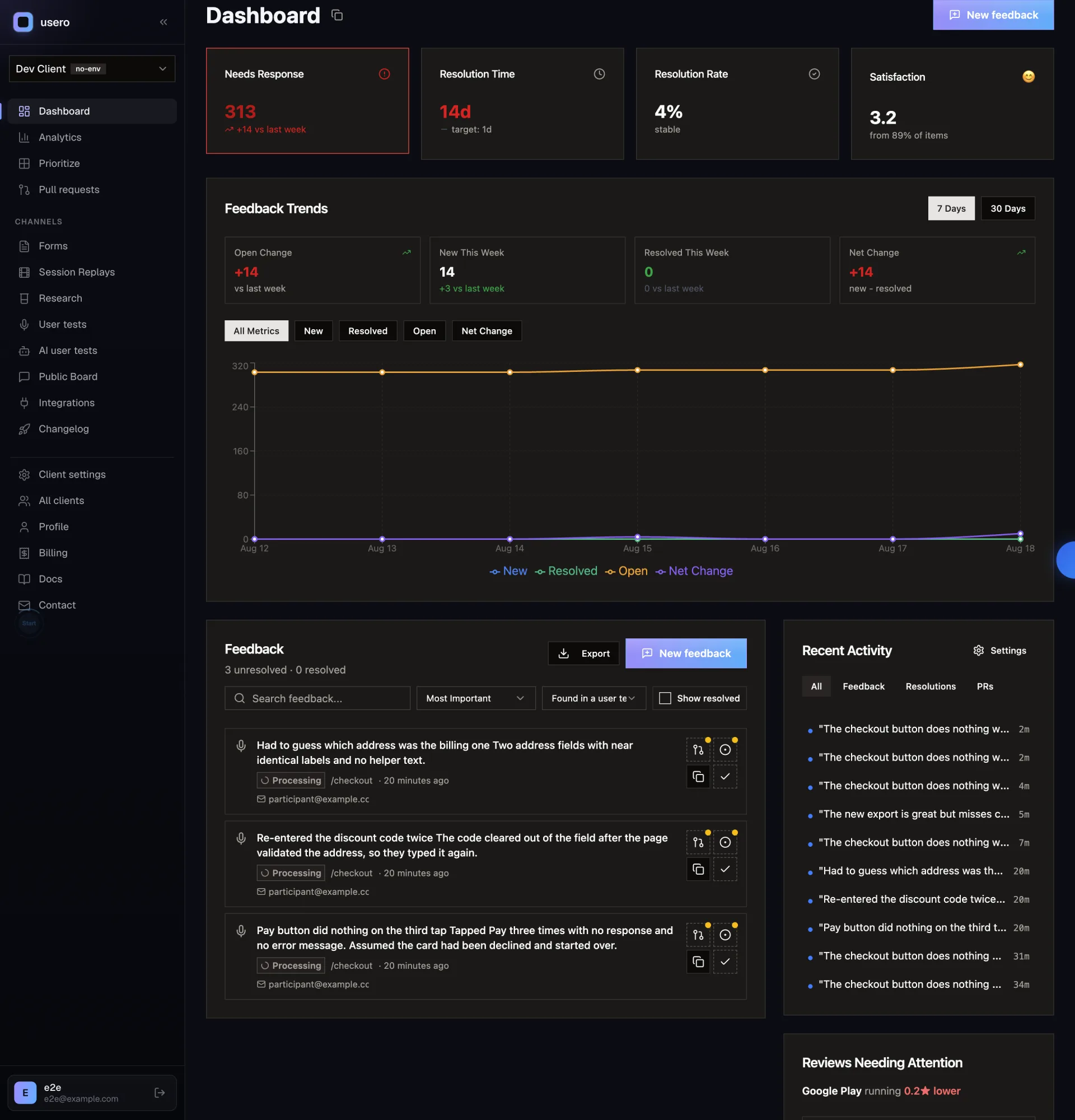
From there a finding is ordinary feedback. It clusters with the same problem arriving from the widget, Slack, or a form, the cluster ranks against everything else, and it can go to an AI-drafted pull request you review and merge. That last step is the one Maze’s loop never reaches.
What we took away
We came away liking Maze more than we expected to. The live participant preview, the think-aloud education with its speak-up reminder, the Skip and Flag hatches on AI follow-ups, the zero-second wait for results. Maze has clearly sat through a lot of these sessions, and two of those features are getting copied. The speak-up reminder goes straight onto our recording UI list, and their first AI follow-up made a strong case for in-session probing, which our container pipeline is not shaped for today. That one will need a night of its own.
The bet we would not copy is where the analysis stops. A paragraph and a sentiment word, priced behind a sales call, still leave a person to do all the reading. Ours files its findings into the inbox where the bugs already live, each with a severity and its moment in the replay, and the next step is a pull request. If you want to run one, read the user testing page or sign up free. The price is on the page, and there is no call to book.
Frequently Asked Questions
What does Maze’s AI produce for an unmoderated user test session?
Per participant, one AI-written summary paragraph and a one-word sentiment label. The summary we got was an accurate compression of the answer plus both AI follow-ups. The sentiment label was a single word ("Negative" in our session) with no score, confidence, or explanation. There is no per-session severity ranking, no quotes with timestamps, and no recommended action. Cross-session themes exist as a separate tab, but in our session it was a manual highlight-then-tag workflow on recordings behind a minimum response count.
Is Maze’s AI analysis free?
No. Maze has two tiers, Free and Enterprise, and every row of the "Maze AI" section on their in-app upgrade page is Enterprise-only: auto-naming, question rephrasing, generative follow-ups, sentiment analysis, and generated themes. Clips (all think-aloud recording) is Enterprise-only too. Enterprise is custom pricing with no dollar figure published anywhere we could find, and AI-moderated studies are a further paid add-on on top of it.
What happens when a Maze participant declines camera and microphone access?
On a study where Clips are required, the session ends. The permission modal shows Camera: Blocked and Microphone: Blocked, the button reads "Waiting for" and stays disabled, and there is no path to continue, even for the plain text questions in the same study. Maze’s help docs describe studies where permissions are optional, so the all-or-nothing behaviour is a per-study setting, but a required study turns every webcam refusal into a lost participant.
How does Usero analyze user test sessions differently?
Usero’s unmoderated user tests record screen and microphone, then transcribe and analyze the session. The analysis output does not stop at a summary: friction findings that carry a severity tag (high, medium, or low) are filed into the feedback inbox as individual items, each with the participant’s words and a link that opens the session replay at the second the moment happened. Filed findings cluster with feedback from the widget, Slack, and forms, and a cluster can go to an AI-drafted GitHub pull request. Praise and neutral observations stay on the session page instead of flooding the inbox.
Does Usero open pull requests automatically from user test findings?
At most one per session, and only for a finding tagged high or medium severity. Everything else filed from the session keeps a manual Create Pull Request button. The cap exists because a single session can file several findings at once, and nobody wants to wake up to five speculative PRs from one recording. Nothing merges without your review either way.
Continue reading
How the AnnounceKit Email Digest Works: We Waited for the Draft That Never Came
We enabled the AnnounceKit email digest, set it to send Saturday, and came back on Saturday. No draft, no digest, and nothing in the product showing whether it ran: no draft view, no send history, and a config that froze into upgrade modals mid-trial while staying armed. Plus the weekly digest we built for Usero the same night: a cadence choice instead of a second channel, a draft-preview email with a one-click skip, and an admin page that always shows the next digest and what happened to the last one. Free.
8 min read
How AnnounceKit Boosts Announcements: Four Megaphones, No Front Door
A second night inside a live AnnounceKit trial, this time on boosters and the email digest. The modal booster collects reactions and feedback right where the announcement lands, then fires again on reload at someone who already answered. The digest emails you a draft 12 hours before it sends. And every path a reader could take to become an email subscriber failed in our workspace, so the email side had nobody to send to. Plus what we built the same night: changelog email subscriptions on Usero, with a confirmation link before anyone is subscribed and requesters deduped out of the broadcast. Free on every plan.
9 min read
How PostHog Scans Session Replays with AI: A Right Score, an Invented Click, and a $15 Pull Request
We built a PostHog Replay vision scanner, fed it a session scripted to fail (17 failed save clicks, two rage bursts, an abandon), and audited every claim against their own event data. The score was right at 8/10. The reasoning also reported a button click that never happened, and the daily digest repeated it as a product finding at 100% confidence. Plus the pricing surface worth copying, the calibration diff, the Self-driving beta that drafts PRs at $15 each, and the replay scanner we built onto Usero the same night, where every claim must anchor to a real event or it gets dropped.
10 min read
Build a feedback loop your team actually uses
Usero collects, clusters, and turns user feedback into shipped fixes.
Get started free