How PostHog Scans Session Replays with AI: A Right Score, an Invented Click, and a $15 Pull Request
Session replay has one famous problem: nobody watches the recordings. PostHog’s new answer is Replay vision, AI scanners you point at your recordings with a plain-language prompt. Last night we went through their replay and survey stack, and the scanners were the one thing we didn’t try. Tonight we went back and built one, fed it a session we scripted to be as frustrating as possible, and checked every claim it made against PostHog’s own event data.
The setup, same as last night: a free PostHog account with our little Compass Calendar test app sending events and recordings from a local page. The replay list now carries a banner: “Replay vision is here. Scanners watch your recordings for you and surface what matters.” There is also a Summarize this recording button inside the player, which turns out to be the same machinery run once, on demand.
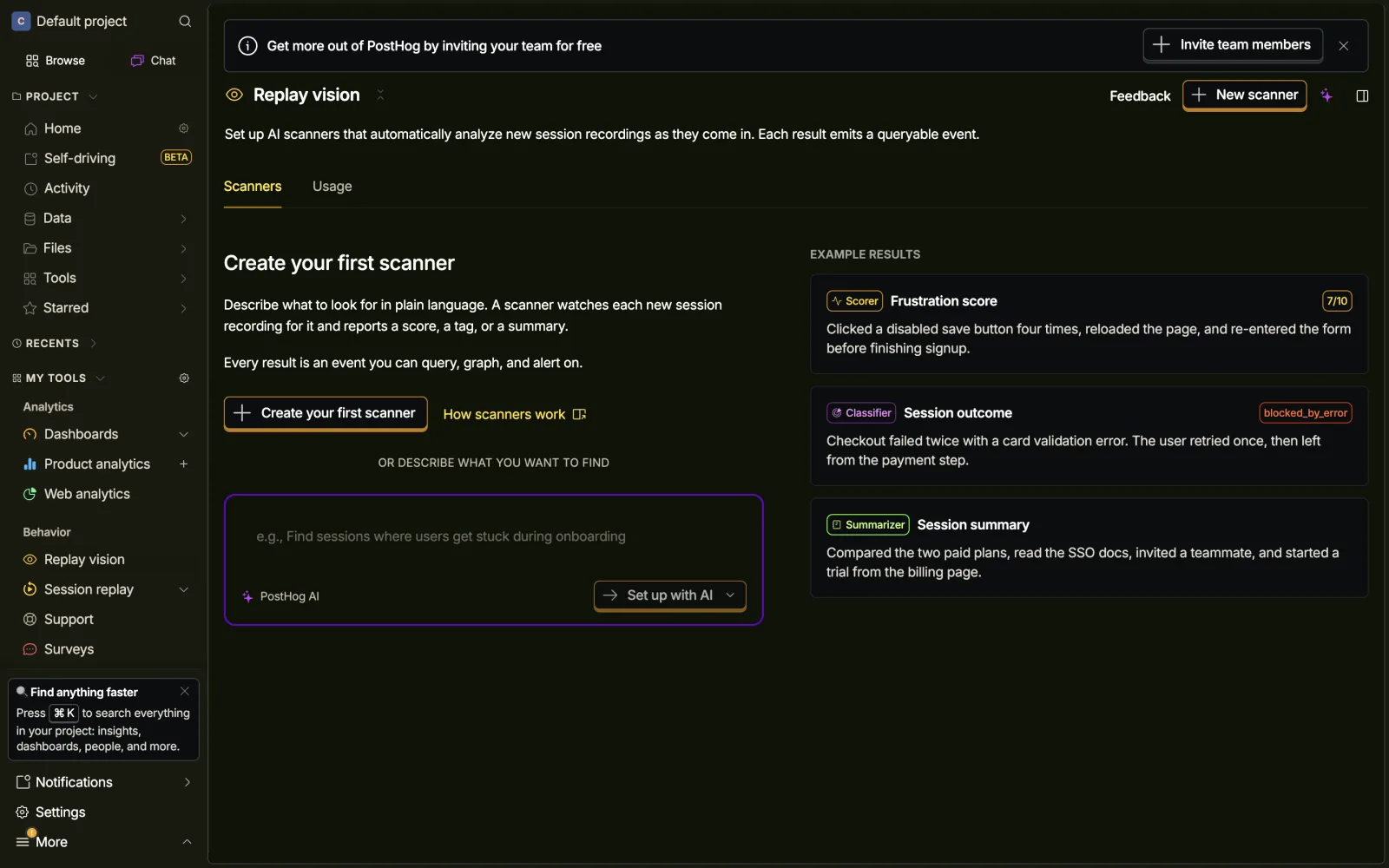
Five steps to a scanner
Creation is a wizard: Template, Details, Configure, Recordings, Budget. Templates are Dead ends, Session summary, User intent, Frustration score, Session outcome, or from scratch. The template locks the scanner type. We picked Frustration score, a Scorer on a 0 to 10 scale.
Two small things on the Details step are worth stealing. Name, description and tags each carry the annotation “The scanning agent doesn’t see this field. It’s for you and your team to keep scanners organized.” One line that separates what your team sees from what the model reads. Most AI products never tell you which is which.
Configure is the prompt (prefilled per template), the scale, and a model tier: Lite at 2 credits per observation, Standard at 5, Pro at 15, with 1 credit = $0.01. The same step carries a toggle we did not expect, but more on that at the end.
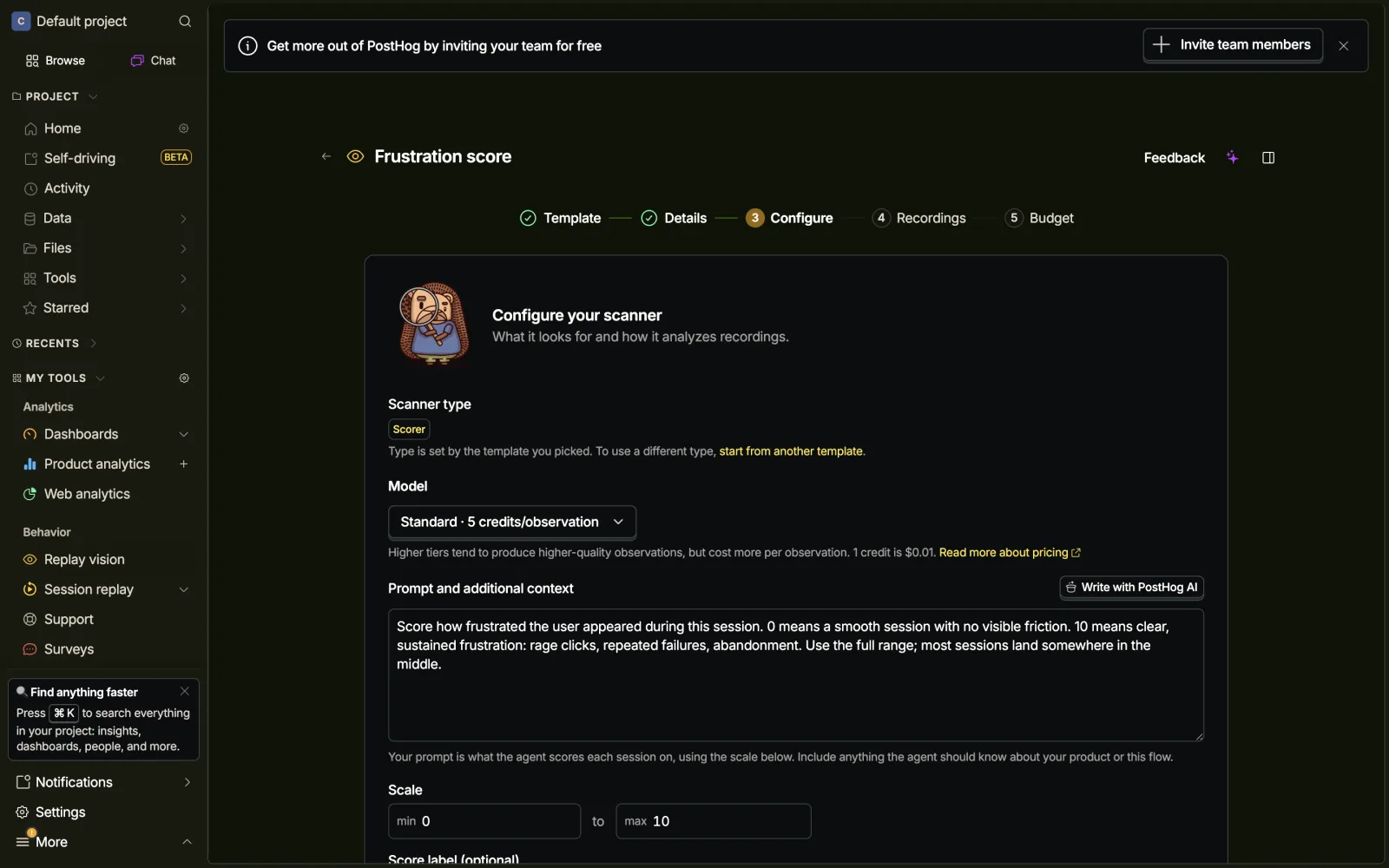
The Budget step is the most honest pricing screen we have seen in this series. Sampling percentage, a coverage policy (highest activity only, skip lowest, or all recordings), a per-scanner credit cap on top of the org cap, and an estimated monthly cost computed from your actual recent volume. The free allowance is 2,500 credits per period. You know what a scanner costs before it exists.
One rough edge: defaults are tuned for teams with traffic. The recordings filter defaults to more than 10 active seconds, the previews look at 1 to 3 day windows, and our day-old low-activity recording was invisible everywhere. On a small project the feature looks broken until you find the paste-a-session-ID escape hatch. There is also a hard cap stated right in the filter popover: recordings over 1 hour of active time are always skipped.
We gave it a session worth flagging
A scanner with nothing to scan proves nothing, so we scripted a properly bad session on our test page: a settings form whose Save button always fails. Our driver typed a value, saved, got the error, rage-clicked Save six times, retyped, saved twice more, scrolled around looking for help, reloaded the page, failed three more times, rage-clicked again and hit Cancel. 17 failed save clicks in 90 seconds. PostHog’s own event pipeline logged 2 $rageclick events, so the raw material was all there.
We pasted the session ID into the On-demand tab, watched the row flip to Running, and about two minutes later the observation landed: 8 / 10, frustration. The reasoning is the best part of the product. Every claim carries a timestamp that seeks the player: “the user clicks the ‘Save settings’ button repeatedly, resulting in a confirmed rage click 00:12.” You can audit the story by clicking on it.
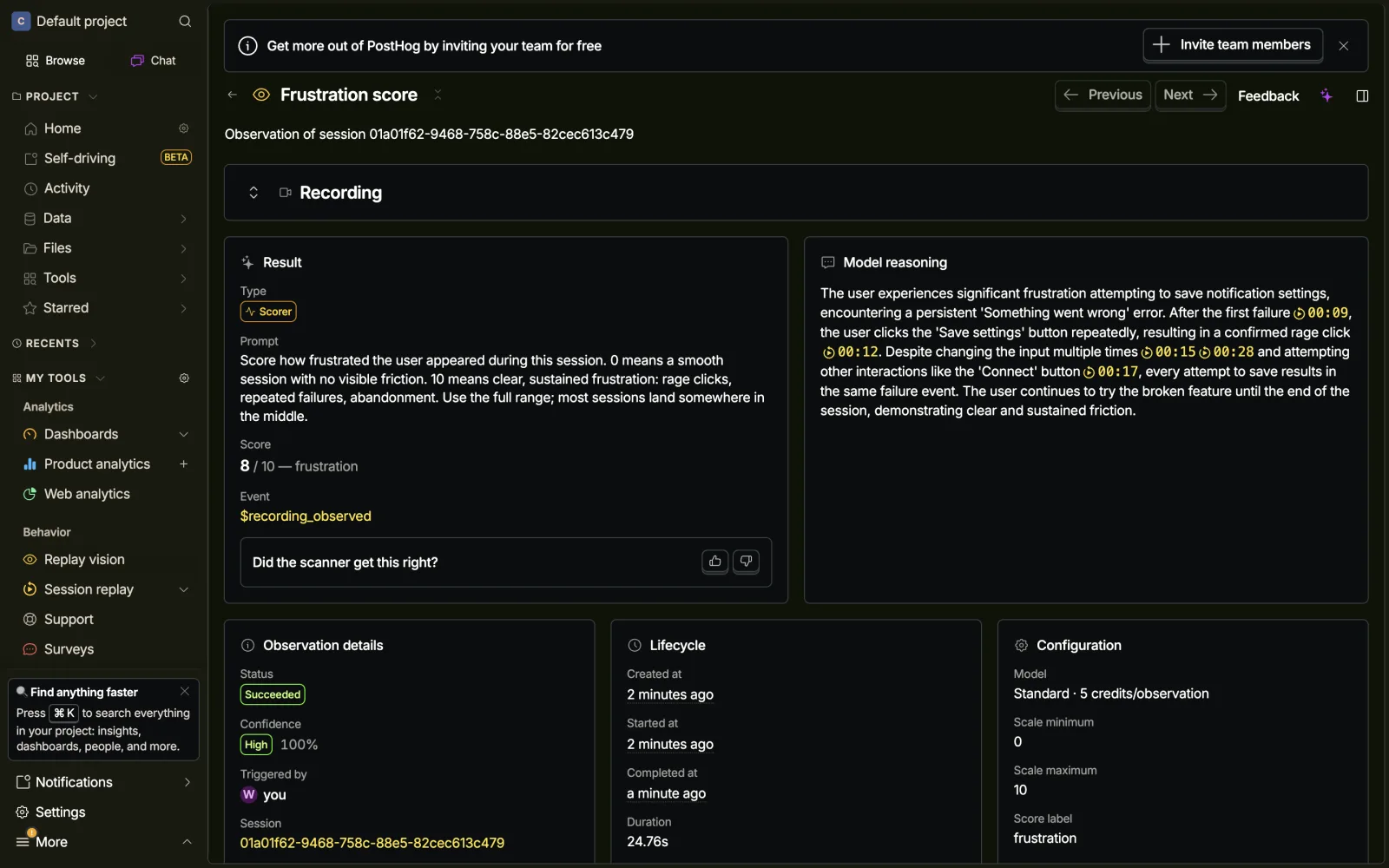
The score held up. One click in the story never happened.
Read the reasoning closely and there is a claim we never scripted: the user tried “other interactions like the ‘Connect’ button 00:17.” The Summarizer ran the same session and wrote that the user “briefly interacted with the Calendar sync Connect button without success.” Our driver never clicked Connect. We checked the ground truth in PostHog’s own HogQL: the Connect button fires a sync_connect_clicked event, and its count for the whole session is 0.
On its own, a small miss. What made it worth writing down is what happened next. We ran the scanner’s daily digest, and the invented click came back as a product-level finding: “Attempts to use related features like the ‘Connect’ button also fail to help or bypass the problem.” The model made it up once, and three surfaces repeated it, each at a stated confidence of 100%. Nothing in the UI distinguishes what the model observed from what it inferred.
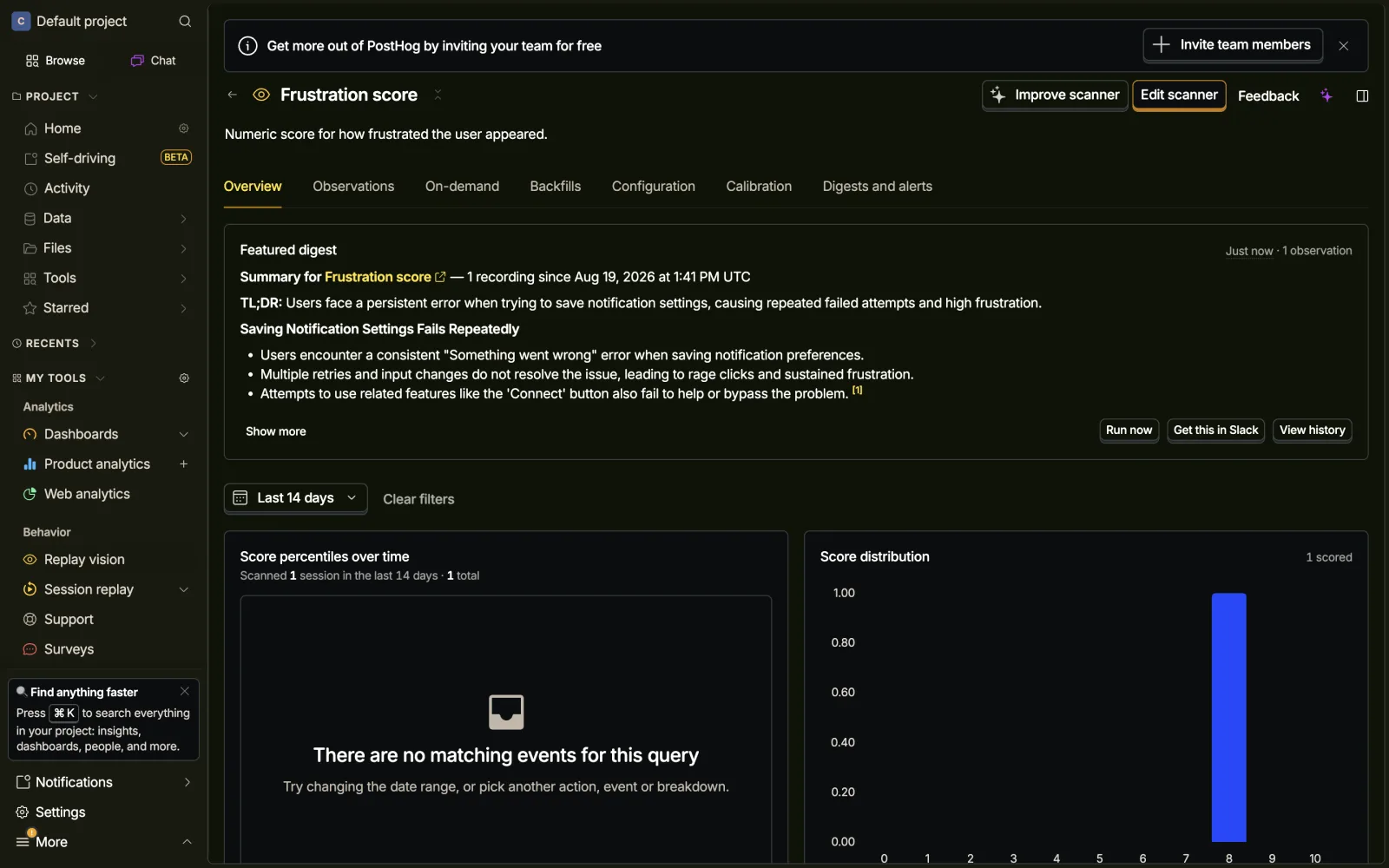
To be fair to them, the timestamped reasoning is what let us catch this at all. A paragraph without anchors would have sailed past. And the miss is understandable, our test page had a Connect button sitting right there in frame while the user flailed. A plausible story, just not what happened.
Calibration is a real workflow, with one blind spot
The Calibration tab is the most complete rate-the-AI loop we have seen shipped. Every observation gets “Scanner got this right / wrong” buttons and a feedback field, ratings chart over time, and a Generate recommendation button where PostHog AI rewrites your prompt from the ratings, presented as a Current/New diff with a “Why this change” note. Prompt configs are versioned, and each observation records the version that produced it.
We rated our observation wrong (our written feedback did not attach, so the system only had the thumbs-down) and asked for a recommendation. It produced a detailed rubric that anchors sessions like ours to the 9 to 10 range, on the theory that 8.0 was an under-score. A reasonable guess. The actual complaint was the invented click. With a bare thumbs-down, the system had to guess which direction the scanner was wrong in, and it guessed wrong. The rewrite still arrives as a ready-to-apply diff.
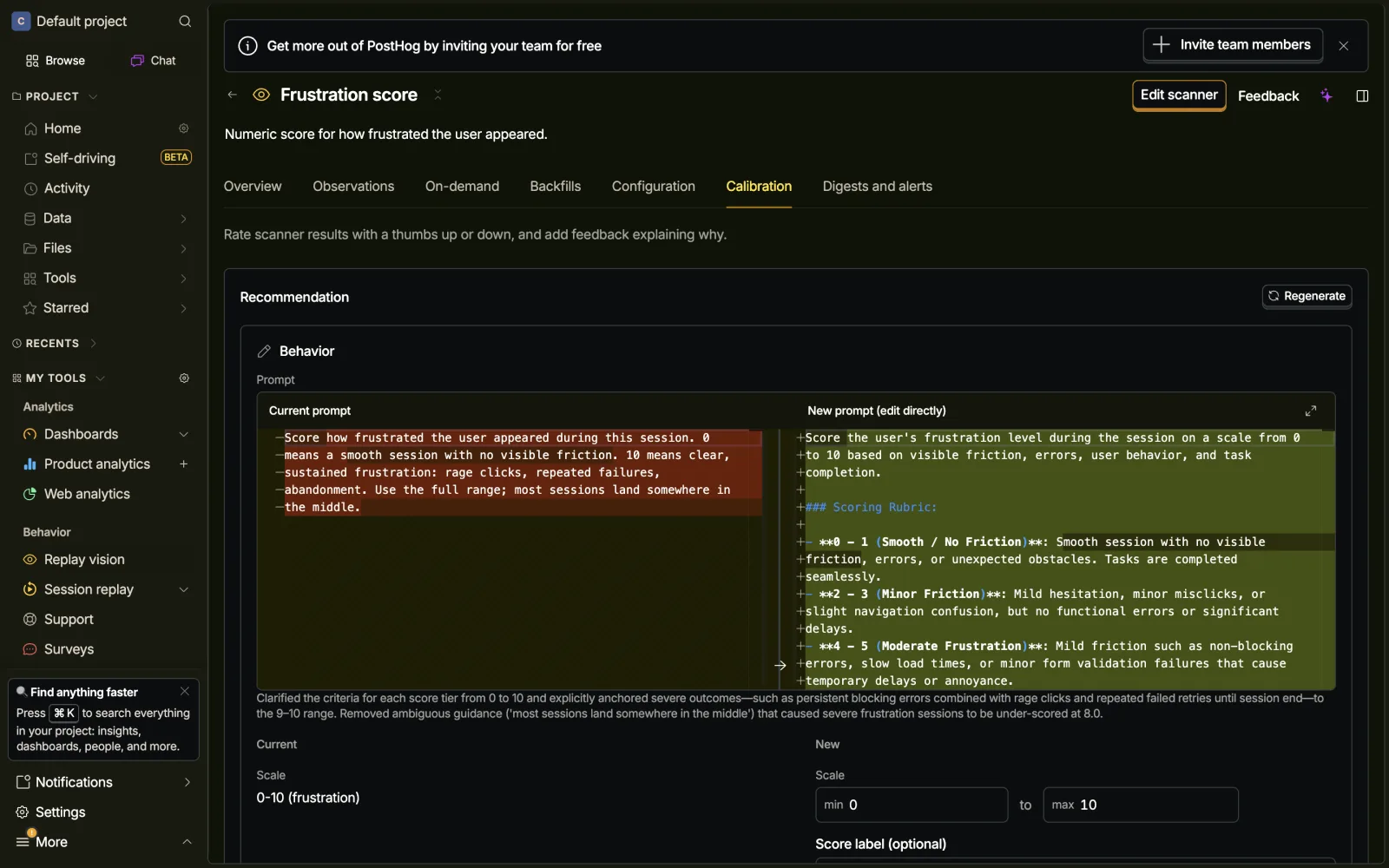
The toggle at the bottom of the Configure step
Back to that toggle. It reads: “Don’t just find problems, fix them. Issues this scanner spots flow into PostHog Signals, where agents dig into the root cause and draft a pull request. You stay in control of what ships.” The sidebar has a matching beta item, Self-driving, whose pitch page says: “PostHog watches your session replays, errors, and Slack. When it finds something worth fixing, it writes the pull request. You review and merge.” Setup is one wizard command. First 3 PRs a month free, then $15 per PR.
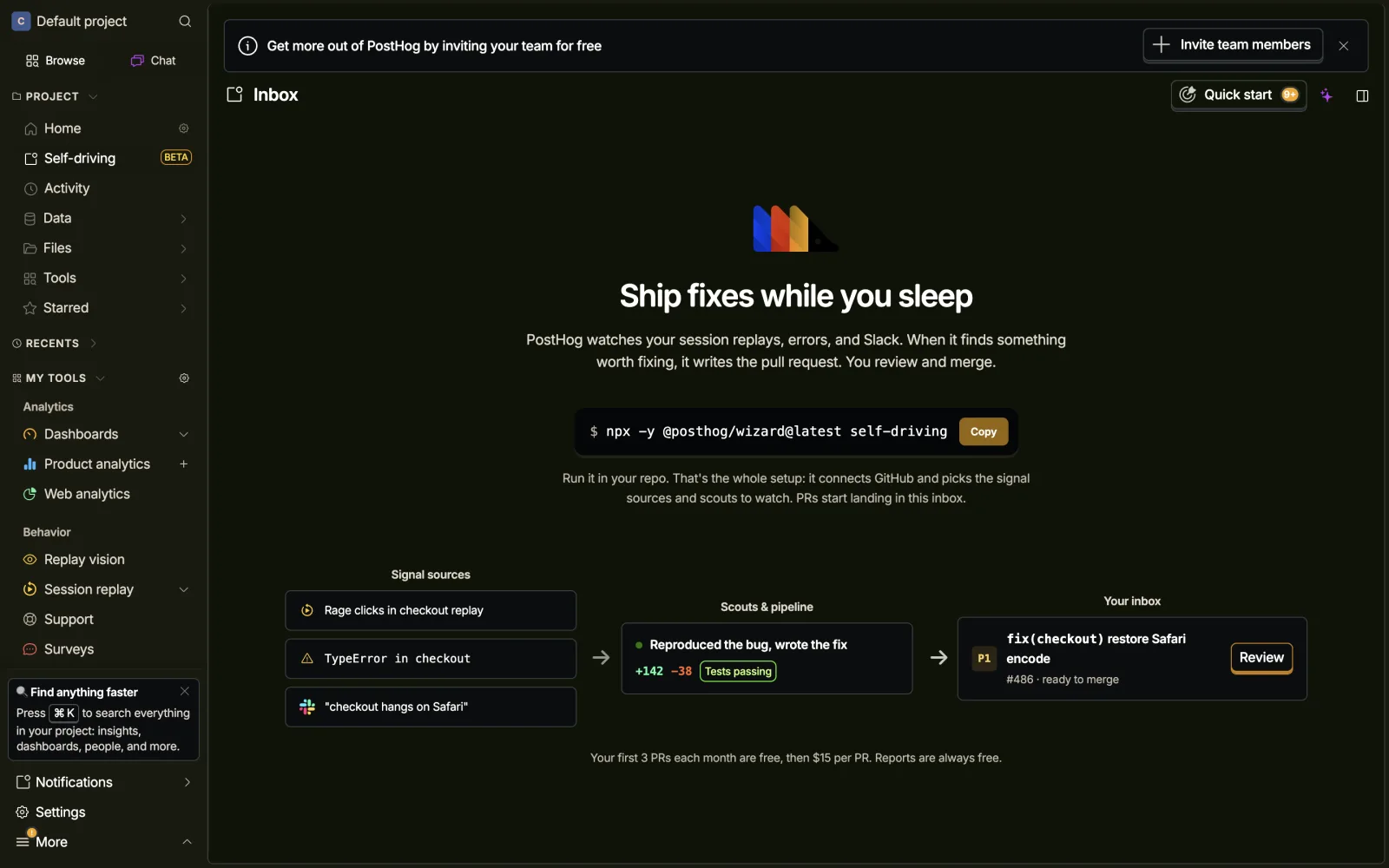
We should be clear about our interest here: feedback that ends in a drafted pull request is Usero’s whole thesis. Watching PostHog arrive at the same loop from the analytics side, metered at $15 per PR, was the part of tonight we kept thinking about. It changed what we built.
How we built ours
Tonight’s findings made two design decisions for us.
First, what the model gets to read. We do not hand it the video. We extract a deterministic activity transcript from the recording itself: every click with its target, rage-click runs, navigations, console errors, idle gaps, with typed input values redacted. The model reads the transcript and must cite a transcript entry for every moment it reports. A claim that does not anchor to a real entry is dropped server-side before anyone sees it. The Connect click that never happened is the exact failure this guard exists for. We already do this for AI-extracted evidence quotes (every quote must be an exact substring of the feedback it came from), and the same rule turned out to fit replays.
Second, where the finding goes. A scan above your threshold files a feedback item into the inbox, with the replay attached and a marker at the worst moment. From there it behaves like any other feedback: it clusters with related reports, counts toward demand, and can go to an AI-drafted pull request. PostHog’s observation becomes an event you can chart, and acting on it costs $15 through a separate beta. Ours is the same pipeline the rest of the feedback already rides, at flat rate.
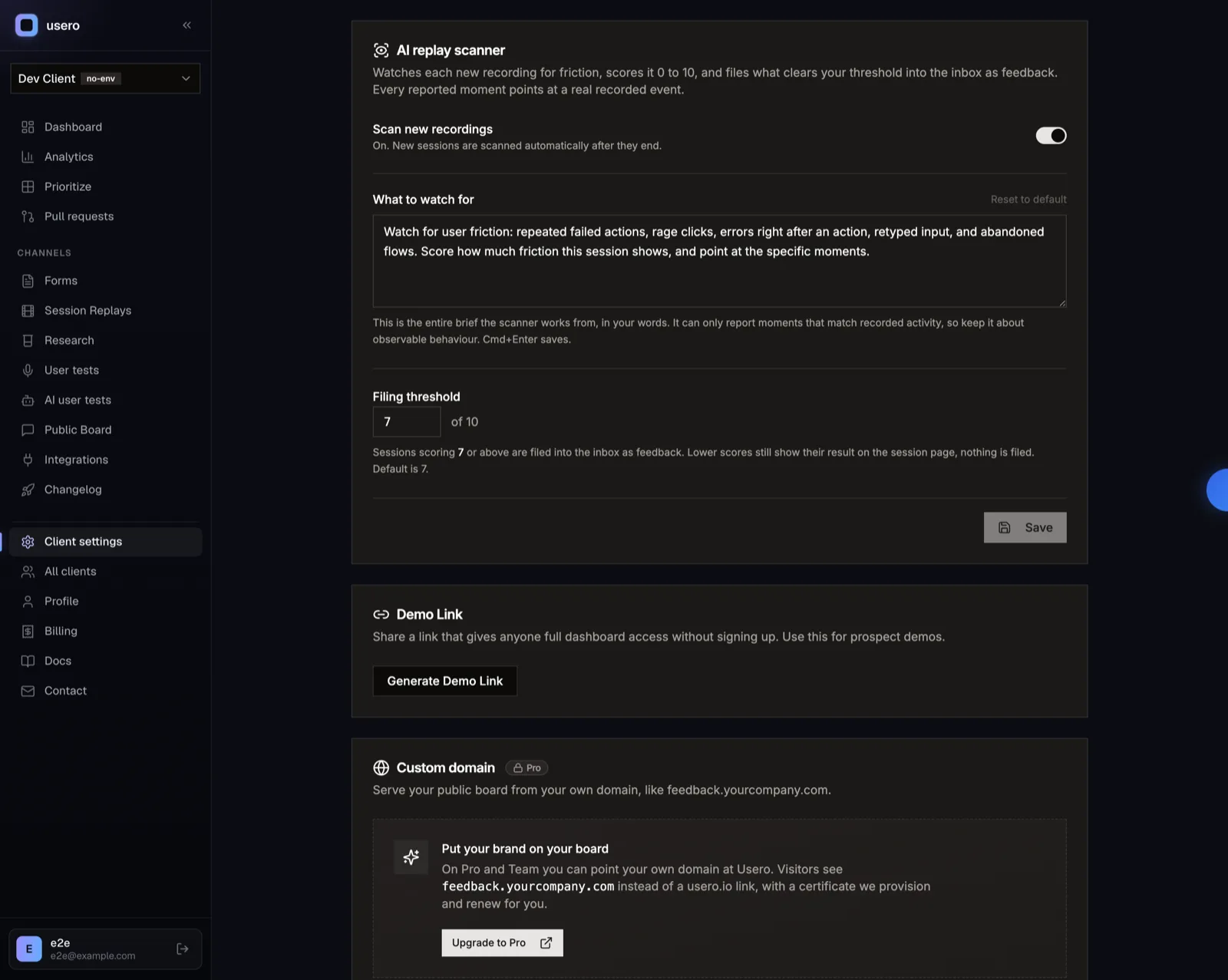
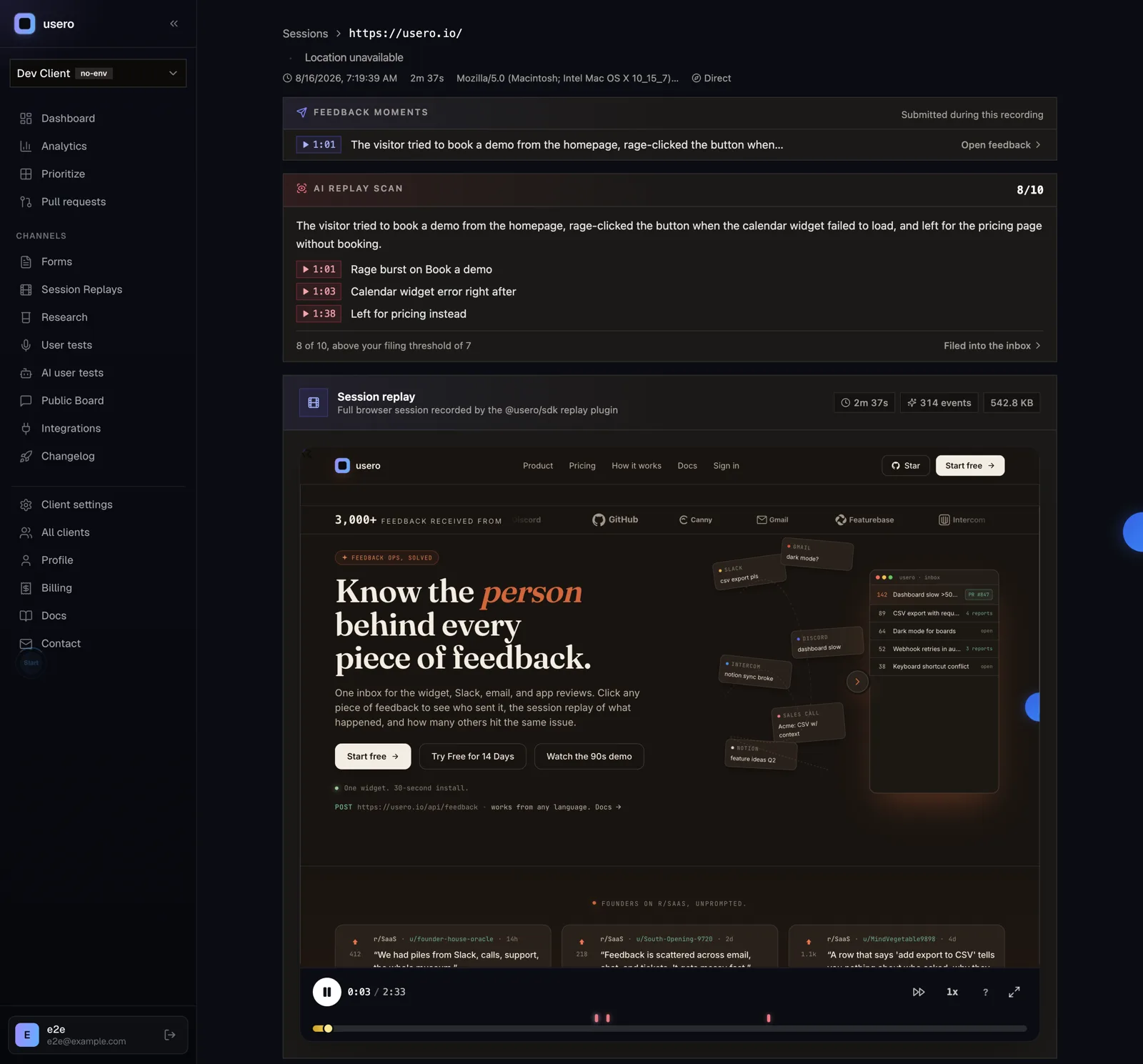
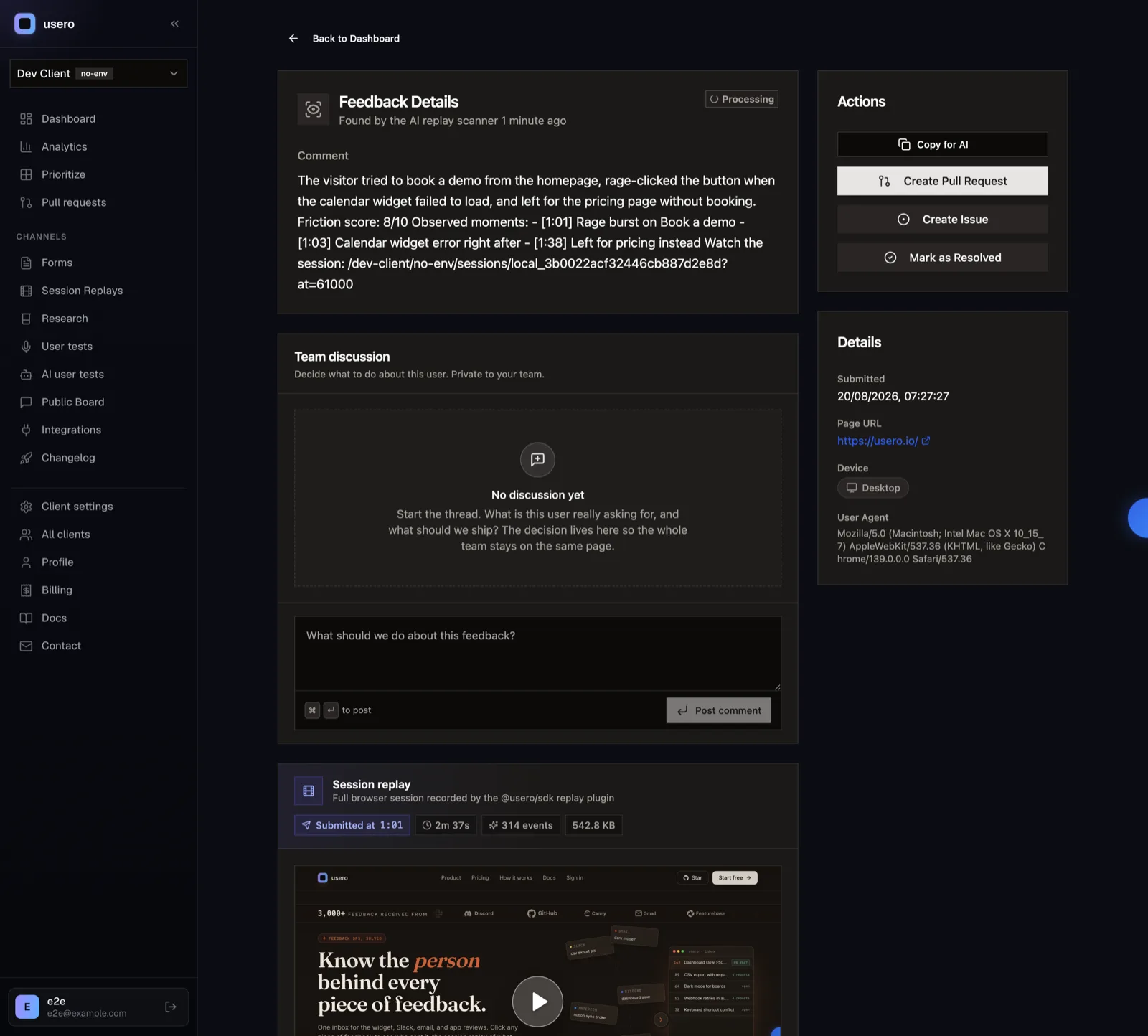
And a few things we stole outright: the “agent doesn’t see this field” honesty, cost stated before you commit, and the calibration diff idea, which we have filed for a night of its own on top of our PR prompts.
What we skipped: confidence percentages. Theirs put 100% on the invented click. Until we have a number that is calibrated against something real, our findings ship without one.
If you want the version of this where the scanner’s finding ends up as a merged fix, sign up free or read the session replay page for how the recording side works.
Frequently Asked Questions
What is PostHog Replay vision?
An AI layer over PostHog session replay. You describe what to look for in plain language ("score how frustrated the user appeared"), and a scanner watches each new recording for it. Four scanner types exist: Scorer, Classifier, Summarizer and Monitor. Each result lands as a $recording_observed event with structured properties (score, summary, intent, outcome, friction points, confidence, credits spent, model used), so you can build insights, alerts and cohorts on it.
How much does Replay vision cost?
Per observation, by model tier: Lite is 2 credits, Standard 5, Pro 15, at 1 credit = $0.01. We observed a free allowance of 2,500 credits per period, which is 500 Standard observations. Sampling percentage, session coverage settings and two layers of spend caps (per scanner and per organization) control the bill. The budget step estimates monthly cost from your actual recent recording volume before you create the scanner.
Did the scanner results hold up?
The score did. We drove a deliberately frustrated session (17 failed save clicks, two rage-click bursts, a reload, an abandon) and the scanner returned 8/10 with a narrative that named the rage click at its real timestamp. But the reasoning also said the user tried the Connect button, and they never did: the click event count for that button was 0 in PostHog's own event data. The invented detail appeared in the Scorer reasoning, the Summarizer output and the daily digest, at a stated confidence of 100%.
What is PostHog Self-driving?
A beta that sits downstream of the scanners. Scanners have an "Emit findings as Signals" toggle; Signals feed agents that investigate root causes and draft pull requests. The in-app pitch: "PostHog watches your session replays, errors, and Slack. When it finds something worth fixing, it writes the pull request. You review and merge." Setup is one wizard command. First 3 PRs per month are free, then $15 per PR.
How is Usero’s replay scanner different?
Two ways. First, anchoring: our scanner reads a deterministic activity transcript extracted from the recording (clicks, errors, rage clicks, navigations), and every claim in a finding must reference a real transcript entry or it is dropped server-side. The model cannot report a click that never happened. Second, the destination: a finding above your threshold files straight into the feedback inbox, where it clusters with related feedback and can go to an AI-drafted pull request at flat rate, instead of becoming an analytics event you pay $15 per PR to act on.
Continue reading
How the AnnounceKit Email Digest Works: We Waited for the Draft That Never Came
We enabled the AnnounceKit email digest, set it to send Saturday, and came back on Saturday. No draft, no digest, and nothing in the product showing whether it ran: no draft view, no send history, and a config that froze into upgrade modals mid-trial while staying armed. Plus the weekly digest we built for Usero the same night: a cadence choice instead of a second channel, a draft-preview email with a one-click skip, and an admin page that always shows the next digest and what happened to the last one. Free.
8 min read
How AnnounceKit Boosts Announcements: Four Megaphones, No Front Door
A second night inside a live AnnounceKit trial, this time on boosters and the email digest. The modal booster collects reactions and feedback right where the announcement lands, then fires again on reload at someone who already answered. The digest emails you a draft 12 hours before it sends. And every path a reader could take to become an email subscriber failed in our workspace, so the email side had nobody to send to. Plus what we built the same night: changelog email subscriptions on Usero, with a confirmation link before anyone is subscribed and requesters deduped out of the broadcast. Free on every plan.
9 min read
How PostHog Links Session Replays to Surveys: One Event Spine, and the Button That Does Nothing
A hands-on teardown of PostHog’s replay-survey cross-linking from inside a free project we fed with real data: the event spine that stamps every survey answer with its session id, the wizard that reads its own defaults back in sentences, the honest data-loss banners, and the View recording button that silently no-oped on three surfaces while the recording provably existed. Plus the person profile page we built onto Usero the same night: a requester’s feedback, replays, and the merged PRs that shipped because they asked.
10 min read
Build a feedback loop your team actually uses
Usero collects, clusters, and turns user feedback into shipped fixes.
Get started free