How PostHog Links Session Replays to Surveys: One Event Spine, and the Button That Does Nothing
PostHog runs surveys and session replay in the same product, and the pitch is the link between them: read what a user wrote, then watch what they were doing when they wrote it. We record replays and collect feedback too, so we spent the evening inside a PostHog project to see how their version holds together. The wiring underneath is the cleanest we’ve seen in this series, and the button sitting on top of it did nothing. Their best screen also turned out to be one we didn’t have, so we built it the same night.
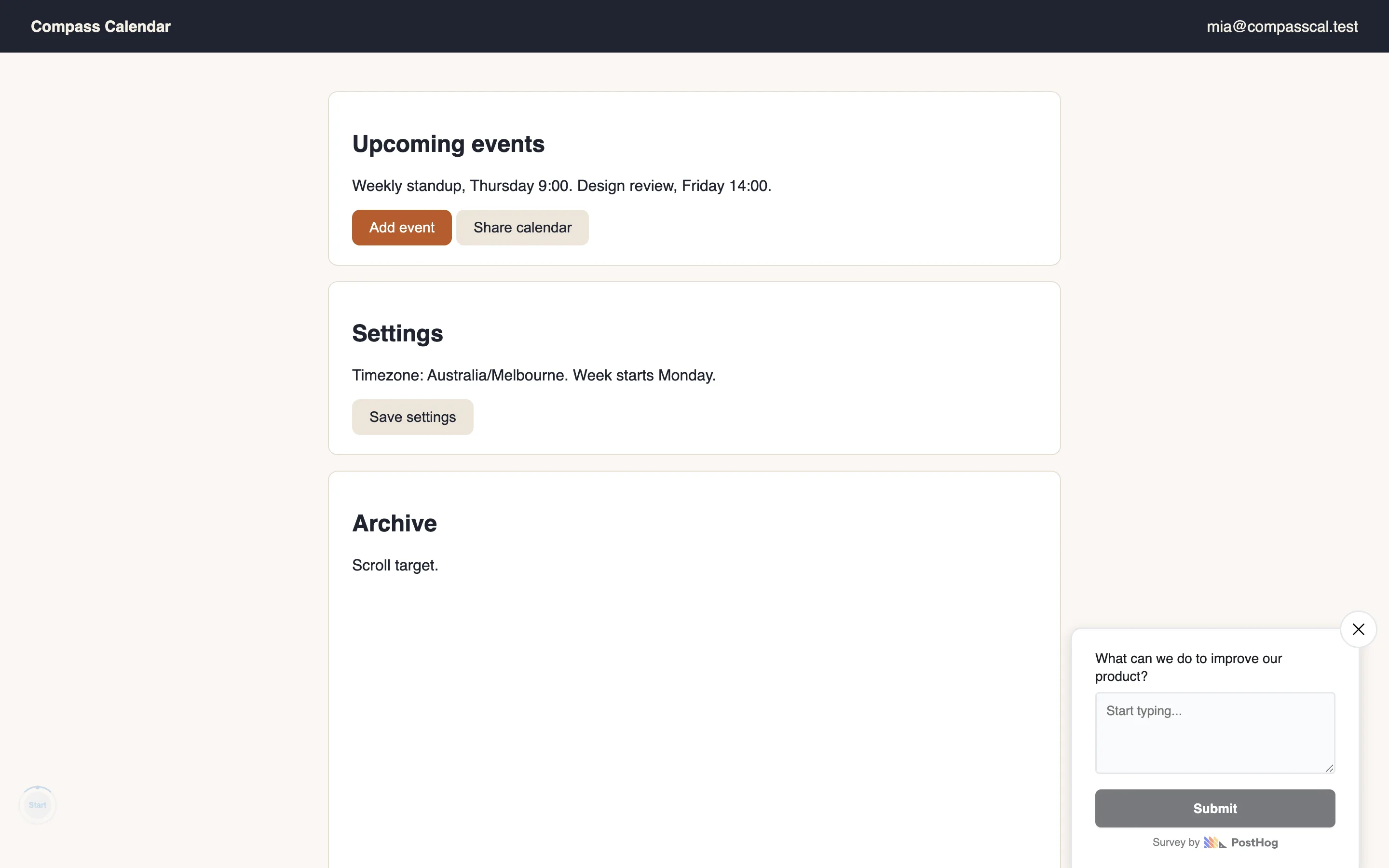
The setup: a free PostHog Cloud project from July that had never seen an event, which was useful, since we got to walk the same path a new team would. Session recording: off by default, its own settings page. Surveys: also off by default, a different settings page. Two toggles before anything captures. We flipped both, launched an “Open feedback” survey from their template gallery, put the posthog-js snippet on a little test app, and sent two identified users through it. One answered the survey. One was meant to dismiss it, and couldn’t, for a reason we get to later.
The survey wizard earns its defaults
Survey creation is a four-step guided wizard: Questions, Targeting, Triggers, Customize. The live preview sits beside the config the whole way through, the same pattern we praised in the Maze and Frill teardowns, and it updates as you type. There’s a small line of advice under the question list: “Shorter surveys get more completions. Every extra question is a chance for someone to drop off.” It sits right where you’d act on it.
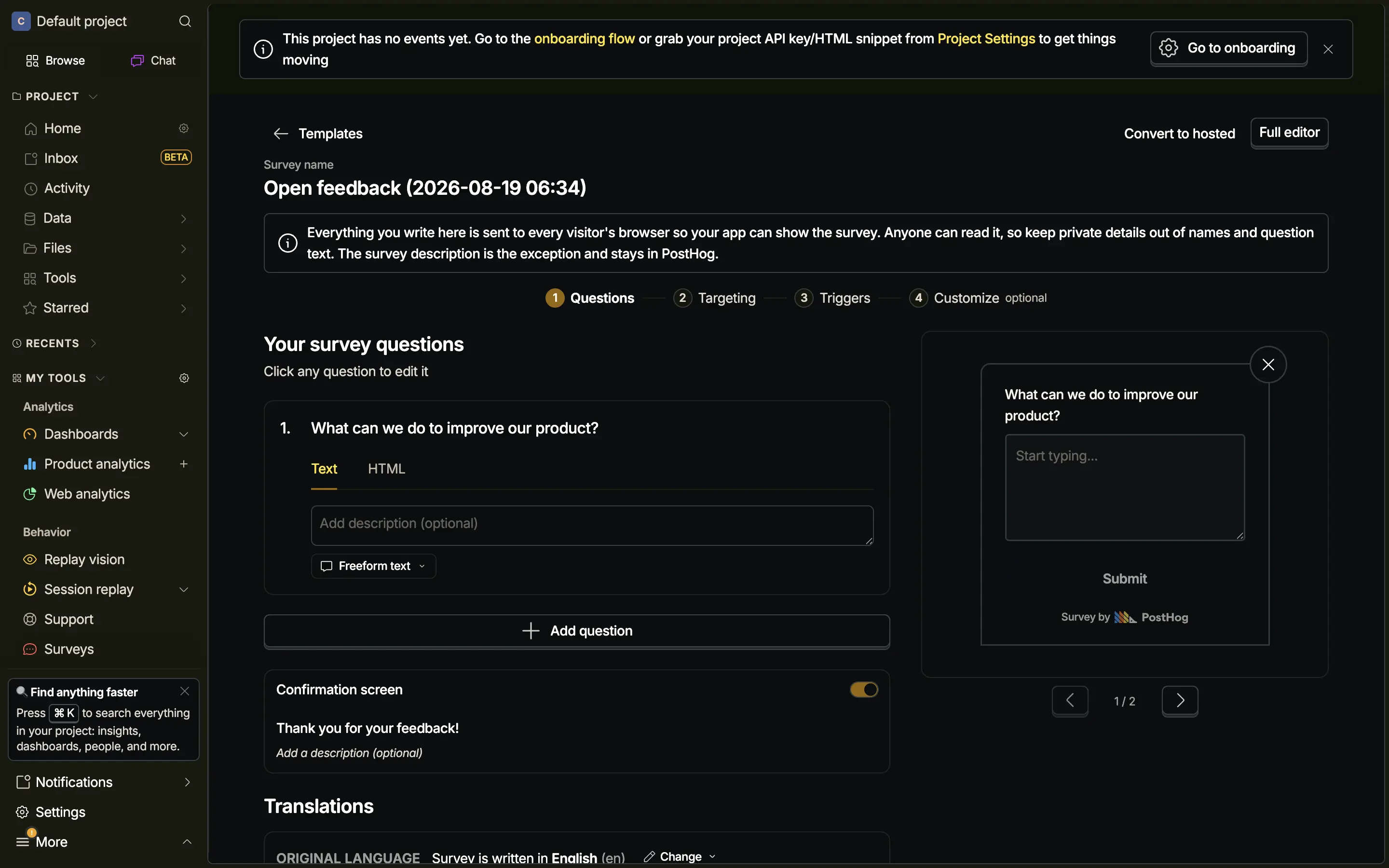
The best sentence in the wizard is a warning: “Everything you write here is sent to every visitor’s browser so your app can show the survey. Anyone can read it, so keep private details out of names and question text.” That is a real constraint of client-rendered surveys, stated where you’d otherwise learn it the hard way. Launch is one confirm, and the summary card reads its own defaults back to you in sentences: showing on all pages, up to 10 times every 30 days, closes automatically in ten months. No digging through settings to find out what you just agreed to.
Everything is an event
The cross-linking comes down to one design choice. A survey answer is an event, survey sent, stamped with the $session_id of the recording in progress, the same as every click and pageview. There is no surveys database joined to recordings after the fact. We checked with a HogQL query: the session id on our response matched our recording, character for character. So the survey results page can offer the recording, the replay player’s inspector lists the survey moments alongside console logs and network calls, and the events feed gives any row a play button into its session. None of those surfaces integrate with each other. They all just read events.
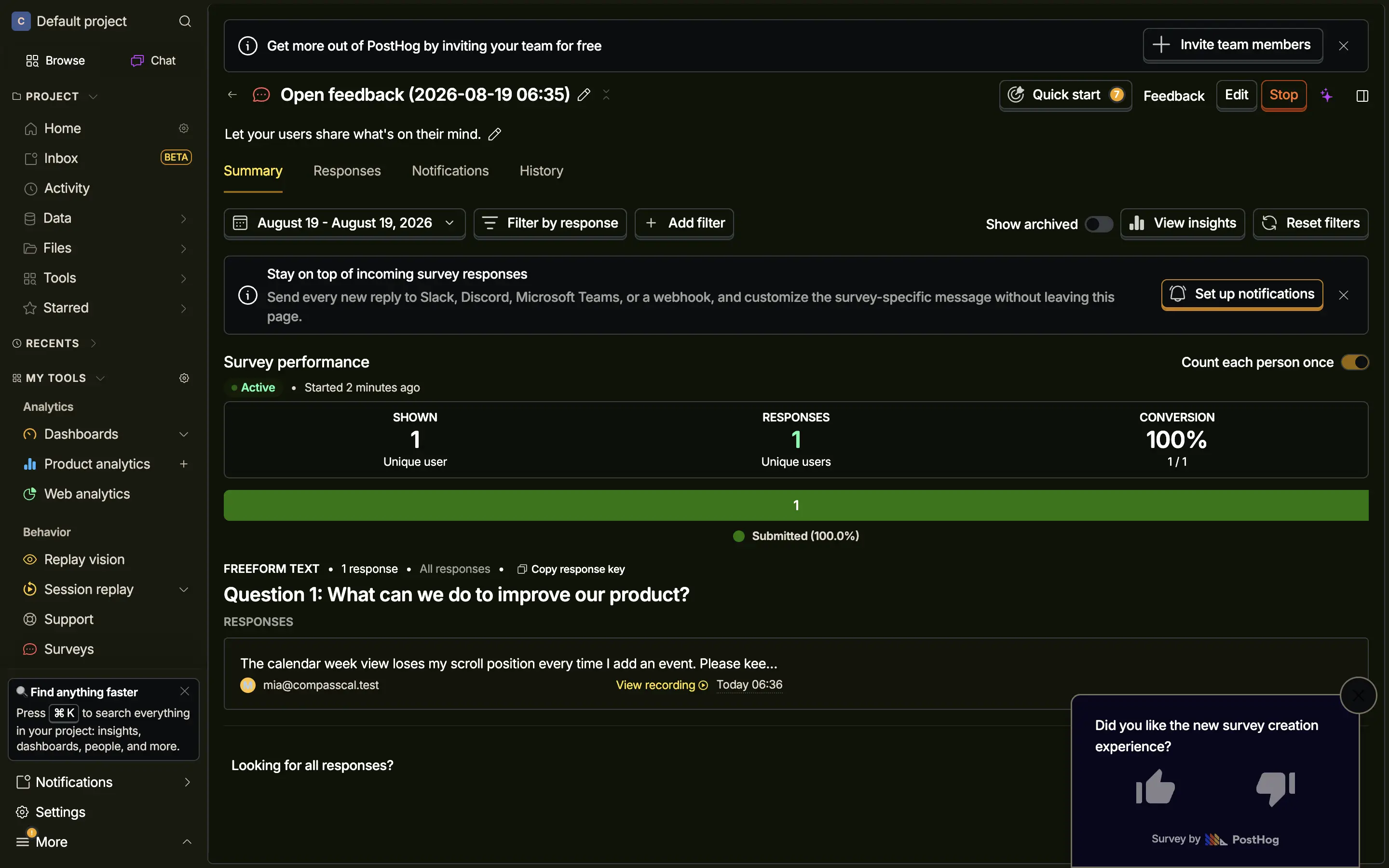
The response card itself is good: the verbatim, the person’s identity, a timestamp, and a View recording link, with per-survey forwarding to Slack, Discord, Teams or a webhook one banner away. And PostHog dogfoods all of it: while we worked, their own survey popped over our dashboard session asking whether we liked the new survey creation experience.
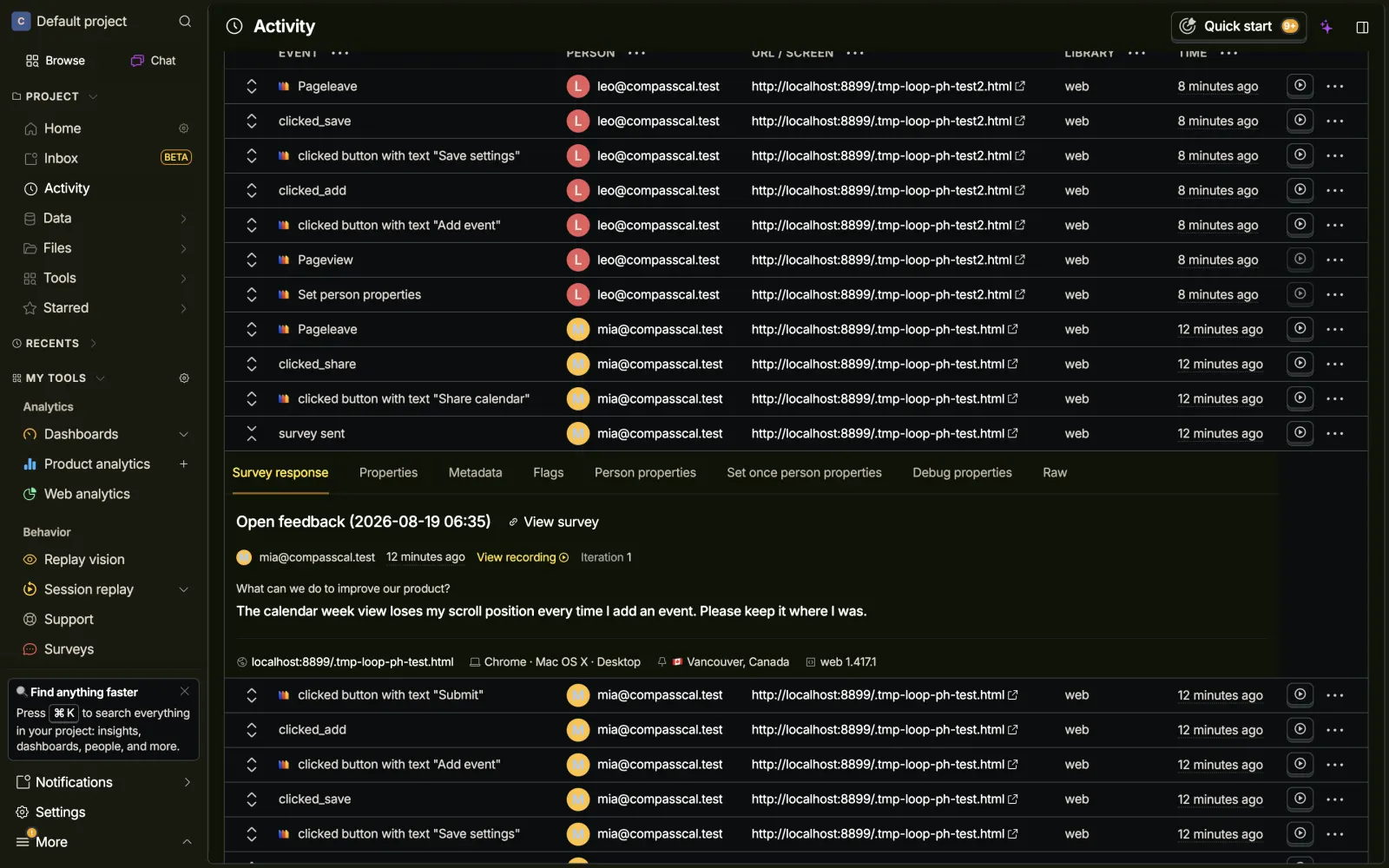
The screen that impressed us most is barely a screen at all. Click a survey sent row in the Activity feed and the expanded row grows a dedicated Survey response tab: the survey name, a link to it, the person, a View recording button, the iteration number, then the question and the full answer with device and location context under it. You read the whole response right there in the event log, without leaving for the surveys page.
The button that does nothing
Then we clicked View recording. Nothing. No player, no navigation, no toast, no console error. We tried the same jump from three surfaces: the response card on the results page, the View recording button inside the expanded event, and the inline play button the events table puts on every row. Real mouse clicks, repeated. All three were silent no-ops, while the recording existed, played fine at its direct URL, and the event provably carried the matching session id.
One free-tier project driven over CDP is not proof this fails for everyone, and we want to be fair: we could not find an account-specific reason either. The same clicks navigated everywhere else in the app. What we can say is the failure mode itself: the button renders whether or not it can act. No disabled state, no tooltip, no error when it fails. Hotjar handled the equivalent moment better, with a disabled Play recording button and a tooltip explaining why. We’ve shipped this bug ourselves - a button drawn before anyone checks whether its target exists - so we took a rule out of it for our own build tonight: don’t render a link that can’t go anywhere.
The settings can bake the same bug in. Recording and surveys are separate toggles on separate settings pages, so a team that enables surveys and not recording gets response cards whose View recording link can never have a target. As far as we could observe, the UI would draw the link anyway.
The honest banners are the best writing in the product
When our recording was still processing, the player said: “We’re still working on it. This recording hasn’t been fully ingested yet. It should be ready to watch in a few minutes,” with a Reload button. When it finished, a yellow banner across the player said the first 4 minutes and 4 seconds could not be shown because the initial snapshot of the screen arrived late, playback starts from the first frame it can render, and here is a Learn more link. It names the data loss and links a doc explaining it. Most tools in this series just don’t mention gaps like this. PostHog wrote a paragraph about it.
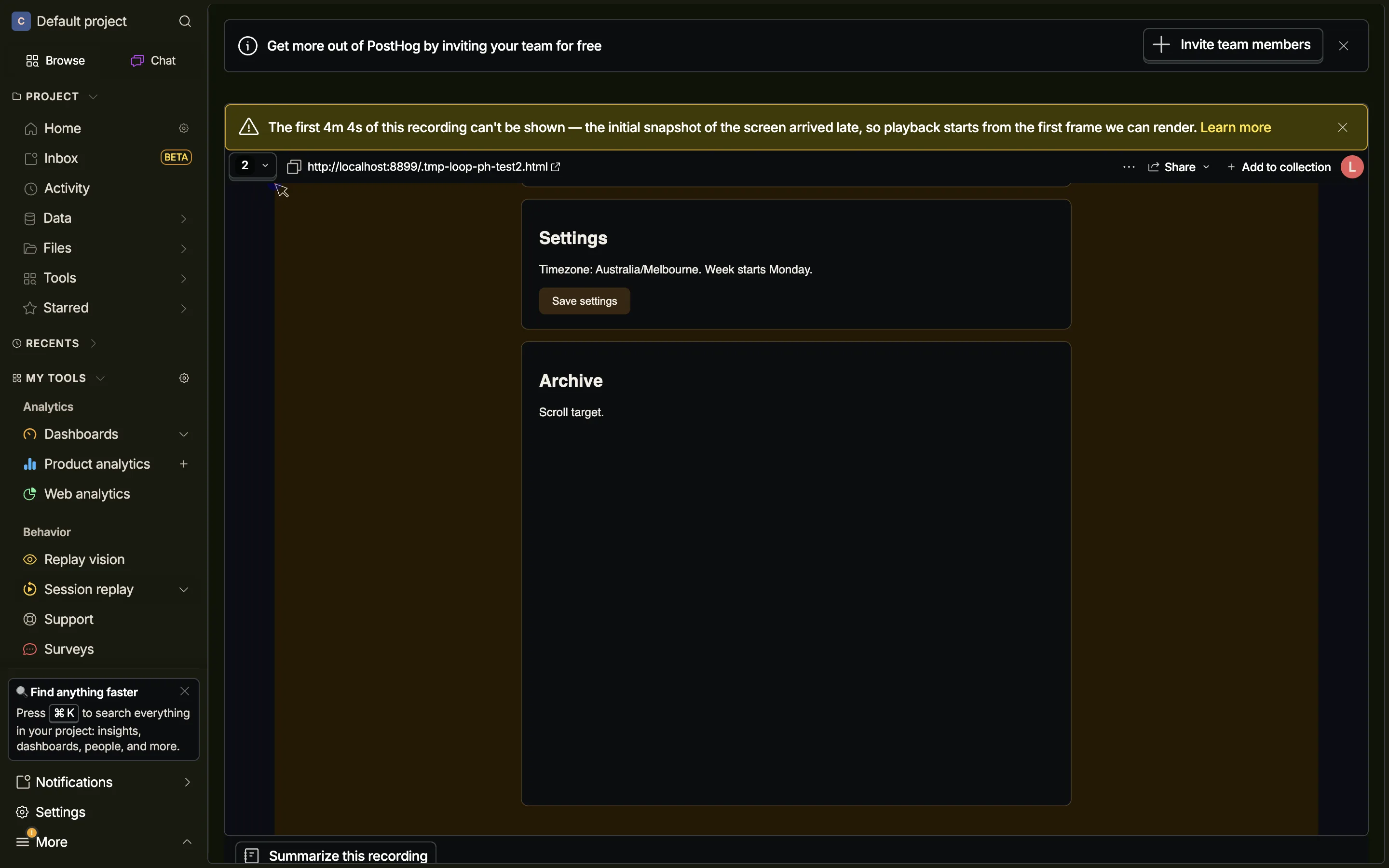
The banner also told us something the survey page didn’t: the lost window contained our survey answer. The moment the View recording link points at was inside the 4 minutes that can’t be rendered. And one more seam showed up when our second user arrived: sessions are keyed to the device, so when leo took over the same browser as mia, his events joined her recording, the recording got attributed to him, and the survey would not show for him because the device had already answered. Person A’s page now lists a recording labeled with person B’s name. Shared desks and QA machines will cross wires like this all day.
The person page is the strongest screen
The feature connects three things: the survey answer, the recording, and the person. The person is where PostHog is strongest. Every identified user gets a page with tabs for their properties, events, recordings, survey answers, exceptions, cohorts and feature flags. Click a person anywhere in the product and you get everything they did, watched, and said, in one place. This is where keying everything to events pays off.
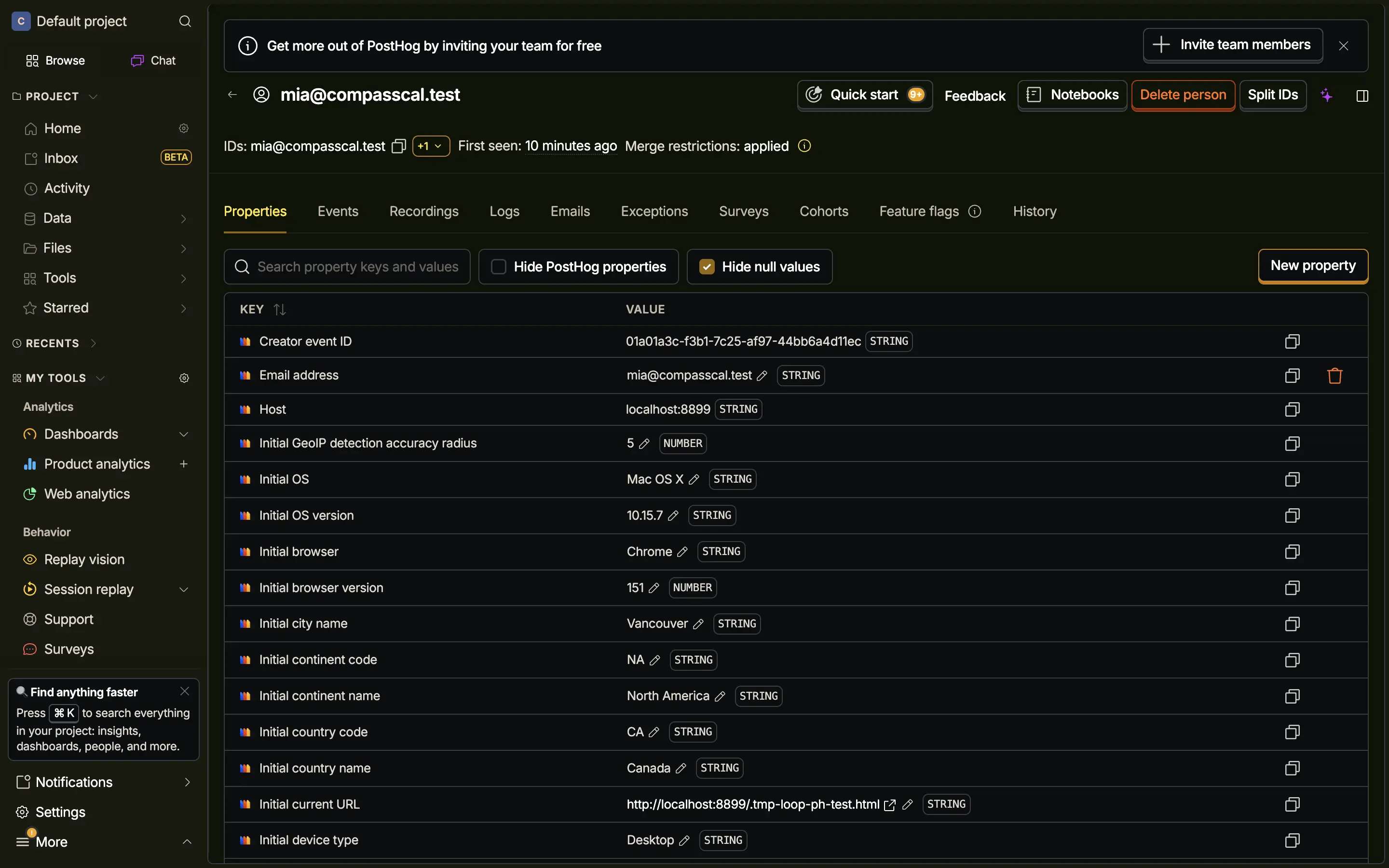
Reading it, we had the same realization this series keeps producing: Usero had all of this data and no page. Our Person model already ties together feedback from every source, session replays, an MRR trait, first and last seen. Our cluster cards already count “6 requesters from 3 companies.” But a requester’s name was just text. Nothing to click, no page showing everything that one person had reported and asked for.
What we built the same night
So tonight’s build is a person profile page. Header with the identity, the traits they’ve sent through identify(), MRR, first and last seen. Then their feedback across every source (widget, survey, board, app reviews), their session replays, and the section PostHog structurally cannot have: Shipped because they asked, the merged pull requests that exist because this person asked. That join already powered our changelog notifications; now it reads in the other direction. The person’s name on feedback detail and on the sessions list became links, so the page is one click from the places you meet a requester.
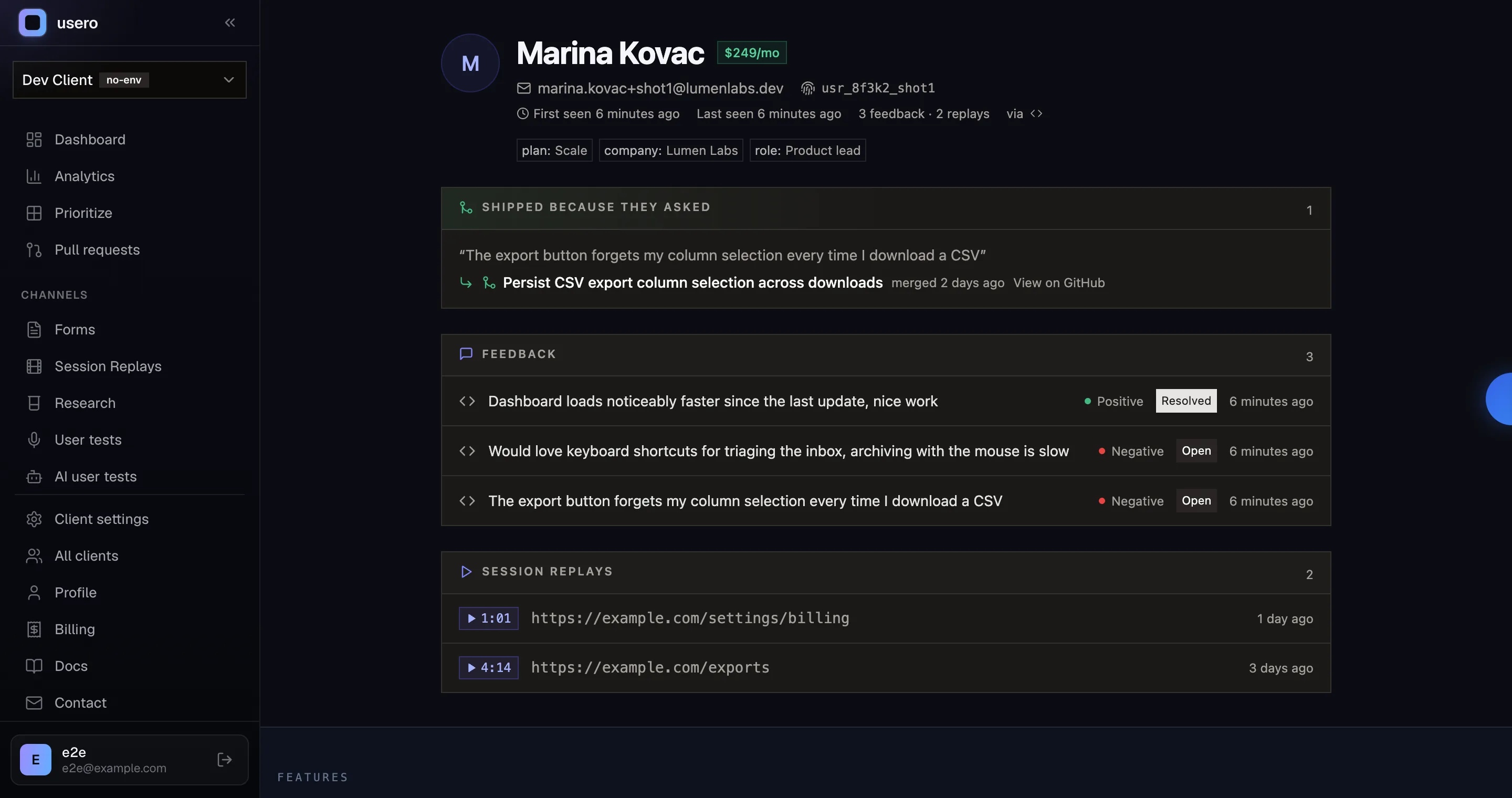
The teardown shaped two rules in the build. First, no dead links: every cross-link on the page checks its target before rendering, and a section with nothing to show says why in one line, in the spirit of PostHog’s ingestion banners rather than their View recording button. Second, person-scoped over device-scoped: our replays and feedback hang off identify() and email reconciliation, so the leo-in-mia’s-recording merge can’t happen here, and we’d like to keep it that way.

Fair scorecard the other way: PostHog’s person page carries events, exceptions, cohorts and feature flags, because PostHog is an analytics platform and those objects exist there. Ours doesn’t have those and shouldn’t. The claim is narrower: for the feedback-to-shipped-code loop, the person page should end at the code, and ours does.
One PostHog feature we deliberately left alone: Replay vision, their new AI scanners that watch each incoming recording for whatever you describe in plain language and emit a score or a summary as a queryable event. “Watch for frustration, file it as feedback” is close enough to what we do that it deserves its own evening. That’s the next question we want to answer.
If you want a person page that ends at merged code, that’s what Usero does. And if anyone at PostHog reads this: the ingestion banners set the bar for this series, and we mean that as a compliment. We’d love to know what the View recording button was waiting for.
Continue reading
How the AnnounceKit Email Digest Works: We Waited for the Draft That Never Came
We enabled the AnnounceKit email digest, set it to send Saturday, and came back on Saturday. No draft, no digest, and nothing in the product showing whether it ran: no draft view, no send history, and a config that froze into upgrade modals mid-trial while staying armed. Plus the weekly digest we built for Usero the same night: a cadence choice instead of a second channel, a draft-preview email with a one-click skip, and an admin page that always shows the next digest and what happened to the last one. Free.
8 min read
How AnnounceKit Boosts Announcements: Four Megaphones, No Front Door
A second night inside a live AnnounceKit trial, this time on boosters and the email digest. The modal booster collects reactions and feedback right where the announcement lands, then fires again on reload at someone who already answered. The digest emails you a draft 12 hours before it sends. And every path a reader could take to become an email subscriber failed in our workspace, so the email side had nobody to send to. Plus what we built the same night: changelog email subscriptions on Usero, with a confirmation link before anyone is subscribed and requesters deduped out of the broadcast. Free on every plan.
9 min read
How PostHog Scans Session Replays with AI: A Right Score, an Invented Click, and a $15 Pull Request
We built a PostHog Replay vision scanner, fed it a session scripted to fail (17 failed save clicks, two rage bursts, an abandon), and audited every claim against their own event data. The score was right at 8/10. The reasoning also reported a button click that never happened, and the daily digest repeated it as a product finding at 100% confidence. Plus the pricing surface worth copying, the calibration diff, the Self-driving beta that drafts PRs at $15 each, and the replay scanner we built onto Usero the same night, where every claim must anchor to a real event or it gets dropped.
10 min read
Build a feedback loop your team actually uses
Usero collects, clusters, and turns user feedback into shipped fixes.
Get started free